Controller.SSHServer
Distinction between SSH protocol, SSH shell access and SFTP access
The controller uses the SSH protocol as the secure transport and authentication mechanism for different types of access. The use of the SSH protocol does not automatically imply that an interactive SSH shell is available to the authenticated user.
Two different access types have to be distinguished:
Customer SFTP access:
The Linux user customer is restricted to SFTP access. An interactive SSH shell is not provided for this user. When customer authenticates, the controller only permits an SFTP session. The SFTP session is executed within a restricted environment based on bwrap, limiting the accessible file system area.
Root SSH access:
The Linux user root is used for privileged SSH access. SSH access for root requires the corresponding access-enabling mechanism and authentication with the appropriate private key.
Therefore, although both access types use the SSH protocol as the underlying secure communication mechanism, the provided services and privileges are different. SFTP access for the customer user must not be interpreted as interactive SSH shell access.
General
Access to the file system via SSH has been available since FW version 01.04.00. This functionality allows you to access the file system via Ethernet. A SSH key is needed to access the device. Lenze Support generates this key only in special support cases and it should not be used during normal operation.
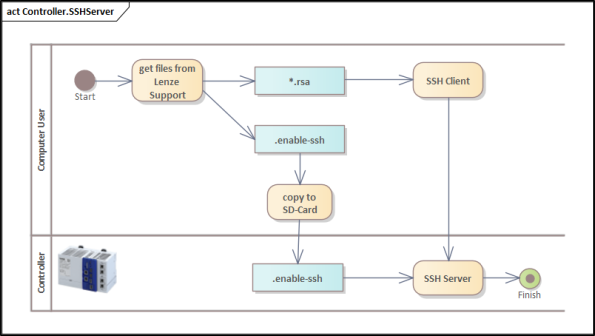
Activity Diagram
You will receive two files from Lenze Support.
-
.enable-ssh
-
*.rsa
Both files are personalized for the requester and must be protected accordingly. Do not share or publish these files.
Physical and logical access
-
Connector X16 (Engineering Access)
-
Used port for SSH is 22/tcp
Controller.SSHServer: SFTP via Ports and Networks
The following table shows the possibility of using SFTP over the existing ports and over the possible networks. This representation refers to a disabled controller firewall.
Combination of SFTP via different Ports and Networks:
|
Device with Interface |
Port |
With .enable-ssh file |
Without .enable-ssh file |
||||
|---|---|---|---|---|---|---|---|
|
c520 |
c530 |
c550 |
c520 |
c530 |
c550 |
||
|
Engineering c550: X16 onboard c520: X16 onboard c430: X16 onboard |
22 |
þSFTP |
þ SFTP |
þ SFTP |
oSFTP |
oSFTP |
oSFTP |
|
47877 |
þ SFTP |
þ SFTP |
þ SFTP |
þ SFTP |
þ SFTP |
þ SFTP |
|
|
PROFINET Device c550: X257/X258 in E1 c520: X257/X258 in E1 c430: X396/X397 onboard |
22 |
oSFTP |
oSFTP |
oSFTP |
oSFTP |
oSFTP |
oSFTP |
|
47877 |
þ SFTP |
þ SFTP |
þ SFTP |
þ SFTP |
þ SFTP |
þ SFTP |
|
|
Switch c550: na c520: na c430: X396/X397 onboard |
22 |
n.a.
|
n.a.
|
þ SFTP |
n.a.
|
n.a.
|
oSFTP |
|
47877 |
n.a.
|
n.a.
|
þ SFTP |
n.a.
|
n.a.
|
þ SFTP |
|
|
þ |
Possible |
|
o |
Not possible |