Language Switching
The Language Switching system module manages texts in multiple languages and provides these texts to other system modules and the user interface.
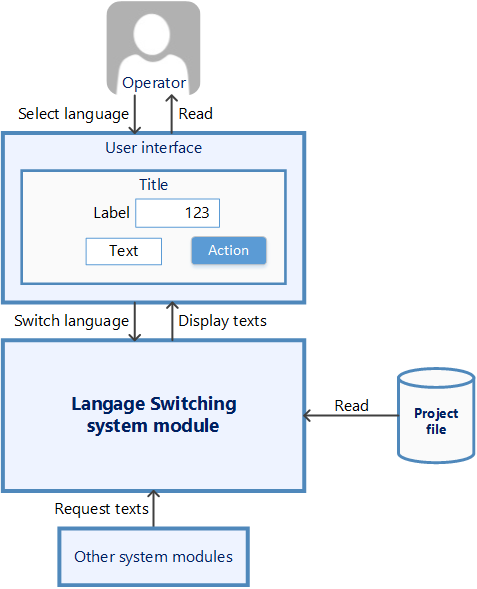
The Language Switching system module enables the management of all texts of a user interface. This means all texts displayed on the user interface—for example, as a title, a label for elements, or on buttons—are stored within the system module for any number of languages.
The operator can select one of these languages. The system module then switches internally to this language and reads the texts for this language from the project file. The texts are then displayed in the user interface.
Other system modules, such as the Alarms system module, can also access the Language Switching to display or save texts.
Overview
The following chapters explain the individual parts of the system in more detail:
-
Components
Schematic overview of the individual components of the Language Switching system module and their interaction. -
Concepts and fundamentals
Overview of the concepts, fundamentals, and interrelationships of the specific sub-components of the Language Switching system module. -
How-tos
Tasks for creating a language switching system. -
Definitions
Overview of the specific object definitions of the Language Switching system module and their functionality. -
Configuration
Overview of the configuration options for the Language Switching system module. -
Tools
Helpful tools of the Language Switching system module, such as selection and editing dialogs for texts and text groups.