Trends
The Trends system module monitors process variables and generates alarms, messages, or notifications to display the machine status to the operator.
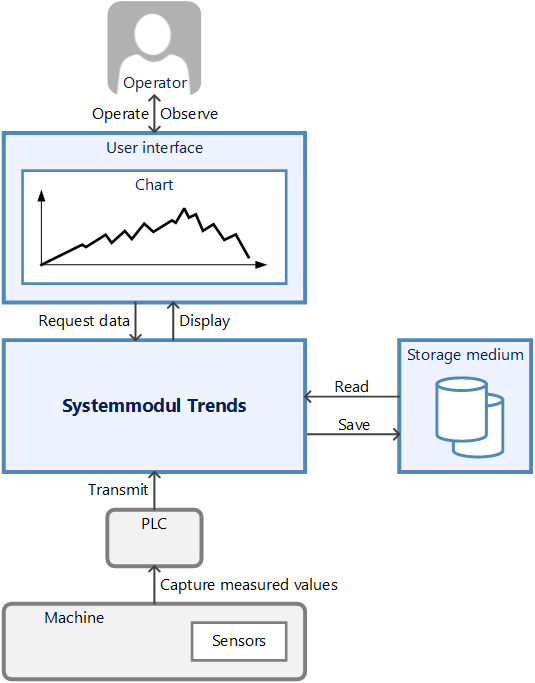
The Trends system module allows to record process values chronologically to display them, for example, in a curve chart (TrendChart) for examination.
-
Machine
-
The PLC captures the values measured by the sensors of the machine.
-
-
PLC
-
The PLC transmits the data requested by the Trends system module.
-
-
Trends system module
-
The system module saves the captured data on a storage medium (main memory or hard disk). The data are saved either in a ring buffer, which leads to older data being overwritten by newer data, or the data are saved in a file of unlimited size or several, sequential files. Sequential files are created automatically when they reach the specified maximum size, if a trigger is set or at specified intervals. Prior to recording, the data can be pretreated by a hysteresis or a filter.
-
-
User interface
-
The trend data are passed on to the user interface to display them in a TrendChart control. The TrendChart can display historical data (pause button) or current data.
-
Overview
The following chapters explain the individual parts of the system in more detail:
-
Components
Schematic overview of the individual components of the Trends system module and their interaction. -
Definitions
Schematic overview of the individual components of the Trends system module and their interaction.