Scaling the cam
A cam can be scaled using factors at the lrSetScalingX or lrSetScalingY input. The scaling factors do not influence the length/cycle length of the cams and the axes.
lrSetScalingX <> 1
The x axis is extended or compressed in relation to the master axis (comparable to a gearbox between the master axis and the x axis).
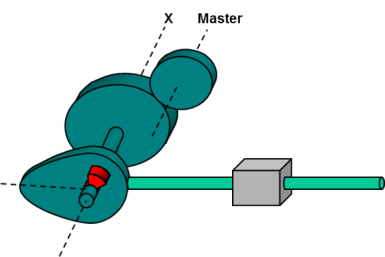
Mechanical cam - scaling of the master value - MasterScaling
lrSetScalingY <> 1
The slave axis is extended or compressed in relation to the y axis (as though the mechanical cam were enlarged or reduced).
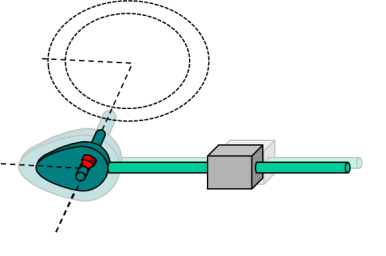
Mechanical cam - scaling of the tool - SlaveScaling
The mode for accepting the scaling factors for the master axis is set via the eScalingModeX parameter, and for the slave axis via the eScalingModeY parameter.
|
Setting mode:
|
Description |
|---|---|
|
0 (x_zero) |
Standard setting: The scaling factors are accepted in the "zero crossing" of the cam. The "zero crossing" is defined as a starting point of a cam if the direction of rotation of the master is positive, or as an end point of a cam if the direction of rotation of the master is negative. |
|
1 (Instant absolute) |
Absolute scaling of the position The scaling factors are accepted immediately after they have been selected or changed. A direct selection or change of the scaling factors causes a step change of the setpoint position even if the axes are at standstill. |
|
2 (Instant relative) |
Relative scaling of the position, absolute scaling of the speed. The scaling factors are accepted immediately after they have been selected or changed. A direct selection or change of the scaling factors causes a step change of the setpoint position even if the axes are at standstill. |
|
3 (profile generator absolute) |
Absolute Scaling the position via the ramp generator with the parameters:
|
|
4 (profile generator relative) |
Relative Scaling the position via the ramp generator with the parameters:
|