Data display and input
Using a switch, a control element in the client can either access the original value from the variable server or the value in the recipe buffer.
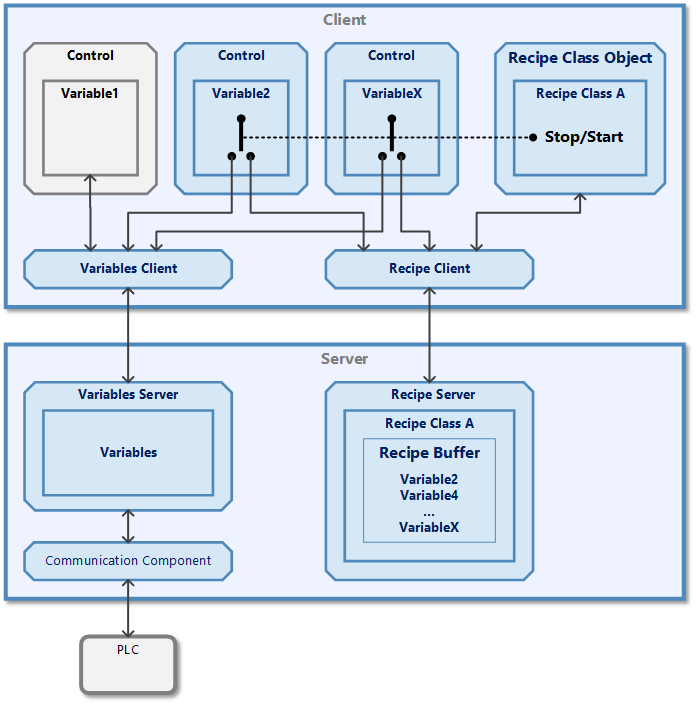
A control element displays data or receives data from the user. This data is processed via a variable object within the control element. The variable object exchanges the data with the variable server via the variable client (see also chapter The five lives of the variable).
If some variables are included in a recipe definition, an additional value exists for these variables in the recipe buffer. The variable object can be enabled to alternatively exchange the data with this storage location in the recipe buffer. There is a special property in the variable object for this purpose, which creates the switch shown. This can of course also be configured for other control elements and variable objects so that a certain number of switches exist.
The position of the switches is controlled centrally by an instance of a recipe class object. This has two methods for this:
- Start: All toggle switches are switched to the right so that the controls can edit the values in the recipe buffer. The controls are now in recipe mode.
- Stop: All toggle switches are switched to the left so that the control elements have a connection to the variable server again.
As the recipe class object is bound to a specific recipe class definition (here "Recipe class A"), it automatically finds all associated variable objects. To do this, a match is determined between the variable names in the recipe class definition and the variable names in all variable objects (here "Variable2" and "VariableX").
Classic UI
| Variable object | Item |
| Retrieval and initialisation | Item item = new Item(); item.Name = variableName; |
| Property for changeover switch | item.RecipeMember = true; |
| Property for recipe mode | if (item.RecipeEdit) |
- See also
Modern UI
| Variable object | IVariable, Variable |
| Retrieval and initialisation | IVariableService variableService = ApplicationService.GetService<IVariableService>(); IVariable variable = await variableService.GetVariableAsync(variableName); |
| Property for changeover switch | variable.CanRecipeEdit = true; |
| Property for recipe mode | if (variable.IsRecipeEditing) |
- See also
Web UI
| Variable object | IVariable, Variable |
| Retrieval and initialisation | const variableService = VisiWin.System.DataAccess.VariableService.getService();const variable = await variableService.GetVariableAsync(variableName); |
| Property for changeover switch | variable.CanRecipeEdit = true; |
| Property for recipe mode | if (variable.IsRecipeEditing) |
- See also
- IVariable (reference)