Software limit positions
The parameterisable limit positions serve to limit the traversing range by the software.

|
Note!
Evaluation and monitoring of the software limit positions are only carried out if
In case of the "Modulo" traversing range and in the device states "Homing", "ErrorStop" and "Disabled", the software limit positions are usually not active. |
- The information that monitoring of the software limit positions is really effective is provided at the FB MC_ReadAxisInfo and FB L_MC1P_AxisBasicControl via the xSWLimitEnabled output.
- From the application, monitoring of the software limit positions can be deactivated via the following FBs (temporarily):
- FB L_MC1P_AxisBasicControl : Set xDisableSWLimit input to TRUE.
- FB L_MC1P_DisableSWLimit : Set xEnable input to TRUE.
- When the SW limit position is exceeded, the system switches to the "ErrorStop" state. "Retraction" of the SW limit positions is possible in the direction of the permitted range. The desired error response can be configured in subindex 105 .
- For motion control FBs which cause a change to the "ContinuousMotion" or "DiscreteMotion" state, the behaviour can be set in subindex 53 .
Software limit position monitoring (subindex 50)
|
|
|||||||||||
|
Activate software limit positions (switch effectively) |
|||||||||||
|
Selection list (Lenze setting printed in bold) |
Info |
||||||||||
|
0 |
Deactivated |
Not activated |
|||||||||
|
1 |
Activated |
Activated |
|||||||||
|
|
UNSIGNED_8 |
||||||||||


Positive software limit position (subindex 51)
|
|
|||||||||||
|
Positive software limit position |
|||||||||||
|
Setting range (min. value | unit | max. value) |
Lenze setting |
||||||||||
|
|
Unit |
|
0.0 unit |
||||||||
|
|
FLOAT_64 |
||||||||||
Negative software limit position (subindex 52)
|
|
|||||||||||
|
Negative software limit position |
|||||||||||
|
Setting range (min. value | unit | max. value) |
Lenze setting |
||||||||||
|
|
Unit |
|
0.0 unit |
||||||||
|
|
FLOAT_64 |
||||||||||
Behaviour - SW limit pos. monit. (subindex 53)
|
|
|||||||||||
|
General behaviour of the motion-activating FBs in case of active software limit positions that put the axis into the Continuous Motion or Discrete Motion state. |
|||||||||||
|
Selection list (Lenze setting printed in bold) |
Info |
||||||||||
|
0 |
Stopping behind the limit |
No monitoring of the software limit positions is made in the motion-activating FBs. Only if the software limit positions are crossed, an error is triggered. |
|||||||||
|
1 |
Stopping on the limit |
Depending on the motion-activating FB, it is already checked if the software limit positions are crossed as soon as the motion is activated.
|
|||||||||
|
|
UNSIGNED_16 |
||||||||||
Behaviour in case of active software limit positions
If the software limit positions are active, travelling commands that would result in exiting from the permissible travel range can no longer be executed:
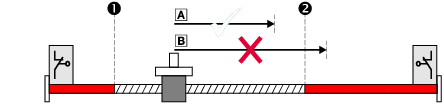


 [4-15] Example: Traversing range limitation by means of software limit positions
If the axis is already outside the permissible travel range and the software limit positions have been activated, only travel commands that result in the axis moving back into the permissible travel range can be executed:
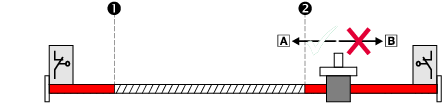
[4-16] Example: Permissible traversing direction if software limit positions active
If the software limit positions are active and a software limit position is passed ("overtravel"):
- The error message "SWLimitPos" or "SWLimitNeg" is generated.
- The output SWLimitSwitchPos or SWLimitSwitchNeg of the FB MC_ReadAxisInfo is set to TRUE.
- The axis state changes to "ErrorStop", i.e. the axis is braked to a standstill depending on the error response configured in subindex 105 .
Response - software limits exceeded (subindex 105)
|
|
|||||||||||
|
Selection list (Lenze setting printed in bold) |
|
||||||||||
|
19 |
Error->Fast stop |
||||||||||
|
21 |
Error->QSP->CINH |
||||||||||
|
|
UNSIGNED_8 |
||||||||||