Activating DC braking manually
By means of the "Activate DC braking" function, DC braking can be activated manually.
Preconditions
The current for DC braking must be set > 0 % so that the function can be executed.
Parameter
 CAUTION!
Example for operating mode
–
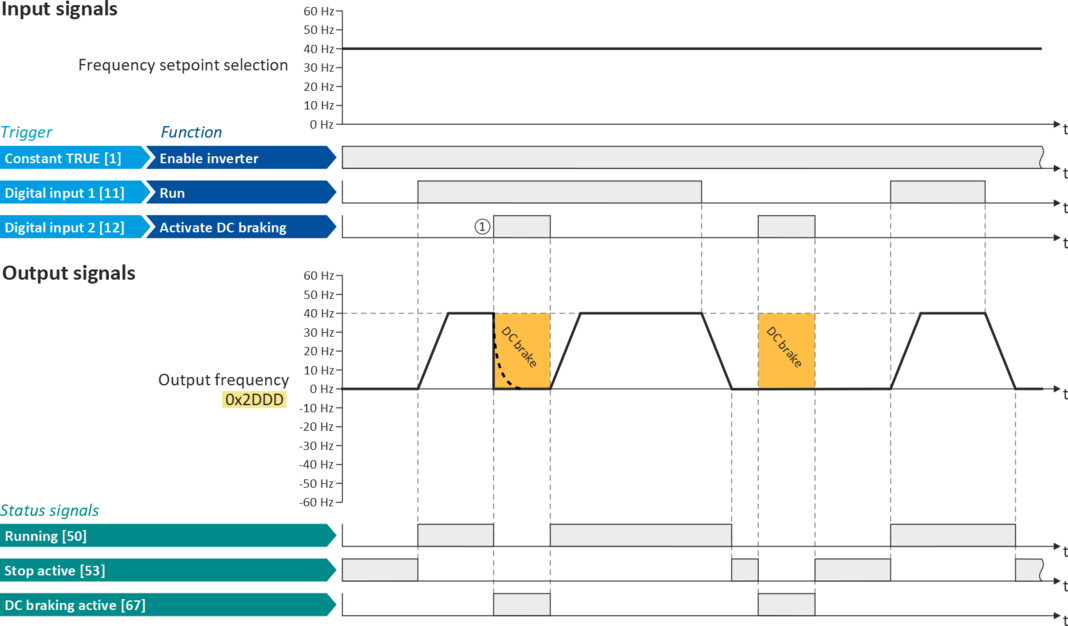
Switch S1 starts the motor in forward direction of rotation. De-asserting switch S1 stops the motor again.
–
Switch S2 activates DC braking.
|
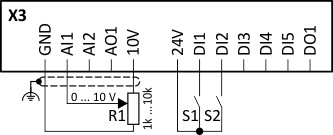
Connection plan
|
Function
|
|
|
|
Potentiometer R1
|
Frequency setpoint selection
|
|
Switch S1
|
Run
|
|
|
Switch S2
|
Activate DC braking
|
|
|
Parameter
|
Designation
|
Setting for this example
|
|
Enable inverter
|
Constant TRUE [1]
|
|
|
Run
|
Digital input 1 [11]
|
|
|
Reset fault
|
Not connected [0]
|
|
|
Activate DC braking
|
Digital input 2 [12]
|
|
|
Control selection
|
Flexible I/O configuration [0]
|
|
|
Stop method
|
Standard ramp [1]
|
|
|
Frequency control: Default setpoint source
|
Analog input 1 [2]
|
|
|
DC braking: Current
|
10 %
|
|
The status signals can be assigned to digital outputs.
 Configure digital outputs Configure digital outputs |
|
|
|
|
|
①
|
If DC braking is activated while the motor is running, the output pulses of the inverter are disabled immediately. For stopping the motor, the current set in 0x2B84:001 (P704.01) is injected. The exact drive behaviour depends on the settings for the "DC braking" function and the load properties.
|