Example: Change-over from terminal control to keypad control
–
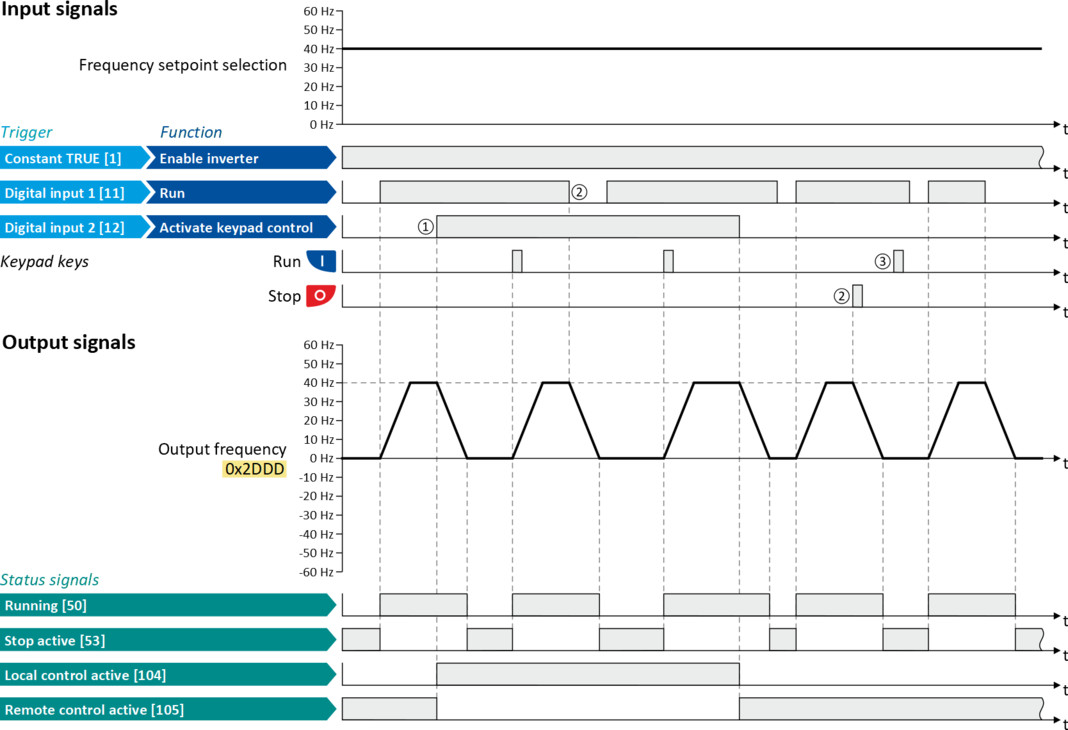
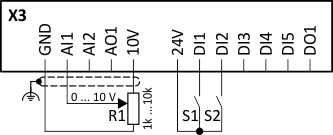
The control is executed primarily via the I/O terminals: Switch S1 serves to start and stop the motor.
–
Switch S2 serves to optionally change over to local keypad control. In case of activated keypad control, the motor can only be started via the keypad key . However, the condition is that switch S1 is closed.
 . However, the condition is that switch S1 is closed.
 –
If switch S1 is opened again or the keypad key is pressed, the motor is stopped (regardless of the active control source).
 is pressed, the motor is stopped (regardless of the active control source).
–
For details of the keypad control of the inverter, see the chapter "Keypad operating mode".
|
Connection diagram
|
Function
|
|
|
|
Potentiometer R1
|
Frequency setpoint selection
|
|
Switch S1
|
Run
|
|
|
Switch S2
|
Activate keypad control
|
|
|
Parameter
|
Name
|
Setting for this example
|
|
Enable inverter
|
Constant TRUE [1]
|
|
|
Run
|
Digital input 1 [11]
|
|
|
Reset fault
|
Not connected [0]
|
|
|
Activate keypad control
|
Digital input 2 [12]
|
|
|
Control selection
|
Flexible I/O configuration [0]
|
|
The status signals can be assigned to digital outputs.
 Configure digital outputs Configure digital outputs |
|
|
|
|
|
①
|
When changing over to another control source, the motor is first stopped with the stop method set in 0x2838:003 (P203.03).
|
|
②
|
The motor is also stopped when the "Run" function is cancelled or the keypad key is pressed (regardless of the active control source).
|
|
③
|
After stopping with the keypad key , the key on the keypad must be pressed to cancel the keypad stop ("KSTOP") again before a new start command from another control source.
|