Changing the control source during operation
The term "control sources" in this connection refers to the digital signal sources from which the inverter receives its start, stop, and reversal commands.
Possible control sources:
–
Digital inputs
–
Keypad
–
Network
Details
First, select in 0x2824 (P200.00) whether the start of the motor is to be configured flexibly (default setting) or exclusively via the keypad.  Control selection
Control selection If "Flexible I/O configuration" is set, a change-over from one control source to another can be effected during operation via the functions listed in the following table. The inverter not only supports such a change-over via its digital inputs, but also as a function of internal inverter states.
|
Activate keypad control
|
Activate network control
|
Active control source
|
|
FALSE / Not connected
|
FALSE / Not connected
|
Flexible I/O configuration (default setting)
–
The motor is controlled via the digital inputs.
–
For preconfigured assignment of the digital inputs, see chapter "Function assignment of the inputs and outputs (default setting)".
–
For description of the basic functions for controlling the motor, see chapter "Flexible I/O configuration of the start, stop and rotating direction commands".
|
|
FALSE / Not connected
|
TRUE
|
Network
–
Starting the motor is only possible via the network control word.
–
Exception: jog operation; see chapter "Flexible I/O configuration of the start, stop and rotating direction commands".
|
|
TRUE
|
Any
|
Keypad
–
Starting the motor is only possible via the keypad key.
–
Exception: jog operation; see chapter "Flexible I/O configuration of the start, stop and rotating direction commands".
|
 Example: Change-over from terminal control to network control
 keypad key.
Parameter
|
Address
|
Name / setting range / [default setting]
|
Information
|
|
|
0x2631:012
(P400.12)
|
Function list: Activate keypad control
(Function list: Keypad control)
|
Assignment of a trigger for the "Activate keypad control" function.
Trigger = TRUE: activate keypad as control source.
Trigger = FALSE: no action / deactivate keypad as control source again.
|
|
|
0
|
Not connected
|
No trigger assigned (trigger is constantly FALSE).
|
|
|
0x2631:037
(P400.37)
|
Function list: Activate network control
(Function list: Network control)
|
Assignment of a trigger for the "Activate network control" function.
Trigger = TRUE: Activate network control.
Trigger = FALSE: no action / deactivate network control again.
|
|
|
0
|
Not connected
|
No trigger assigned (trigger is constantly FALSE).
|
|
|
114
|
Network control active
|
TRUE if the network control is requested via bit 5 of the AC drive control word 0x400B:001 (P592.01). Otherwise FALSE.
Notes:
–
Set this selection if the network control is to be activated via bit 5 of the AC drive control word.
–
The AC drive control word can be used with any communication protocol.
|
|
Internal control logic
The following signal flow shows the internal control logic:
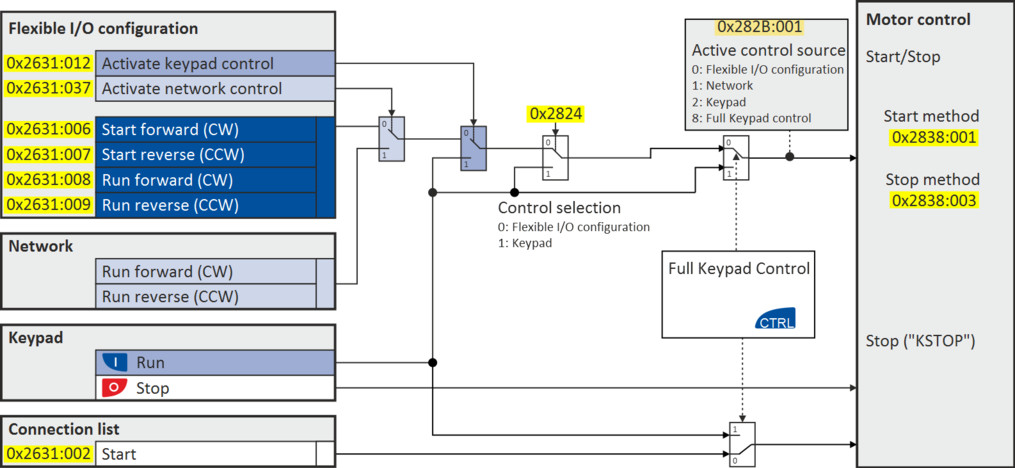
Notes:
In case of an activated keypad or network control, the "Run" 0x2631:002 (P400.02) function must be set to TRUE to start the motor in addition to the "Enable inverter", either via digital input or by the "Constant TRUE [1]" setting.
In case of an activated network control, the following functions are still active:
–
0x2631:001 (P400.01): Enable inverter
–
0x2631:002 (P400.02): Run
–
0x2631:003 (P400.03): Activate quick stop
–
0x2631:004 (P400.04): Reset error
–
0x2631:005 (P400.05): DC braking
–
0x2631:010 (P400.10): Jog forward (CW)
–
0x2631:011 (P400.11): Jog reverse (CCW)*
–
0x2631:012 (P400.12): Activate keypad control*
–
0x2631:037 (P400.37): Activate network control*
–
0x2631:043 (P400.43): Activate fault 1
–
0x2631:044 (P400.44): Activate fault 2
–
0x2631:054 (P400.54): Reset position counter
(*Not active in case of network operation in CiA402 mode 0x6060=2).
In case of an activated network control, the following functions are also still active if they are not configured in the NetWordIN1 bit functionality:
–
0x2631:048 (P400.48): Activate PID influence ramp
–
0x2631:041 (P400.41): Select parameter set (bit 0)
–
0x2631:042 (P400.42): Select parameter set (bit 1)
All other functions configurable via 0x2631:xx (P400.xx) are deactivated in case of network control.
In case of keypad control, the following functions continue to be active:
–
0x2631:001 (P400.01): Enable inverter
–
0x2631:002 (P400.02): Run
–
0x2631:003 (P400.03): Activate quick stop
–
0x2631:004 (P400.04): Reset error
–
0x2631:005 (P400.05): DC braking
–
0x2631:010 (P400.10): Jog forward (CW)
–
0x2631:011 (P400.11): Jog reverse (CCW)*
–
All other functions of 0x2631:012 (P400.12) - 0x2631:055 (P400.55)
The functions for setpoint changeover. Changing the setpoint source during operation
Changing the setpoint source during operation Diagnostic parameters:
–
0x282A:001 (P126.01): Cause of disable
–
0x282A:002 (P126.02): Cause of quick stop
–
0x282A:003 (P126.03): Cause of stop
–
0x282B:001 (P125.01): Active control source