Function assignment of the inputs and outputs (default setting)
By default, the inverter can be controlled via the I/O terminals as follows:
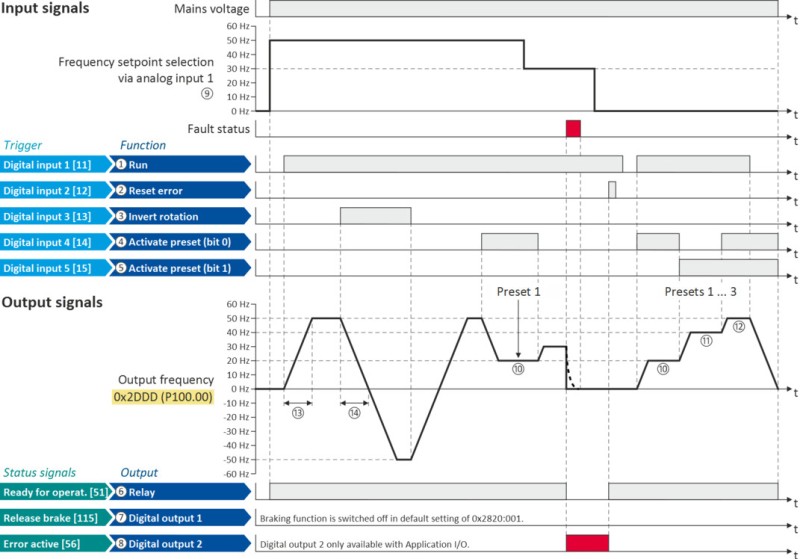
|
Parameter
|
Designation
|
Default setting
|
|
|
Control functions
|
|||
|
①
|
Run
|
Digital input 1 [11]
|
|
|
②
|
Reset fault
|
Digital input 2 [12]
|
|
|
③
|
Reverse rotational direction
|
Digital input 3 [13]
|
|
|
④
|
Activate preset (bit 0)
|
Digital input 4 [14]
|
|
|
⑤
|
Activate preset (bit 1)
|
Digital input 5 [15]
|
|
|
Configuration of digital outputs
|
|||
|
⑥
|
Relay
|
Ready for operation [51]
|
|
|
⑦
|
Digital output 1
|
Release holding brake [115]
|
|
|
③
|
Digital output 2 (only for application I/O)
|
Fault active [56]
|
|
|
Settings for the frequency setpoint
|
|||
|
④
|
Frequency control: Default setpoint source
|
Analog input 1 [2]
|
|
|
⑩
|
Frequency setpoint presets: Preset 1
|
20 Hz
|
|
|
⑪
|
Frequency setpoint presets: Preset 2
|
40 Hz
|
|
|
⑫
|
Frequency setpoint presets: Preset 3
|
50 Hz
|
|
|
⑬
|
Acceleration time 1
|
5.0 s
|
|
|
⑭
|
Deceleration time 1
|
5.0 s
|
|
All functional possible settings for controlling the inverter are described in the "Start, stop and rotating direction commands" chapter.