Keypad full control
The "Keypad Full Control" control mode can be activated with the keypad key “CTRL”. Both the control and the setpoint selection are then made via the keypad. This special control mode can be, for instance, used during the commissioning phase if external control and setpoint sources are not ready to use yet.
 CAUTION!
If the "Keypad Full Control" control mode is active, the "Run" 0x2631:002 (P400.02) function is internally set to TRUE.
In this case, the motor cannot be stopped via this function.
▶
For stopping the motor, use the keypad key, deactivate the "Enable inverter" or activate the "quick stop" function.
 keypad key, deactivate the "Enable inverter" or activate the "quick stop" function.
Details
–
After the "CTRL" key has been pressed, the activation of the control mode must be confirmed with the key. (The key serves to cancel the action.)
 key. (The
  key serves to cancel the action.)
–
When the control mode is changed over, the motor is first stopped and the "Forward" direction of rotation is set. Then, the motor can be started and stopped via the keypad.
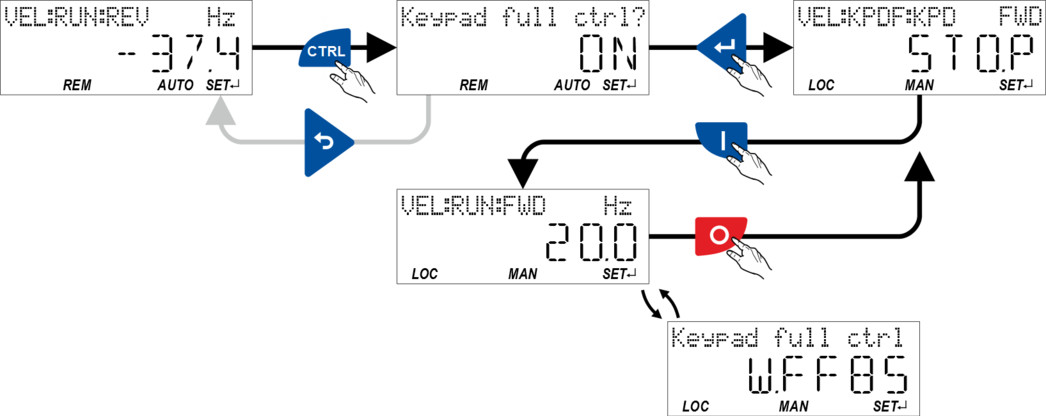
If the "Keypad Full Control" control mode is active,
–
the keypad shows the warning "Keypad full ctrl" alternately with the status display.
–
the set standard setpoint sources are ignored.
–
a changeover to other setpoint sources is not possible.
–
a changeover to network control is not possible.
In case of keypad control, the following functions continue to be active:
–
0x2631:001 (P400.01): Enable inverter
–
0x2631:003 (P400.03): Activate quick stop
–
0x2631:004 (P400.04): Reset fault
–
0x2631:005 (P400.05): Activate DC braking
–
0x2631:010 (P400.10): Jog forward (CW)
–
0x2631:011 (P400.11): Jog reverse (CCW)
–
All other functions of 0x2631:012 (P400.12) - 0x2631:055 (P400.55)
The control mode can be terminated again if the "CTRL" keypad key is pressed again.
 Configure R/F and CTRL keys