Cascade function for pumps and fans
This feature allows you to control multiple drives in fan and pump applications. The main drive is controlled by the inverter and the (maximum two) auxiliary drives are switched on directly via contactors if required. The main drive is controlled by the PID controller or another alternative setpoint source (digital/analog inputs, keypad, network) The switching cycles of the auxiliary drives are triggered depending on the actual load (PID controller).
 Configuring the process controller
Possible configurations
|
Inverter
|
Drive
|
|
i5xx with standard IO (with or without network)
|
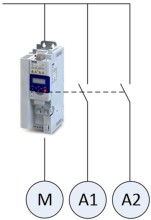
1 main drive (controlled via this inverter)
|
|
2 auxiliary drives (controlled via relay/digital output)
|
Example with i550 cabinet frequency inverter:
|
M
|
Main drive
|
|
A1
|
Auxiliary drive 1
|
|
A2
|
Auxiliary drive 2
|

Additional relays may be required to control the power contactors if the current/voltage range from the relay/digital output is not sufficient for direct control.
Operating modes
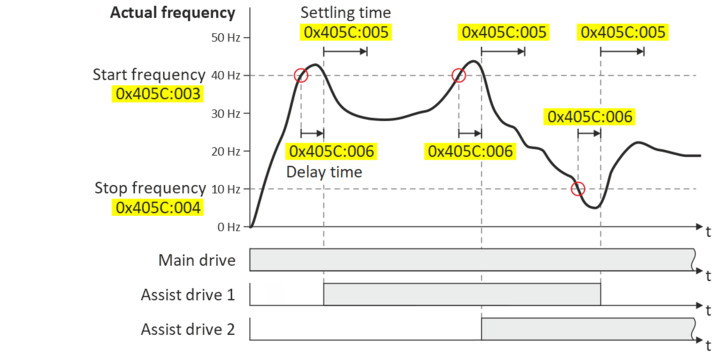
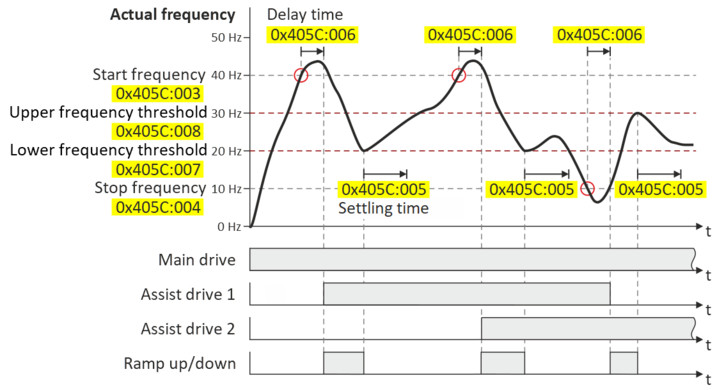
Two operating modes are available for the cascade function, "without ramp" and "with ramp". The following diagrams illustrate the respective behavior.
|
0x405C:001 (P770.01) = "1: without ramp"
|
|
|
When the current frequency reaches the start frequency set in 0x405C:003 (P770.03), the delay time set in 0x405C:006 (P770.06) starts. The delay time is used to avoid unwanted on/off cycles.
After the delay time has elapsed:
–
The on/off command for the next auxiliary drive is set.
–
The settling time set in 0x405C:005 (P770.05) starts.
During the settling time, no other auxiliary drive may be controlled by means of an on/off command. This time is also required so that the PID controller for the main drive can regulate itself again.
|
|
|
0x405C:001 (P770.01) = "2: with ramp"
|
|
|
When the current frequency reaches the start frequency set in 0x405C:003 (P770.03), the delay time set in 0x405C:006 (P770.06) starts. The delay time is used to avoid unwanted on/off cycles.
After the delay time has elapsed:
–
The on/off command for the next auxiliary drive is set.
–
The frequency is reduced via a ramp to the lower frequency threshold set in 0x405C:007 (P770.07).
When the current frequency reaches the lower frequency threshold, the settling time set in 0x405C:005 (P770.05) starts.
During the settling time, no other auxiliary drive may be controlled by means of an on/off command. This time is also required so that the PID controller for the main drive can regulate itself again.
|
|
Transition mode configuration
To ensure equal operating times of both auxiliary drives, a specific transition behavior from one add-on drive to the second add-on drive can be configured by setting the "Automatic reversing time" in 0x405C:010 (P770.10).
The following three transition modes are possible:
|
Transition mode
|
Information
|
Required setting
|
|
Direct transition
|
The active auxiliary drive switches off, the other auxiliary drive switches on. Note that this may cause undesirable behavior in your system.
|
0x405C:010 (P770.10) = 0.0 s (default setting)
|
|
Sequential transition
|
The active auxiliary drive switches off. The other auxiliary drive only switches on after the reversing time set in 0x405C:010 (P770.10) has elapsed.
|
0x405C:010 (P770.10) > 0.0 s
|
|
Overlapping transition
|
The other auxiliary drive switches on immediately. The auxiliary drive that is already switched on does not switch off until the (negative) reversing time set in 0x405C:010 (P770.10) has elapsed.
|
0x405C:010 (P770.10) < 0.0 s
|
|
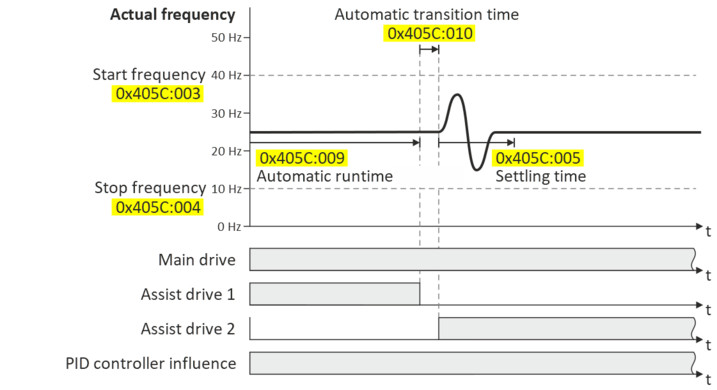
Example of "Sequential transition" mode
|
|
|
The example shows a sequential transition from auxiliary drive 1 to auxiliary drive 2.
–
Auxiliary drive 1 is switched off after the operating time set in 0x405C:009 (P770.09).
–
After the reversing time set in 0x405C:010 (P770.10) (e.g. 5 s) has elapsed, the transition to auxiliary drive 2 is executed.
–
No further transitions are possible during the settling time set in 0x405C:005 (P770.05).
|
|
Basic settings
In the following description and in the parameter designations, the term "additional pump", which is more unambiguous for a pump cascade, is used instead of "auxiliary drive". Of course, the function can be used in the same way for a fan cascade.
Based on the default setting, we recommend the following proceeding:
1.
2.
Activate one or both additional pumps for the cascade function:
–
Activate additional 1: 0x2631:056 (P400.56) = "constant TRUE [1]"
–
Activate additional pump 2: 0x2631:057 (P400.57) = "constant TRUE [1]"
3.
Configure control of the additional pumps via digital output 1 or the relay:
–
Digital output 1 switches additional pump 1: 0x2634:001 (P420.01) = "additional pump 1 [160]"
–
Digital output 1 switches additional pump 2: 0x2634:001 (P420.01) = "additional pump 2 [161]"
–
Relay switches additional pump 1: 0x2634:002 (P420.02) = "additional pump 1 [160]"
–
Relay switches additional pump 2: 0x2634:002 (P420.02) = "additional pump 2 [161]"
4.
Set operating mode ("without ramp" or "with ramp") in 0x405C:001 (P770.01).
5.
Set transition mode by setting the automatic reversing time in 0x405C:010 (P770.10).
6.
Adjust other parameters of the function (start/stop frequency, delay time, settling time, frequency thresholds, etc.) according to the application.
Parameter
|
Address
|
Name / setting range / [default setting]
|
Information
|
|
|
0x2631:056
(P400.56)
|
Function list: Assist pump 1
(Function list: Assist pump 1)
|
Assignment of a trigger to the "Additional pump 1" function.
Trigger = TRUE: Cascade function uses additional pump 1.
Trigger = FALSE: No action.
|
|
|
0
|
Not connected
|
No trigger assigned (trigger is constantly FALSE).
|
|
|
0x2631:057
(P400.57)
|
Function list: Assist pump 2
(Function list: Assist pump 2)
|
Assignment of a trigger to the "Additional pump 2" function.
Trigger = TRUE: Cascade function uses additional pump 2.
Trigger = FALSE: No action.
|
|
|
0
|
Not connected
|
No trigger assigned (trigger is constantly FALSE).
|
|
|
0x2631:058
(P400.58)
|
Function list: Reset operating time
(Function list: Reset oper.time)
|
Assignment of a trigger to the "Reset power-on time" function.
Trigger = TRUE: Both counters for the power-on time of the additional pumps are reset to zero.
Trigger = FALSE: No action.
|
|
|
0
|
Not connected
|
No trigger assigned (trigger is constantly FALSE).
|
|
|
0x405C:001
(P770.01)
|
Pump cascading: Operating mode
(Pump cascading: Operating mode)
|
Selection of the operating mode for the cascade function.
|
|
|
0
|
Disabled
|
Cascade function is deactivated.
|
|
|
1
|
Without ramp
|
After reaching the start or stop frequency, the cascade function has no influence on the frequency setpoint.
|
|
|
2
|
With ramp
|
After reaching the start or stop frequency, the cascade function leads the frequency setpoint via a ramp to the lower or upper frequency threshold, respectively.
The active auxiliary pump switches on/off:
–
When the start or stop frequency is reached.
–
When the delay time has elapsed.
|
|
|
0x405C:002
(P770.02)
|
Pump cascading: Priority at startup
(Pump cascading: Prior.at startup)
|
||
|
0
|
Assist pump 1
|
||
|
1
|
By operating time
|
The auxiliary pump with the fewest operating hours starts first.
|
|
|
0x405C:003
(P770.03)
|
Pump cascading: Start frequency
(Pump cascading: Start frequency)
0.0 ... [40.0] ... 599.0 Hz
|
||
|
0x405C:004
(P770.04)
|
Pump cascading: Stop frequency
(Pump cascading: Stop frequency)
0.0 ... [10.0] ... 599.0 Hz
|
||
|
0x405C:005
(P770.05)
|
Pump cascading: Settling time
(Pump cascading: Settling time)
0.0 ... [5.0] ... 3600.0 s
|
||
|
0x405C:006
(P770.06)
|
Pump cascading: Delay time
(Pump cascading: Delay time)
0.0 ... [2.0] ... 3600.0 s
|
||
|
0x405C:007
(P770.07)
|
Pump cascading: Lower frequency threshold
(Pump cascading: Low F threshold)
0.0 ... [20.0] ... 599.0 Hz
|
||
|
0x405C:008
(P770.08)
|
Pump cascading: Upper frequency threshold
(Pump cascading: Up. F threshold)
0.0 ... [30.0] ... 599.0 Hz
|
||
|
0x405C:009
(P770.09)
|
Pump cascading: Automatic runtime
(Pump cascading: Auto runtime)
0 ... [0] ... 1000 h
|
||
|
0x405C:010
(P770.10)
|
Pump cascading: Automatic transition time
(Pump cascading: Auto trans.time)
-10.0 ... [0.0] ... 10.0 s
|
The reversing time also defines the transition mode:
–
Reversing time = 0.0 s: Direct transition
–
Reversing time > 0.0 s: Sequential transition
–
Reversing time < 0.0 s: Overlapping transition
|
|
|
0x405C:011
(P770.11)
|
Pump cascading: Reset operating time
(Pump cascading: Reset oper.time)
|
1 = Both counters for the power-on time of the additional pumps are reset to zero.
|
|
|
0
|
Disabled
|
||
|
1
|
Activate
|
||
|
0x405C:012
(P770.12)
|
Pump cascading: Status word
(Pump cascading: Status word)
–
Read only
|
||
|
Bit
0
|
Assist pump 1 activated
|
Additional pump 1 was activated for the cascade function via 0x2631:056 (P400.56).
|
|
|
Bit
1
|
Assist pump 2 activated
|
Additional pump 2 was activated for the cascade function via 0x2631:057 (P400.57).
|
|
|
Bit
3
|
Assist pump 1 running
|
||
|
Bit
4
|
Assist pump 2 running
|
||
|
Bit
6
|
Start frequency reached
|
The start frequency set in 0x405C:003 (P770.03) has been reached.
|
|
|
Bit
7
|
Stop frequency reached
|
The stop frequency set in 0x405C:004 (P770.04) has been reached.
|
|
|
Bit
8
|
Cascading overload
|
The maximum frequency in 0x2916 (P211.00) has been reached and no free additional pump is available.
|
|
|
0x405C:013
(P770.13)
|
Pump cascading: Operating time pump 1
(Pump cascading: Operatingtime p1)
–
Read only: x s
|
||
|
0x405C:014
(P770.14)
|
Pump cascading: Operating time pump 2
(Pump cascading: Operatingtime p2)
–
Read only: x s
|
||
 Trigger list