UIDesigner.OPCUAClient.Certificate
If the controller is forcing an encrypted communication, the OPC UA Client needs a certificate handling for encryption.
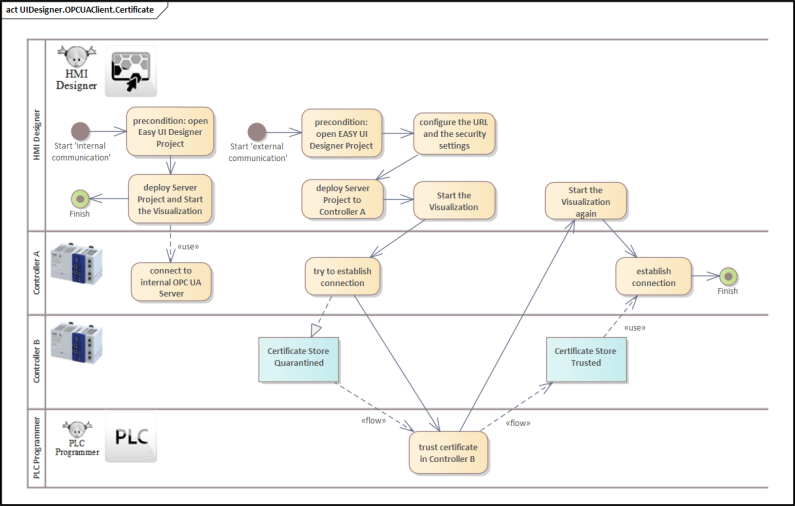
Activity Diagram
Two different considerations or possible uses must be distinguished here.
Internal Communication
The UI Designer Runtime runs on the same controller as the application program. In this case, the UI Designer Runtime accesses the internal endpoint of the OPC UA Server via an OPC UA Client via internal communication. In this case, authentication (UIDesigner.OPCUAClient.Authentification) is required, but no encrypted communication, since this takes place internally.
External Communication
The UI Designer runtime runs on a different controller, than the application program. In this case, the UI Designer Runtime accesses the external endpoint of the OPC UA Server via an OPC UA Client via external communication. In this case, authentication (UIDesigner.OPCUAClient.Authentification) is required, and encrypted communication if the other controller enforces it.
Handling certificates for an external communication and enforced encrypted communication
To configure the OPC UA Client, first set the connectivity under Common in the Server project under Variables / Channels / Controller: OPCUA. Make sure to set the correct IP address with the port of the OPC UA Server.
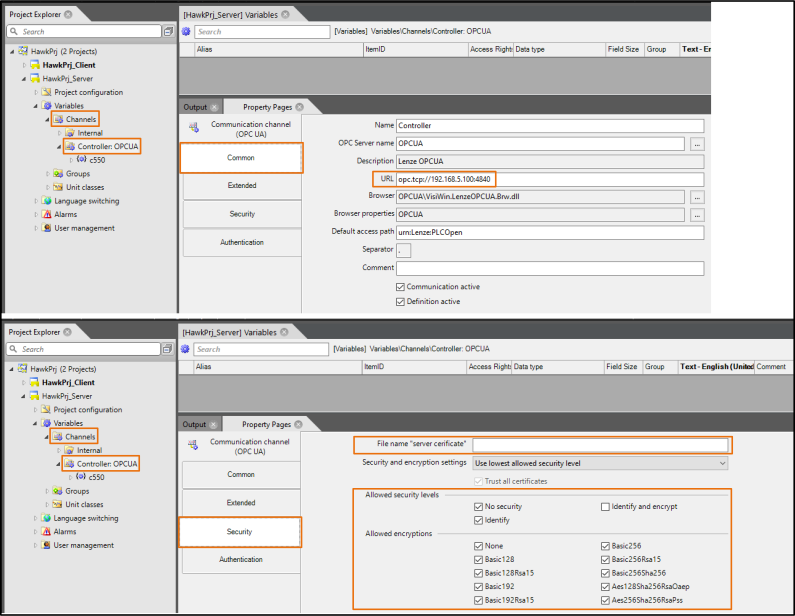
own “server certificate”
Changing to the Security tab allows you to configure the server certificate for connection.
Security and encryption settings:
-
Use lowest allowed security level
-
Use highest allowed security level
Allowed security levels:
-
No security
-
Identify
-
Identify and encrypt
Allowed encryptions:
-
None
-
Basic128
-
Basic128Rsa15
-
Basic192
-
Basic192Rsa15
-
Basic256
-
Basic256Rsa15
-
Basic256Sha256
-
Aes128Sha256RsaOaep
-
Aes256Sha256RsaPss
After configuring encrypted communication, deploy the server project to Controller A (see the picture at the beginning of this chapter). When the visualization is started on Controller A, a connection to Controller B is attempted and a certificate is quarantined.
Now, the PLC programmer of Controller B must trust the certificate, e.g., using the "PLC Designer."
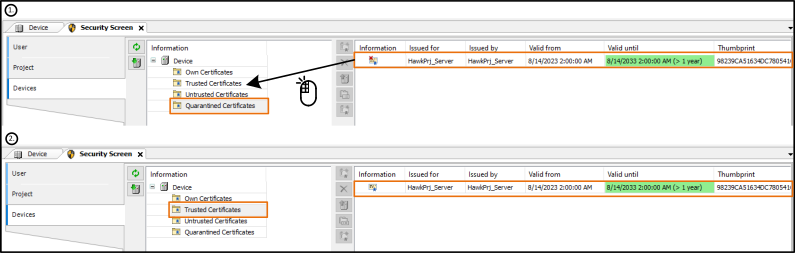
Trust Certificate
After the certificate is trusted on Controller B, the EASY UI Designer can start the visualization.
-
Important:
This own certificate, which is automatically generated for the OPC UA Client, is valid for 10 years and must be renewed before it expires. Otherwise, the OPC UA Client will not be able to connect.