UIDesigner.TargetDeviceManager.Authentication
Since version 01.04.00 of the »EASY UI Designer«, the authentication of the Target Device Manager is available.
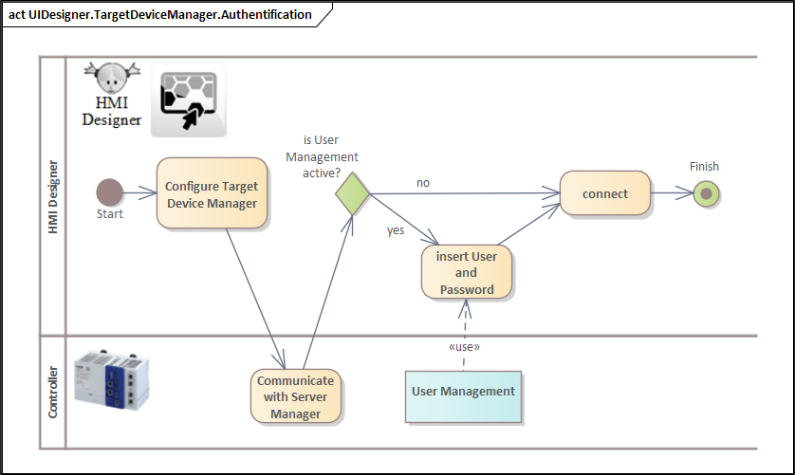
Activity Diagram
Integrate the Host-IP and connect to the controller.
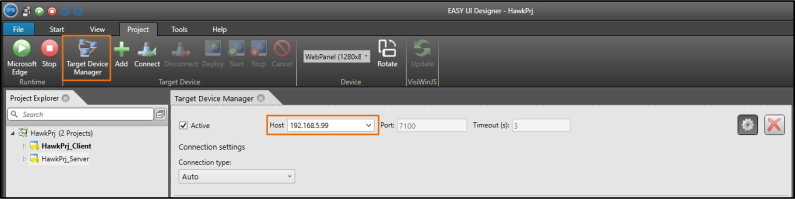
Integrate Host-IP
After that, a message occur "Please enter a user".
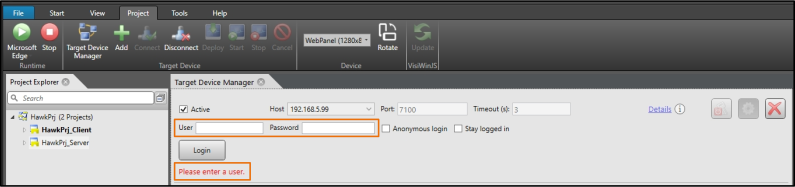
Enter a user
A user with password from a user, created in the Controller.UserManagement (Controller.UserManagement), must be specified.
What happens if authentication is correct?
After entering the correct credentials, it is possible to deploy the client and server projects.
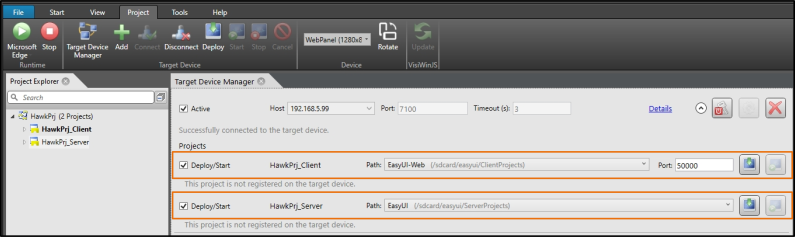
Deployment
What happens if I enter the wrong information?
If you log in with an empty username and password, an error message that says "Please enter a username" appears. If you enter the wrong username and/or password, an error message that says "The user could not be logged in" appears.
Changing a user
The Target Device Manager has a button with a key. The tool tip shows the currently authenticated user (in this example it is "EasyUiUser", see the following image).
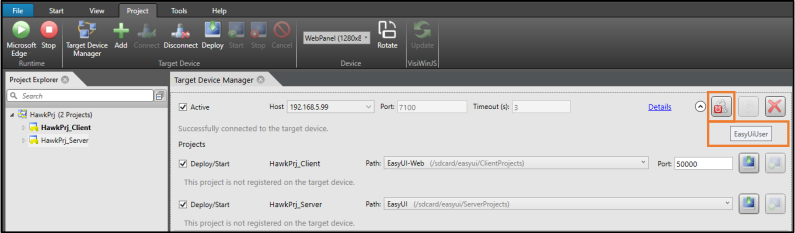
Changing a user
By clicking the button, the login authentication appears, allowing another user to be entered and authenticated with their password.
What does "Anonymous login" mean?
If the controller has a deactivated user management, the »EASY UI Designer« can use the "Login anonymous" flag. With this option a login is possible without username and password.
Save credentials
Selecting the "Save credentials" checkbox allows the user's credentials to be saved.

Stay logged in
Use case 1: Disconnect from and connect to the target.
Use case 2: Close the UI-Designer Tool and start the UI-Designer Tool with this project again.
If the user activates the "Save credentials" flag, the username and the password will be saved in the Windows Credential Manager, (Storing Credentials for Authentification). On the next login,the data will be used again.
Behavior when Controller.UserManagement is not enabled
If user management is not enabled on the controller, the »EASY UI Designer« can go online without authentication. To go online to the IP address specified under host, press the "Connect" button.

Connect without Controller.UserManagement