UIDesigner.ServerManagerUI.Authentication
In order to go online with the »EASY UI Designer« when user management of the controller is activated, authentication must be enabled by the "Server Manager UI".
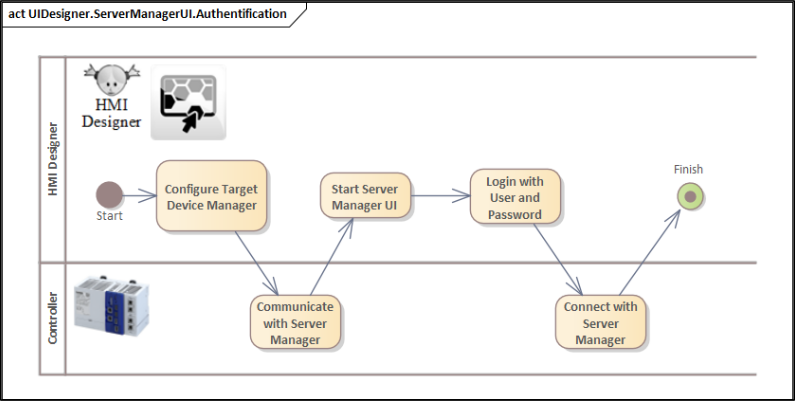
Activity Diagram
The settings for this are made with the following steps:
-
Start the "Server Manager UI" with "UI Designer / Tools / Server Manager UI".
-
Enter the username and password of a user in the controller user management group "EasyUi" (refer to chapter "Cyber Security\c5x0 controller\Security Functions\Controller.UserManagement\Controller.UserManagent: User for UI-Designer"). Leave the domain field blank.
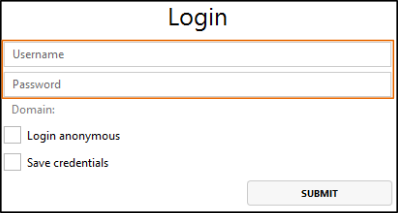
UI-Designer Server Manager UI Login Screen
If the credentials are correct, Server Manager is started. If the access data is not correct, the error message "Login failed – invalid input" appears.
To end the user's session, a logout function is available:

Logout
-
The following characters are not supported in the password:
§ ß ü Ü ö Ö ä Ä
Login anonymous
If the controller has an deactivated user management, the »EASY UI Designer« can use the "Login anonymous" flag. With this option, a login is possible without username and password.
Save credentials
If the user activates the "Save credentials" flag, the Username and the Password will be saved in the Windows Credential Manager, (Storing Credentials for Authentification). At the next login, the data will be used again.