Security mechanisms : Device Replacement
Device Replacement (i9x0-base) from Version V1.x to Version V2.x
If the i9x0 is used in the base variant, i.e. the parameter 0x4000 is set to CiA 402, the parameter set is located and persits on the higher-level Controller regardless of whether the firmware is in V1.x or V2.x and is transferred to the i9x0 Servo Inverter at startup. This means that no further steps are required for a device replacement.
Device Replacement (i9x0-para) from Version V1.x to Version 2.x
If the i9x0 is used in the para variant, i.e. the parameter 0x4000 is set to TA [...] (with the exception of TA User), the parameter set is persists on the SD Card of the i9x0 Servo Inverter.
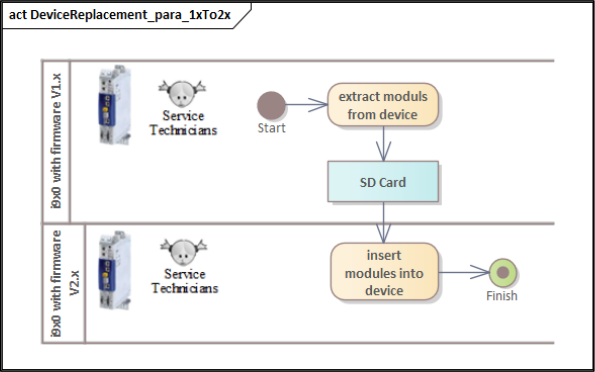
i9x0 Device Replacement i9x0-para from Version V1.x to Version V2.x
With the i9x0 para, device replacement is only possible by taking the SD card with you. The following behavior applies here:
-
No initial query for the Security Configuration (refer to chapter i9x0.MinimumAndDefaultSecurity). The i9x0-para is always preset with "Minimal Security".
-
The display for Secure Factory Setting does not flash (refer to chapter i9x0.MinimumAndDefaultSecurity).
-
If executing the device command for Secure Factory Reset (refer to chapter i9x0.SecureFactoryReset), the settings of the Secure Configuration will always "Minimum Security".
-
The Firewall will be deactivated by default.
-
The Communication will be in plain text by default.
-
The application or the parameter set on the SD card is not encrypted.
Device Replacement (i9x0-prog) from Version V1.x to Version V2.x
If the i9x0 is used in the prog variant, i.e. the parameter 0x4000 is set to TA User, the following diagram shows the device replacement process for a transition from firmware 1.x to a device with firmware 2.x.
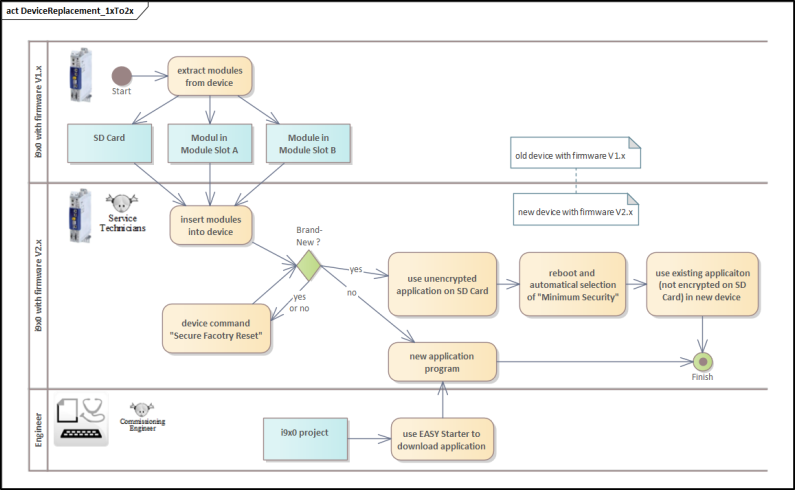
i9x0 Device Replacement i9x0-prog from Version V1.x to Version V2.x
Precondition
Info: From firmware V2.x, the data on the SD Card is encrypted for a new project, if default security is used in the i950 (refer to chapter i9x0.MinimumAndDefaultSecurity). This applies to the application data, but not to the SD Card itself.
-
If an i9x0 Servo Inverter with V1.x firmware is used, the application data is still unencrypted on the SD Card.
-
Optionally, an unencrypted backup can be stored on the SD Card.
Replacement Scenario
-
The SD Card is removed from the old firmware V1.x device and inserted into the new firmware V2.x device.
-
All existing Encoder Modules in module slot A and module slot B are also replaced from the old to the new device.
-
When the new i9x0 Servo Inverter is switched on, it checks whether it is still in the brand-new state (indicated by the blink code Brandnew, refer to chapter i9x0.MinimumAndDefaultSecurity).
Info: In the actual Firmware V2.x the i950 Servo Inverter will immediately switch to Minimum Security, so the blink code will not be visible.
Info: If the i9x0 Servo Inverter is no longer in this state, it can be reset using the Reset Origin device command, refer to chapter i9x0.SecureFactoryReset. -
Is the brand-new state given:
-
The i9x0 Servo Inverter finds the unencrypted application on the SD Card and automatically sets its own security mode to "Minimal Security", refer to chapter i9x0.MinimalAndDefaultSecurity.
-
A subsequent reboot is necessary for correct operation.
-
The i9x0 Servo Inverter can then work with the unencrypted application data on the SD Card (although it is in firmware V2.x).
-
This information is important for the customer, as in this scenario the customer is using an i9x0 Servo Inverter with V2.x firmware and can therefore use a simple migration and replacement scenario, but the application program is still stored unencrypted on the SD Card. This must be organizationally protected.
-
-
Is the brand-new state not given:
-
The i9x0 Servo Inverter does not accept the unencrypted application program and does not automatically set itself to "minimum security". The user must either run through the Secure Factory Reset device command (refer to chapter i9x0.SecureFactoryReset) or commissioning with the help of the EASY Starter and thus set the initial security configuration (refer to chapter i9x0.MinimumAndDefaultSecurity) manually.
-
-
For further detailed descriptions, please refer to the Device Replacement security function.
Device Replacement from Version V2.x to Version V2.y
If the i9x0 is used, the following diagram shows the device replacement process for a transition from firmware 2.x to a device with higher version of firmware 2.y. An i9x0 Servo Inverter stores the application on the SD card depending on the security configuration. How the device replacement runs depends on this.
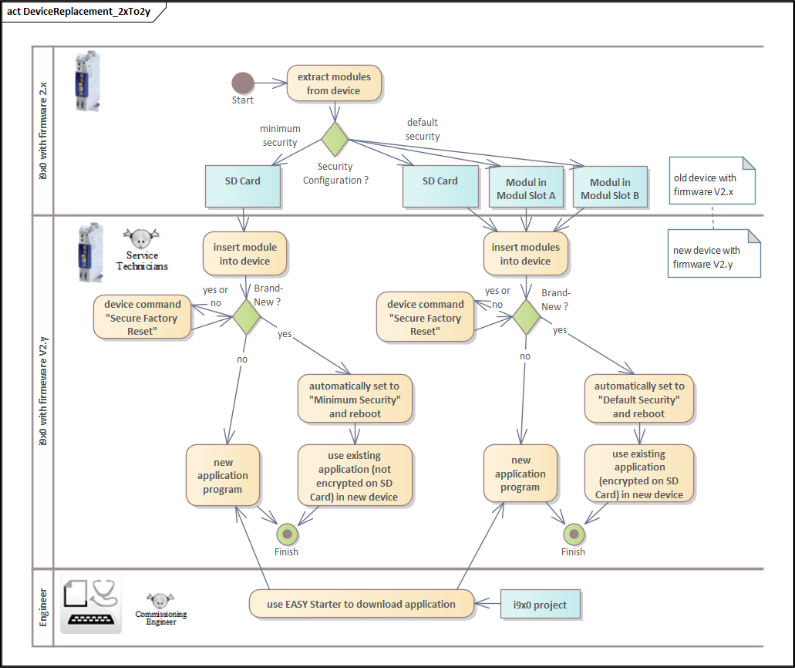
i9x0 Device Replacement i9x0-prog from Version V2.x to Version V2.y
Precondition
Info: From firmware V2.x, the data on the SD Card can be encrypted (see status of the encryption in 0x5902:002). This applies to the application data, but not to the SD Card itself.
-
If an i9x0 Servo Inverter with V2.x firmware is used, the application data is unencrypted or encrypted on the SD card, depending on the security configuration.
Replacement Scenario
-
The SD Card is removed from the old firmware V2.x device and inserted into the new firmware V2.y device.
-
Depending on the security configuration of the current device, different modules must also be replaced:
-
Secure data storage is not active (0x5902:002 or 0x5905:010 Bit 11):
In this case the application on the SD Card is not encrypted. Only the SD Card must be transferred from the old to the new device. -
Secure data storage is active (0x5902:002 or 0x5905:010 Bit 11):
In this case the application on the SD card is encrypted. The SD card and both encoder modules in module slot A and module slot B must be transferred from the old to the new device.
-
-
For further detailed descriptions, please refer to the Device Replacement security function.