i9x0.MinimumAndDefaultSecurity
This chapter is divided into
-
identification of the secure default delivery status,
-
set the security configuration,
-
behavior with minimum security and
-
behavior with default security.
Identification of the secure default delivery status
The i9x0 Servo Inverter flashes in the delivery state and after a successful device command set factory reset.
|
Blinking pattern of the RDY-LED |
Status |
Status/meaning |
|
|---|---|---|---|
|
flashing each second |
Brand-New |
The i9x0 Servo Inverter is in brand-new state. |
|
If the Firmware 2.x is started in the factory-new state, the security state "minimum security" is automatically selected. In this respect, the flashing is not visible. This module has already been implemented for later versions, where the user can choose between minimum security or default security on initial switch-on (refer to chapter i9x0.MinimalAndDefaultSecurity).
Set the secure configuration
As of firmware v2.0.0, the i9x0 Servo Inverter is in the state 0x5905:010 Bit 0 = activated on delivery and after Secure Factory Setting, i.e. initial security is selected. On this basis, the user must decide which security configuration is to be selected.
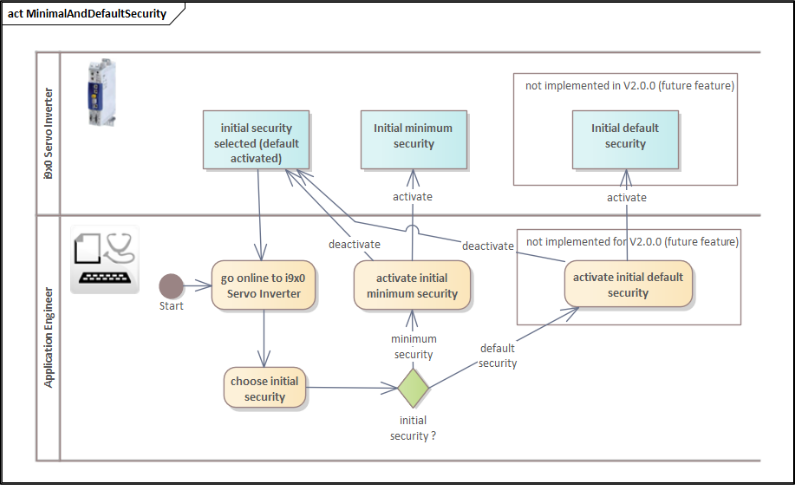
i9x0 Security Configuration
The setting is made via the following parameter in the parameter set.
|
Address |
Name |
Info |
|
|---|---|---|---|
|
0x5905:010 |
Security user settings: Status device security |
|
|
|
Bit 0 |
Initial security selected |
This bit is set by default. | |
| Bit 1 | Initial Minimum security | In version 2.0, the i950 will automatically switch to "Minimum Security" mode in the factory new state. | |
| Bit 2 |
Initial Default security |
This bit is created for use in future firmware versions, but is currently not assigned. | |
| Bit 3 | reserved, shall be zero | ||
| Bit 4 | Customer specific security | ||
|
Bit 5 Bit 6 Bit 7 |
reserved, shall be zero | ||
| Bit 8 | Access Control active | ||
| Bit 9 | Firewall active | ||
| Bit 10 | Secure Communication enforced | ||
| Bit 11 | Secure Communication enforced | ||
| Bit 12 | Secure Bootloader active | ||
Behavior with minimum security
This selection option and function is included in firmware version V2.0.0 and will be selected by default.
Cybersecurity distinguishes between its own device protection and customer-selectable features. The device protection functions are included as standard and cannot be deactivated. This is in contrast to the customer-selectable features. These are all deactivated in the initial minimal security setting and can subsequently be reactivated individually by the customer (opt-in approach).
The following settings are set for initial minimum security:
-
Deactivated Firewall
-
Deactivated Encrypted Communication
-
Deactivated User Management
-
Deactivated Data Encryption
Behavior with default security
This selection option and function is not included in firmware version V2.0 and will be implemented in future versions.
Cybersecurity distinguishes between its own device protection and customer-selectable features. The device protection functions are included as standard and cannot be deactivated. This is in contrast to the customer-selectable features. These are all activated in the initial default security setting and can subsequently be deactivated individually by the customer (opt-out approach).