i9x0.WebVisu.Activation
The i9x0.WebVisu is only available with the customer-specific type of the i950 Servo Inverter and from the firmware version 01.07.04 on.
-
Be sure to use a target device in the PLC Designer with the name of the i9x0 and the added note “Extended for customer specific devices only”.
* The product ID is I95xxxxxxxxxxWxxxx or I95xxxxxxxxxxVxxxx.
* The parameter 0x2012:007 has the value 'enabled [1]‘.
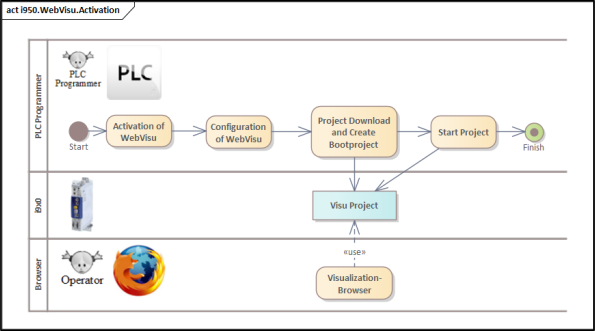
Activity Diagram
To activate WebVisu, please follow these steps:
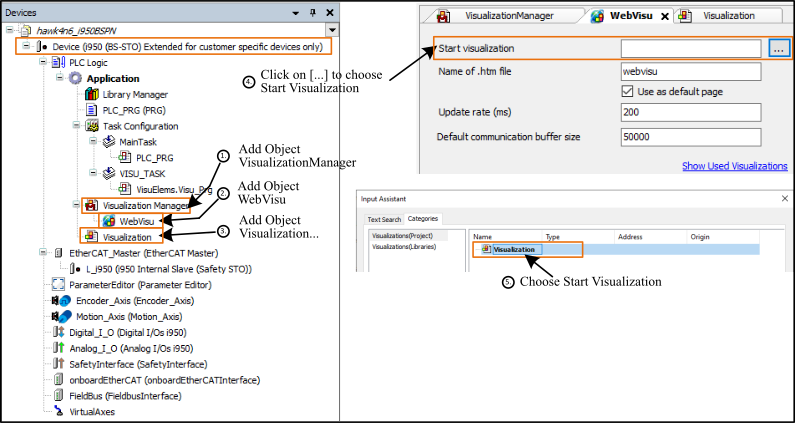
Activation of the WebVisu in the PLC Designer
1. After adding a i950 device with the “Extended for customer specific devices only" extension, add an object called “VisualizationManager” as a child of the application. During this procedure, activate the “VisuSymbols (System)” symbol library.
2. Add an object called “WebVisu” as a child of the VisualizationManager.
3. Add an object called “Visualization...” as a child of the application.
4. Open the tab for WebVisu and start the input assistant for the start visualization by clicking the [...] button.
5. Select Start Visualization.
Afterwards, build and download the project to the i950. Finish by creating the boot application.
-
Please check the firewall settings, and if necessary open the port 8080 via the application ports.
The visualization can be shown in a browser of a panel when connecting to the IP address, the port 8080 and the name of the htm file (shown in the WebVisu-Tab), e.g.:
http://192.168.10.102:8080/webvisu.htm