i9x0.SSHServer
Accessing the device via SSH has been available since FW version 01.00.00.
This functionality allows you to access the file system via Ethernet. A SSH key is needed to access the device. Lenze Support generates this key only in special support cases and it should not be used during normal operation.
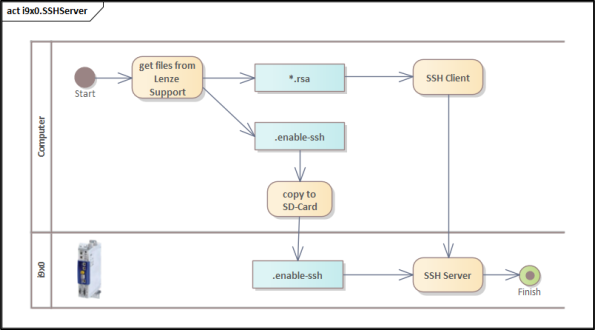
Activity Diagram
You will receive two files from Lenze Support.
-
.enable-ssh
-
*.rsa
Both files are personalized for the requester and must be protected accordingly. Do not share or publish these files.
Physical and logical access
-
Connector X16 (Engineering Access)
-
Used port for SSH is 22/tcp
i9x0.SSHServer: Enable SSH-Access
In order to obtain SSH access to the i9x0, the following steps must be completed.
-
SSH access is not possible in the delivery state. This key is generated by Lenze Support only in special support cases and should not be used during normal operation.
-
The .enable-ssh file must be copied to the i9x0’s SD card. It should be ensured that the leading point (hidden file in Linux) is included in the file name. The location for the file is directly in the root directory of the SD card.
The following is a description of how to access the i9x0 with a Linux Ubuntu system. Other clients may have a different procedure.
-
Copy the *.rsa file to the /home/<user>/.ssh/ directory.
-
If the directory does not yet exist, it must be created and provided with appropriate rights:
-
mkdir -p ~/.ssh
-
chmod 0700 ~/.ssh
-
-
The access rights to the file must be adjusted accordingly:
-
chmod 0600 <*.rsa>
-
-
The key must be added to the ssh:
-
ssh-add “~/.ssh/<*.rsa>”
-
-
After that, the SSH access to the controller can be created with the following command:
-
ssh root@<ip>
-
i9x0.SSHServer: Disable SSH-Access
Remove the .enable-ssh file from i9x0’s SD Card.
i9x0.SSHServer: Combination of SSH and SFTP via Ports and Networks
The following table shows the possibility of using SSH and SFTP via the existing ports and via the possible networks. This representation refers to a disabled i9x0.Firewall.
Combination of SSH and SFTP via different ports and networks:
|
Device with Interface |
Port |
with .enable-ssh file |
without .enable-ssh file |
|---|---|---|---|
|
Engineering-port X16 onboard |
22 |
þ SSH þ SFTP |
oSSH oSFTP |
|
47877 |
þ SSH þ SFTP |
oSSH þ SFTP |
|
|
PROFINET Device X256/X257 in E1 |
22 |
þ SSH þ SFTP |
oSSH oSFTP |
|
47877 |
þ SSH þ SFTP |
oSSH oSFTP |
|
|
EthernetIP Adapter x266/x267 in E1 |
22 |
þ SSH þ SFTP |
oSSH oSFTP |
|
47877 |
þ SSH þ SFTP |
oSSH þ SFTP |
|
|
EoE via onboard EtherCAT X236/X237 onboard
|
22 |
þ SSH þ SFTP |
oSSH oSFTP |
|
47877 |
þ SSH þ SFTP |
oSSH þ SFTP |