i9x0.CertificateStore.viaPLCDesigner
The i9x0 Servo Inverter from version 2.0.0 on, has its own Certificate Store. This can be managed and controlled via the PLC Designer.
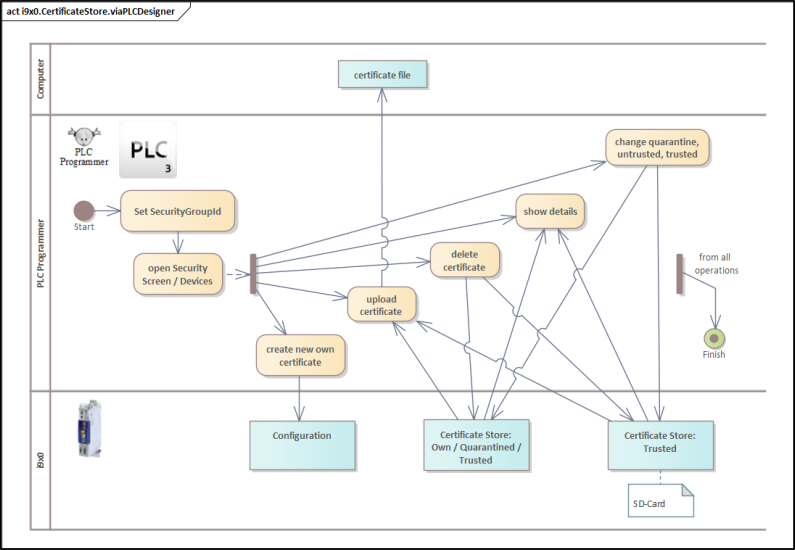
Activity Diagram
To do this, open the Security Screen with the "Devices" tab.
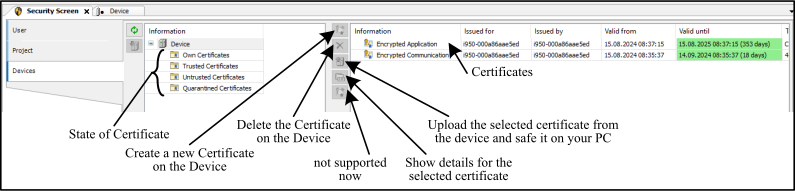
Security Screen Devices
In the middle window, the respective status of the certificates can be selected under Information. The following four status are available:
-
Own Certificates:
Own certificates of the i9x0
-
Trusted Certificates:
Certificates from trusted communication partners
-
Untrusted Certificates:
Certificates from untrusted communication partners
-
Quarantined Certificates:
Certificates from communication partners who are in quarantine
To change a certificate's status, simply drag and drop it from the right window to the desired status. The following certificate usage options are available:
Create a new certificate on the i9x0
For this purpose, an existing own certificate or a placeholder, i.e. a certificate with the note (not available) must be selected and the button must be pressed. Subsequently, the desired key length and validity can be specified and the certificate can be created.
-
If a certificate A exists and another certificate B is created, the certificate with the longer valid time is used, even if it is certificate A. If the ‘Own Certificate’ area is called up, both A and B certificates are displayed. If you want to replace certificate A with certificate B, you should first delete certificate A and then create certificate B.
Delete the Certificate on the Device
To do this, select a certificate and press the button. It is important that the certificate is deleted and not moved to "Untrusted Certificates". To do this, select a certificate and press the button. It is important that the certificate is deleted and not moved to ’Untrusted Certificates’.
Upload the selected certificate from the device and safe it on your PC
For this purpose, a certificate must be selected and the button must be pressed. It is important that the respective certificates are loaded onto the PC with the public key. The private key remains on the i9x0 servo inverter.
Show details for the selected certificate
For this purpose, a certificate must be selected and the button must be pressed. A window opens where the details of the certificate can be viewed.
Initial Certificates
When the i9x0 boots, some certificates will be generated automatically. This happens for the first time when these devices are produced in manufacturing. Since no time has been set in the i9x0 for this production step and since there is no communication via an NTP connection, the certificates are created with a initial time stamp far in the past. After the devices are sent to the customer, they are switched on again.
When logging into the i9x0 with PLC Designer, a pop up dialog informs that some certificates are expired. On the security screen, the expired (validity date in the past) or inactive (empty information field) certificates can be checked. Expired or inactive certificates can be deleted. New certificates will either be generated automatically during the next boot or can be created manually via the security screen.