i9x0.Firewall
The functionality of the i9x0 Firewall is available from versions 2.0.0 on.
The »PLC Designer« is used to put the i9x0 Firewall into operation and to parameterize it. A general procedure can be found in the following picture.
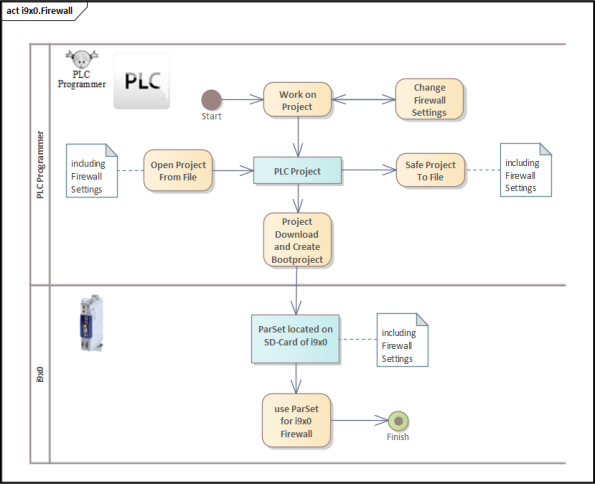
Activity Diagram
i9x0.Firewall: Configuration
This chapter describes the configuration regarding parameterization of the i9x0 Firewall.
i9x0 Firewall Configuration Data:
The configuration data of the i9x0 Firewall is stored in the parameter set of the i9x0 . The individual setting options are mapped to individual indexes, subindices, bit coding or enumerations. The index range extends from 0x5910 to 0x5913. This parameter set can be configured PLC Designer and is part of the PLC Designer project. Likewise, the parameter set is part of the project, which is transferred to the i9x0. The parameter set is located on the SD card of the i9x0.
During commissioning, this parameter set must be protected from unauthorized modification by additional measures. When commissioning a machine, it is therefore necessary that the individual communication channels are considered and evaluated from a cyber security point of view. Examples include: (a) Change with the EASY Starter (b) Change via SSH (c) Change SFTP (d) etc.. Furthermore, the SD card must be protected from removal, as the format on it can be read and changed with the help of any SD card reader. It is therefore recommended to the operator to mechanically protect the control cabinet from unauthorized use.
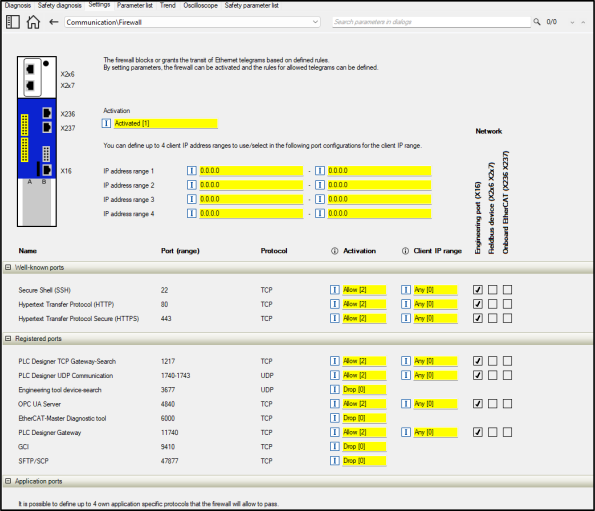
Settings Dialog for the i9x0.Firewall
Parameter for the i9x0 Firewall:
The parameter concept contains four indexes:
-
0x5910: Basic parameters for the i9x0 Firewall, which apply generically
-
0x5911: Well-Known Port Settings (Ports 1 bis 1.023)
-
0x5912: Registered Port Settings (Ports 1.024 – 49.151)
-
0x5913: Application Port Settings
All four areas are described below.
Basic parameters for the i9x0 Firewall 0x5910:
In the default settings, the firewall is deactivated. This is necessary for compatibility reasons with older versions. The activation is possible with parameter 0x5910:001.
Parameter for activating the i9x0 Firewall
|
Address |
Name |
Info |
|
|---|---|---|---|
|
0x5910:001 |
Firewall: Firewall activation |
|
|
|
0 |
Deactivated |
i9x0 Firewall is deactivated. |
|
|
1 |
Activated |
i9x0 Firewall is activated. |
|
The following setting option affects the IP clients that want to access the i9x0. The IP address ranges of the clients are specified here.
Example:
If 0x5910:002=192.168.5.100 and 0x5910:003=192.168.5.120 are parameterized, the range of IP addresses is allowed, e.g. a client with the IP address of 192.168.5.110 may access, but a client with the IP address of 192.168.5.90 or 192.168.5.130 may not. It is also possible to select the same start and end address to allow only a single IP address. Four IP ranges are offered in order to be able to set the IP clients on the different networks separately.
Parameter for the IP Client Addresses:
|
Address |
Name |
Info |
|---|---|---|
|
0x5910:002 |
Firewall IP Range: IP Range Start |
Start of IP Range for the IP Clients |
|
0x5910:003 |
Firewall IP Range: IP Range End |
End of IP Range for the IP Clients |
Please remember that, at this point, only the limits of the IP address ranges of the clients are set. The selection and activation takes place for the individual protocols. These IP addresses apply to all protocols and are therefore generic.
-
Setting the IP ranges of clients only affects the engineering port and the EoE network. Clients on the fieldbus are not considered in terms of their IP addresses. Furthermore, changes to the parameters for the IP ranges only affect new sessions and not existing ones.
Parameters for the Well-Known Port Settings (Port 1 – 1,023) 0x5911:
The firewall settings are stored in the device parameter set. Below the index is the range of subindices. The subindex range is divided into blocks of 10 subindices each. Each block contains the parameters for each possible protocol. There are three setting options for each protocol (other subindices are reserved):
|
Address |
Name |
Info |
|
|---|---|---|---|
|
0x5911:xx1 |
Firewall <protocol>: Network |
|
|
|
0 |
Engineering Port |
Engineering Port via X16 |
|
|
1 |
Fieldbus slave |
Fieldbus slave via Profinet Device X256/X257 or Ethernet/IP Adapter X266/X267 |
|
|
4 |
Onboard EtherCAT (EoE) |
EoE (Ethernet over EtherCAT) via onboard X236/X237 |
|
|
0x5911:xx2 |
Firewall <protocol>: Client IP Range |
|
|
|
0 |
Any |
All Client IP Addresses are allowed. |
|
|
1 |
IP Range 1 |
IP Range 1 defined in 0x5910:002 and 0x5910:003. |
|
|
2 |
IP Range 2 |
IP Range 2 defined in 0x5910:004 and 0x5910:005. |
|
|
3 |
IP Range 3 |
IP Range 3 defined in 0x5910:006 and 0x5910:007. |
|
|
4 |
IP Range 4 |
IP Range 4 defined in 0x5910:008 and 0x5910:009. |
|
|
0x5911:xx3 |
Firewall <protocol>: Activation |
|
|
|
0 |
Drop |
Deny Connection without notifying the Sender. |
|
|
1 |
Reject |
Deny Connection with notifying the Sender. |
|
|
2 |
Allow |
Allow Connection |
|
As mentioned above, these choices are available for each protocol.
Parameters for the Registered Port Settings (Ports 1,024 – 49,151) 0x5912:
The range of subindices is divided into blocks of ten. Each block contains the parameters for one possible protocol. There are three setting options for each protocol that correspond to the settings of the well-known ports.
Parameters for the Application Port Settings (Ports 49,152 – 65,535) 0x5913:
In contrast to the first mentioned ports, it is not possible to perform a factory default setting for the application ports. The reason lies in the dynamic use of e.g. sockets in the IEC application. This may make it necessary to open additional ports in the firewall. This is exactly where the application ports aim.
The special feature here is that the protocols required by the ports are unknown and defined only by the application. Further setting options are necessary for this purpose, which are explained below.. These setting options are additional, e.g. each protocol still contains the three subindices for Network, Client IP Range and Activation.
In addition, there are four additional parameters for each application port:
|
Address |
Name |
Info |
|
|---|---|---|---|
|
0x5913:xx7 |
Firewall: Protocol Type |
|
|
|
0 |
None |
|
|
|
1 |
TCP |
|
|
|
2 |
UDP |
|
|
|
3 |
TCP&UDP |
|
|
|
0x5913:xx8 |
Firewall: Port Range Start |
Start Port Address |
|
|
0x5913:xx9 |
Firewall: Port Range End |
End Port Address |
|
|
0x5913:x10 |
Firewall: Protocol Name |
Help note for the protocol name |
|
With these parameters, the user can open an application port with these parameters:
0x5913:x10 Protocol Name
This parameter is only available to give the firewall rule a name. The customer can assign a name, which is stored in the parameter set and displayed on the tool's interface. This name is not relevant to the actual function.
0x5913:xx8 Port Range Start and 0x5910:xx9 Port Range End
These two parameters can be used to set the port range of the firewall rule. In special cases where start and end are the same, only a single port is addressed. By default, the port range 49,152 to 65,535 is set here. This is the range where customers should place their ports. However, the value range of these parameters is possible from 1 to 65,535. This means that, by adjusting the parameters accordingly, values in the range of the well-known or registered ports are also possible. Only port 0 is prohibited and is outside the addressable range.
It is possible that the customer selects a port for the application ports, that is already listed under well-known or registered ports. If the rules for the application port and well-known or registered ports contradict each other, the rule for well-known or registered ports leads.
0x5913:xx7 Protocol Type
This parameter can be used to set the log type of the rule. The following settings are offered:
-
None
The firewall rule does not refer to any protocol and is therefore inactive.
-
TCP
The firewall rule applies to TCP protocols.
-
UDP
The firewall rule applies to UDP protocols.
-
TCP&UDP
The firewall rule applies to both UDP and TCP protocols.
i9x0.Firewall: Good to know …
This chapter discusses some topics that are relevant for the i9x0 firewall.
Validity of i9x0 Firewall parameters:
The prerequisite is an i9x0 with an executable application. For this purpose, a boot application must be created. Restart the i9x0. With this configuration, it is possible to describe any parameter of the i9x0 Firewall and it is effective immediately. This can be ideally used to test firewall settings. These changes can be saved using the command "Save parameter sets..." so that they are available again after a restart.
Handling IP ranges
The i9x0 checks the IP range for admissibility in the settings. Among other things, the rule that the upper value must be greater than the lower value is checked. As a result, the upper value must be entered first and, followed by the lower value..
Exclude from the i9x0:
It is possible to deactivate the currently used protocol and the currently used communication channel and thus exclude yourself from access. There are three workarounds that can be used.
-
Connect via a different communication channel or protocol and reopen the previously closed port.
-
Connect via a different communication channel or protocol and deactivate the complete i9x0 Firewall.
-
Remove the SD card and delete the parameter set regarding the project and reinstall it.
Note: The parameter set that contains the parameters of the firewall is located on the SD card under /plc/prg/PlcParameterSet/PLC_0_0.pprm.
Handling of the parameter set:
Since the i9x0 Firewall parameters are part of the parameter set, they are subject to the same mechanisms that apply to the parameter set itself. This means that they included in both the PLC Designer project and the Application Loader Package. They are displayed in difference lists and can also be used and changed by the EASY Starter if it has passed authentication for the i9x0.
Philosophy of Default Assignment
The philosophy for the default assignment of the i9x0 Firewall parameters is as follows: Rules for the ports:
-
By default, the i9x0 Firewall is deactivated and must be activated.
-
In general, all ports are closed by default and must be opened.
-
An exception are the ports for a PLC Designer at the interface of the engineering port.
-
An exception are the ports that are required within the production for the production of the components.
For more information about the ports with deactivated firewall and activated firewall with default parameter i9x0.Firewall:PortList
Prioritization of i9x0 Firewall Rules:
The rules of the i9x0 Firewall are applied as follows:
-
All ports are closed.
-
The ports in the Well-Known area are opened according to the settings.
-
The ports in the Registered area are opened according to the settings.
-
The ports in the Application area are opened according to the settings.
-
If the settings of the first two areas contradict each other with the application area, the rule of the first two areas counts.
Using http via Port 80 or via Port 8080
Port tcp/80 on the i950 is intended for http communication in order to access the Free and Open Source Software (FOSS) list. This port is active by default and can be deactivated via the firewall for further hardening.
Port tcp/8080 on the i950 Servo Inverter is only intended for the extended version with integrated WebVisu. This port is deactivated by default and must be opened for use via the firewall using the application parameters 0x5913.