PLCDesigner.PasswordManager
This chapter describes the functionality of the Password Manager for the »PLC Designer«. This means that all the properties described here apply to the »PLC Designer« as a program and not to the active open project. An overview is shown in the following figure.
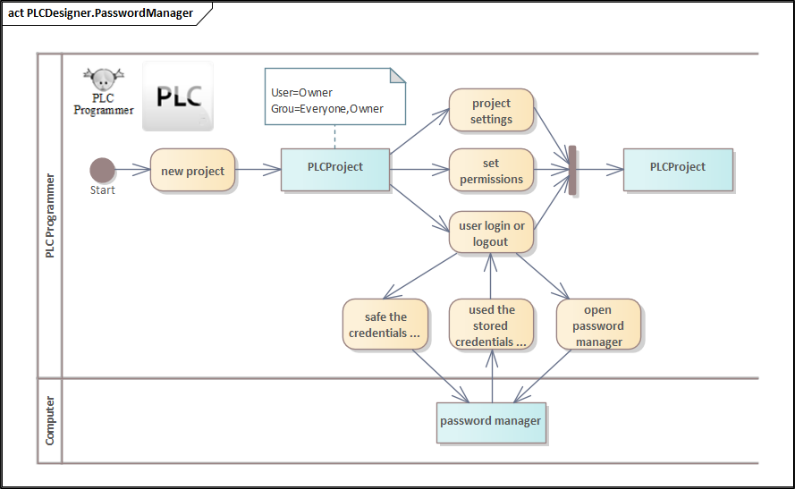
Activity Diagram
The following is a brief description of the respective actions. For more details, refer to the documentation of the »PLC Designer«.
Safe the Credentials locally on this Computer
When using it for the first time, the master password must be defined, which is stored and managed locally on the computer. Then the current user and his password can be stored via the function 'Safe the credentials locally on this computer'.
-
With the help of the master password, all contained passwords can be read out if the username is known.
Use the Stored Credentials for <user>
This function can be used to load passwords stored in the password manager.
Open the Password Manager
With this function, the password manager can be started. All locally stored users are displayed and can be removed from the password manager. Furthermore, the master password can be changed.
Forgot the Master Password
The Password Manager is secured with a master password, which is assigned by the user. If this master password has been forgotten, the entire password manager must be reset.
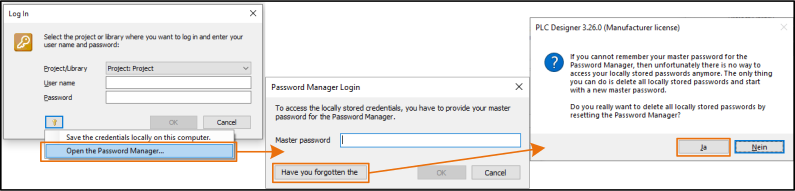
Forgotten Password
This can be done by opening the Password Manager with the following selection of the "Have you forgotten the" button.