PLCDesigner.Project.Signature.WithCertificate
This feature uses a key from a certificate to sign the PLC project, allowing the project creator to send the project to a second person and verify its origin.
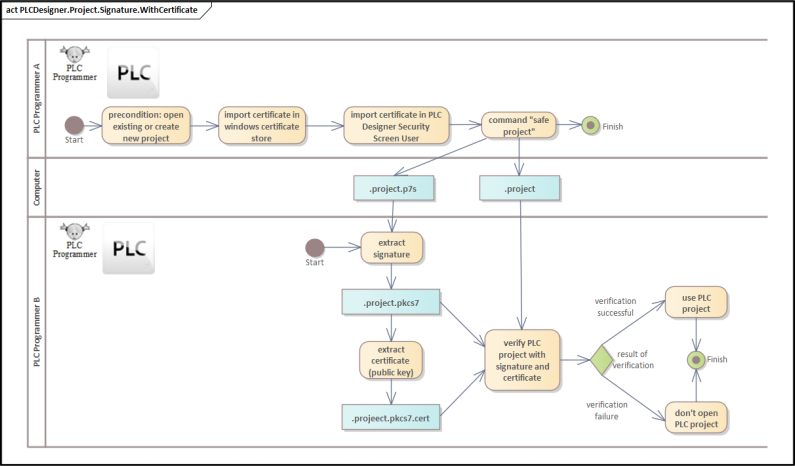
Activity Diagram
To sign a PLC project, select a certificate in the Digital Signature area of the Security screen in the User area of the PLC Designer. This certificate must contain a private key. Additionally, select the option "Enforce signing of project files."
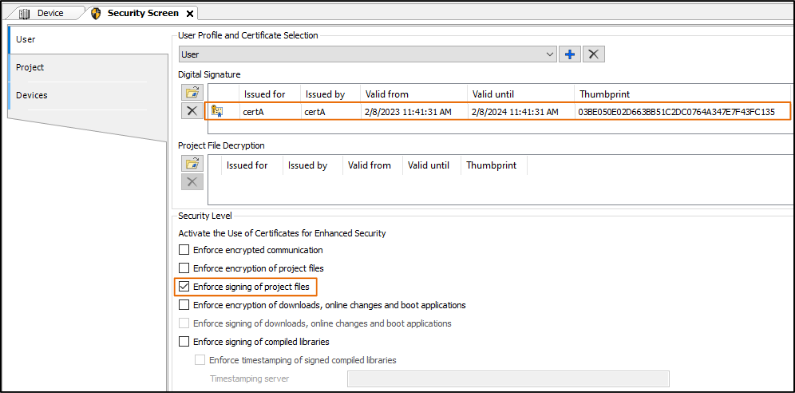
Enforce signing of project files
This creates an additional file with the extension *.p7s in the project directory. The project can now be handed over to a second person. That person can then check the signature.
When the project is opened in the »PLC Designer«, the signature is checked. It is invalid because the project has been changed, a warning is issued.
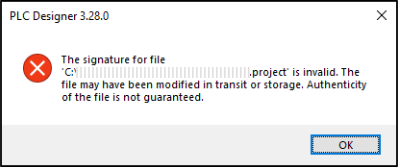
Validate Signature
There are several methods to additionally verify this signature. The following example describes a procedure in Linux with the help of openssl. In this example, the »PLC Designer« project "plc.project" and the signature file "plc.project.p7s" are available.
-
First, the pkcs7 signature is generated from the p7s file.
$ openssl pkcs7 -inform der -in plc.project.p7s -out plc.project.pkcs7
-
In a second step, the certificate is extracted from the p7s file.
$ openssl pkcs7 -print_certs -in plc.project.pkcs7 -out plc.project.pkcs7.cert
-
Finally, the file can be verified.
$ openssl smime -verify -binary -inform PEM -in plc.project.pkcs7 -content plc.project -certfile plc.project.pkcs7.cert -nointern -noverify > /dev/null
-
The result can be ‘Verification successful’ or ‘Verification failure’.
-
This function only applies to the base project file "*.project". When saving the PLC project, additional data is stored. For example there,are xml files for node sets for the OPC-UA model. This function does not sign these additional files, so the user must protect them organisationally if necessary.
-
A notice:
The Certificate for Signing remains selected even if the PLC Designer project is closed and the PLC Designer is restarted. It must therefore be replaced by the appropriate certificate or deactivated if a new project is to be opened.