PLCDesigner.Project.Integrity
This functionality generates and verifies a integrity value for the PLC project. To check the integrity of the PLC project, the PLC project is not saved in plain text, but in a proprietary format. When saving, an integrity value is formed and checked when the project is opened. This function only checks integrity. The proprietary format does not represent encryption or confidentiality.
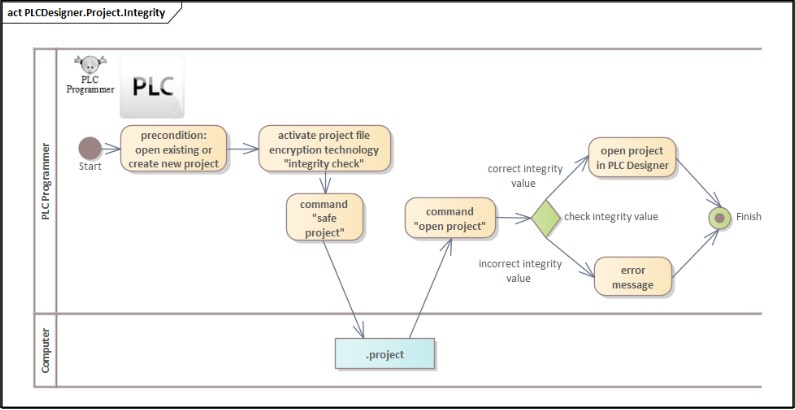
Activity Diagram
This function can be accessed via the »PLC Designer« "project/project settings/ security". If the Project File Encryption Technology is set to "Integrity check" in the Project tab, the function is activated.
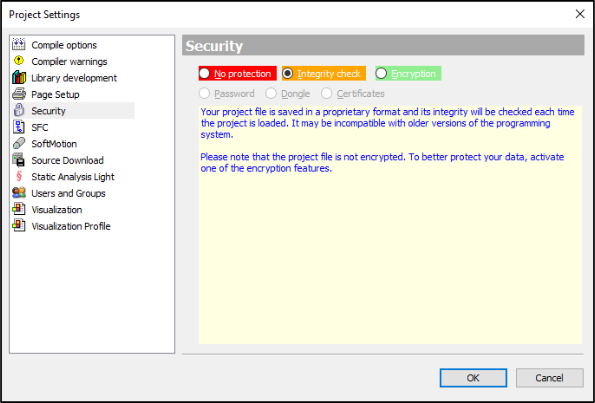
Project Settings
When a PLC project is opened, It is checked for integrity. If the integrity is intact, the project opens without a message. If the integrity is compromised, an error message is displayed and the project does not open.
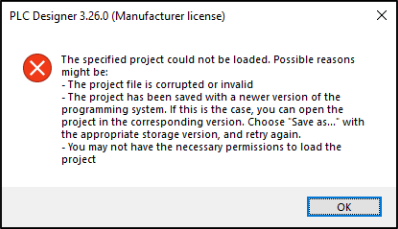
Error Message
-
This function only applies to the base project file "*.project". When saving the PLC project, additional data is stored. For example, there are xml files for node sets for the OPC-UA model. This function does not protect the integrity of these additional files, so users must protect them organizationally if necessary.