Functional description
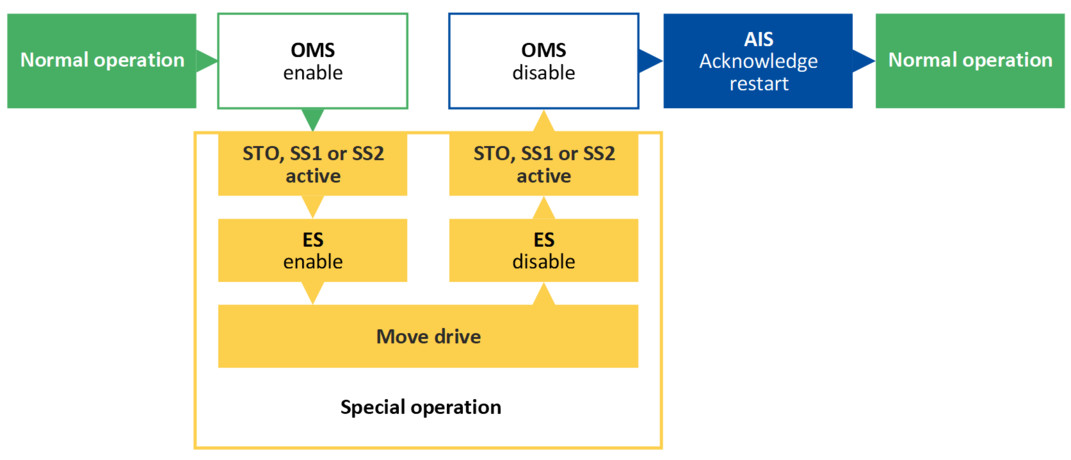
Fig. 1: OMS function
Sequence of the special operation
1.
Activate OMS via the configured trigger source.
The stop function configured for OMS is activated.
2.
Activate the enable switch ES via the configured trigger source.
The stop function is now overruled.
3.
The drive can be moved with the configured motion function.
If monitoring functions are activated, the movement is monitored.
4.
When the action is complete, deactivate the ES enable switch.
The drive can no longer be moved.
The stop function configured for OMS is activated.
5.
Deactivate the trigger source for OMS.
The special operation is finished.
6.
The drive waits for the restart to be acknowledged.
7.
Acknowledge the restart via terminal AIS or the safety bus.
The drive changes to normal operation.
Behavior of the function in the event of an error
Activation of OMS via a safe input
–
In case of a wire breakage at the safe input when OMS is activated via a HIGH signal:
–
OMS is deactivated.
–
The drive changes to normal operation. No stop function is triggered.
–
In the event of an error at the safe input (e.g. discrepancy error):
–
OMS is deactivated.
–
The "ERR" LED is blinking.
–
The drive changes to normal operation. No stop function is triggered.
–
Once the error has been corrected and acknowledged, the special operation can be reactivated.
Activation of OMS via the safety bus
–
In case of failure of safe communication:
–
OMS is deactivated.
–
The drive changes to normal operation. No stop function is triggered.
Error when executing the movement function
–
When a parameterized monitoring responds:
–
The parameterized stop function for special operation is triggered.
–
The drive does not change to normal operation.