Travel profiles
For a maximum of 15 travel profiles, values for speed, acceleration, deceleration and jerk can be configured. The travel profiles are bit-coded.
Settings in »EASY Starter«:
–
Settings tab - Parameters dialog Profiles
|
Select profile
 0x5030:010 |
Profile parameters
|
|||||||
|
Bit 19
|
Bit 18
|
Bit 17
|
Bit 16
|
Profile
|
Profile speed
|
Profile acceleration
|
Profile deceleration
|
Profile jerk
|
|
FALSE
|
FALSE
|
FALSE
|
FALSE
|
No profile selected
|
||||
|
FALSE
|
FALSE
|
FALSE
|
TRUE
|
Profile 1
|
||||
|
FALSE
|
FALSE
|
TRUE
|
FALSE
|
Profile 2
|
0x5031:034
|
0x5031:035
|
0x5031:036
|
0x5031:037
|
|
FALSE
|
FALSE
|
TRUE
|
TRUE
|
Profile 3
|
0x5031:045
|
0x5031:046
|
0x5031:047
|
0x5031:048
|
|
FALSE
|
TRUE
|
FALSE
|
FALSE
|
Profile 4
|
0x5031:056
|
0x5031:057
|
0x5031:058
|
0x5031:059
|
|
FALSE
|
TRUE
|
FALSE
|
TRUE
|
Profile 5
|
0x5031:067
|
0x5031:068
|
0x5031:069
|
0x5031:070
|
|
FALSE
|
TRUE
|
TRUE
|
FALSE
|
Profile 6
|
0x5031:078
|
0x5031:079
|
0x5031:080
|
0x5031:081
|
|
FALSE
|
TRUE
|
TRUE
|
TRUE
|
Profile 7
|
0x5031:089
|
0x5031:090
|
0x5031:091
|
0x5031:092
|
|
TRUE
|
FALSE
|
FALSE
|
FALSE
|
Profile 8
|
0x5031:100
|
0x5031:101
|
0x5031:102
|
0x5031:103
|
|
TRUE
|
FALSE
|
FALSE
|
TRUE
|
Profile 9
|
0x5031:111
|
0x5031:112
|
0x5031:113
|
0x5031:114
|
|
TRUE
|
FALSE
|
TRUE
|
FALSE
|
Profile 10
|
0x5031:122
|
0x5031:123
|
0x5031:124
|
0x5031:125
|
|
TRUE
|
FALSE
|
TRUE
|
TRUE
|
Profile 11
|
0x5031:133
|
0x5031:134
|
0x5031:135
|
0x5031:136
|
|
TRUE
|
FALSE
|
FALSE
|
FALSE
|
Profile 12
|
0x5031:144
|
0x5031:145
|
0x5031:146
|
0x5031:147
|
|
TRUE
|
TRUE
|
FALSE
|
FALSE
|
Profile 13
|
0x5031:155
|
0x5031:156
|
0x5031:157
|
0x5031:158
|
|
TRUE
|
TRUE
|
TRUE
|
FALSE
|
Profile 14
|
0x5031:166
|
0x5031:167
|
0x5031:168
|
0x5031:169
|
|
TRUE
|
TRUE
|
TRUE
|
TRUE
|
Profile 15
|
0x5031:177
|
0x5031:178
|
0x5031:179
|
0x5031:180
|
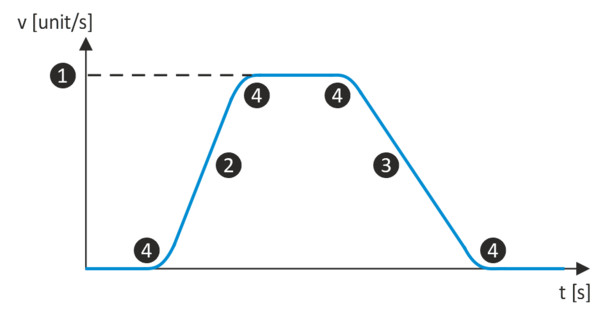
Fig. 1: Travel profile parameter
(1)
Speed
(2)
Acceleration
(3)
Deceleration
(4)
Jerk
|
Symbol
|
Profile parameters
|
|
1
|
Speed profiles 0 ... 15
The maximum velocity used for approaching the target position.
–
The speed profile is dependent on the acceleration or deceleration.
–
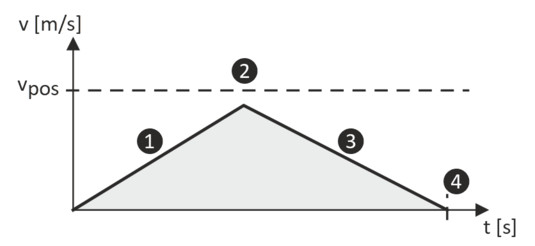
It is possible that the drive does not reach the maximum velocity. In this case, the graph is shown as a triangle instead of a trapezium.
|
|
2
|
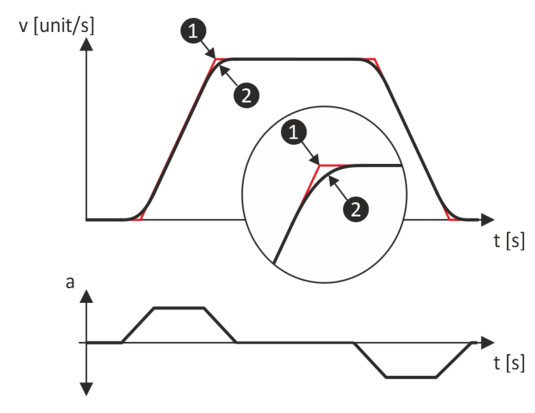
Acceleration profiles 0 ... 15
The acceleration to reach the maximum velocity. A distinction is made between two types of acceleration:
|
|
–
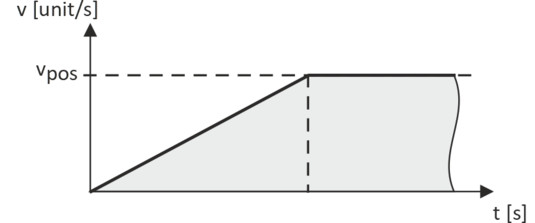
Linearly increasing speed
|
|
|
–
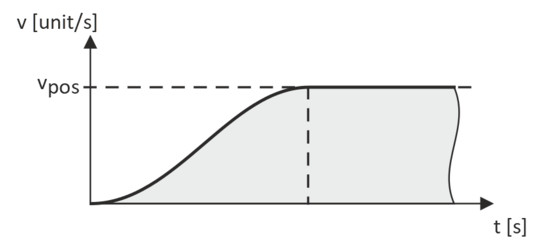
S-shaped increase in speed
|
|
|
3
|
Deceleration profiles 0 ... 15
The deceleration to brake from the maximum velocity to a standstill.
|
|
4
|
Jerk profiles 0 ... 15
Jerk limitation for acceleration or deceleration.
If a jerk limitation is given for a travel profile, acceleration and/or deceleration are executed more smoothly via S-shaped ramps.
–
This protects sensitive machine parts against damage.
–
The S-shaped acceleration and deceleration extend the duration of positioning compared to linear acceleration and deceleration.
|
|
1 Profile without jerk limitation
2 Profile with jerk limitation
|
Parameter