Signal flow
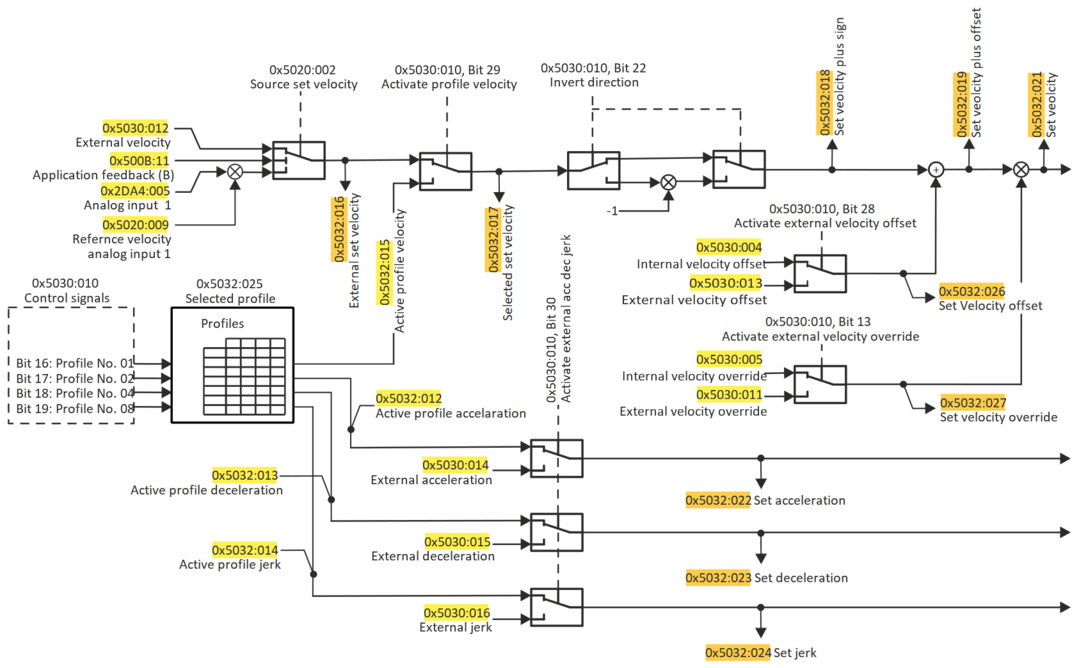
Fig. 1: Signal flow of speed control function
Settings in the »EASY Starter«:
–
Tab Settings - Parameter dialog Signal flow
Relevant parameters of other functions
|
Address
|
Name
|
Default setting
|
Setting range
|
|
Diagnostics of analog input 1: Scaled percent value
|
x.xx % (Read only)
|
||
|
Actual velocity
|
- (Read only)
|
||
|
Reference velocity for analog input 1
|
500.0000
|
0.0000 ... 214748.3647
|
|
|
Internal velocity offset
|
0.0000
|
-214748.3648 ... 214748.3647
|
|
|
Internal velocity override
|
100.00 %
|
0.00 ... 100.00 %
|
|
|
Control signals
|
0x00000000
|
0x00000000 ... 0xFFFFFFFF
|
|
|
External velocity override
|
0.00 %
|
0.00 ... 100.00 %
|
|
|
External velocity
|
0.0000
|
-214748.3648 ... 214748.3647
|
|
|
External velocity offset
|
0.0000
|
-214748.3648 ... 214748.3647
|
|
|
External acceleration
|
0.00
|
0.00 ... 21474836.47
|
|
|
External deceleration
|
0.00
|
0.00 ... 21474836.47
|
|
|
External jerk
|
0.00
|
0.00 ... 21474836.47
|
|
|
Status signals
|
0x00000000
|
0x00000000 ... 0xFFFFFFFF
|
|
|
Active profile: Velocity setpoint
|
- (Read only)
|
||
|
External velocity setpoint
|
- (Read only)
|
||
|
Active set velocity
|
- (Read only)
|
||
|
Set velocity with sign
|
- (Read only)
|
||
|
Velocity setpoint with offset
|
- (Read only)
|
||
|
Velocity setpoint
|
- (Read only)
|
||
|
Acceleration setpoint
|
- (Read only)
|
||
|
Deceleration setpoint
|
- (Read only)
|
||
|
Jerk setpoint
|
- (Read only)
|
||
|
Selected profile
|
- (Read only)
|
||
|
Velocity offset setpoint
|
- (Read only)
|
||
|
Velocity override setpoint
|
- (Read only)
|
||