Interface
The technology interface is operated via the following parameters:
–
Simulation of control signals  0x5040:001 bit 0 ... 7
–
Simulation of status signals 0x5040:101 bit 0
0x5040:101 bit 0|
Bit
|
Function
|
|
0
|
Activates the simulation of the control signals.
The first double word of the control words switches over to manual operation.
|
|
1 ... 7
|
Activates the simulation of the control signals. Selecting the bits triggers switchover to manual operation.
|
|
Bit
|
Function
|
|
0
|
Activates the simulation of the status signals.
All status words are switched over to manual operation.
|
During a switch-over, both the control words and the status words are switched over. Depending on the technology application chosen, the bits of the respective control words and status words are already pre-assigned.
Assignment of control words and status words:
The following illustration shows the basic signal flow within the technology application and the change-over mechanism of the Interface selection parameter.
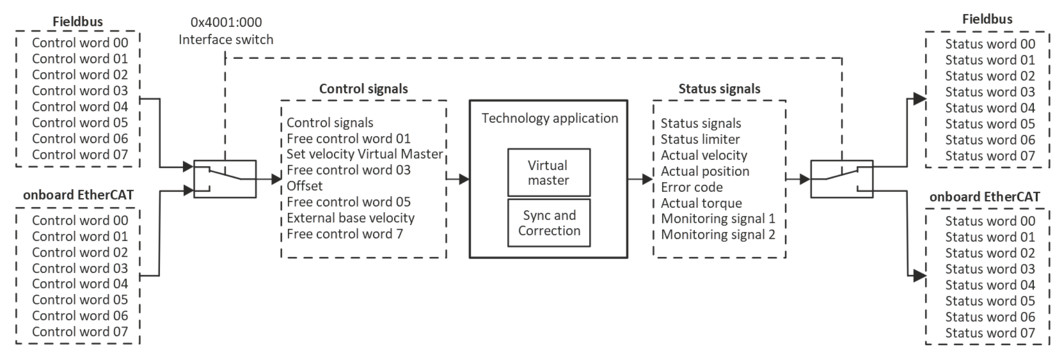
Fig. 1: Signal flow of the technology application
Parameter