Touch probe positioning
In touch probe positioning, the travel profile is executed according to the profile data.
If a touch probe is detected during the positioning process, it is automatically changed to the profile defined in the Profile TP window - upper limit. profile parameter.
If a touch probe is detected during the positioning process, it is automatically changed to the profile defined in the Profile TP window - upper limit. profile parameter.
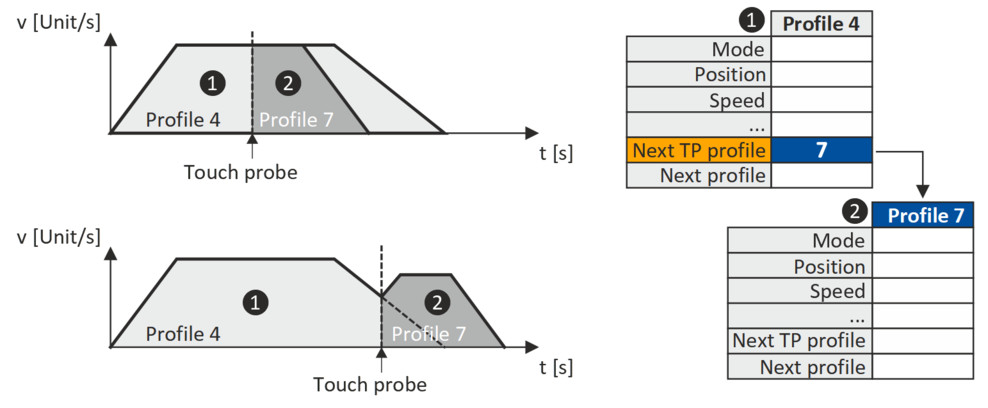
Fig. 1: Touch probe positioning
1
Start travel profile according to the profile data
2
Travel profile from the "touch probe profile" parameter
The profile parameters Profile TP window - lower limit and Profile TP window - upper limit limit the area in which a touch probe can be detected. If both parameters have the value 0, the touch probe detection is activated for the entire travel profile or travel range.
If no touch probe was detected and the travel profile was executed completely, the profile set in the Sequence profile parameter is executed.
If no touch probe was detected and the travel profile was executed completely, the profile set in the Sequence profile parameter is executed.
Notes
–
If the touch probe positioning starts while a profile is executed with maximum speed and a residual path to be travelled is too short for the set deceleration ramp, the target position will be overtravelled.
A reversing motion takes place.
–
Constellations with linking of travel profiles are possible that make it impossible to reverse and reach the target position. A reversing motion of the axis can be prevented by the "Safe direction (SDI)" safety function.
Source for touch probe signal
The following inputs are available for connecting a sensor for touch probe positioning:
–
Digital inputs of the inverter
–
Zero pulse of the position encoder
–
EtherCAT system bus
The sensor source and the edge to be evaluated (rising, falling, both) are selected via the Source TP 1 parameter.  0x5020:011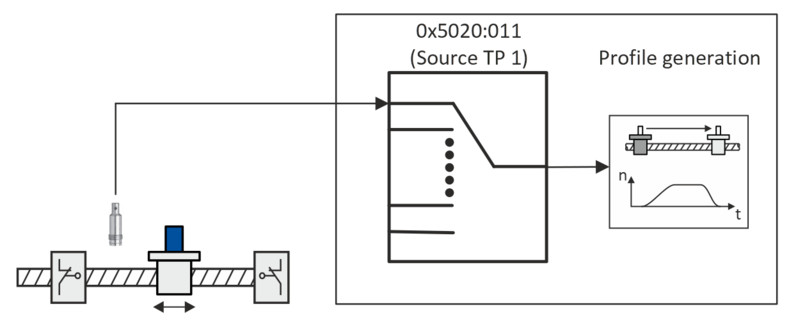
Fig. 2: Selection of "Touch probe sensor"
Parameter