Controller.CertificateStore.HAProxy.Replace Certificate for HA Proxy
To replace the automatically generated certificate, open the Security Screen in the »PLC Designer« and select the "Device" tab.
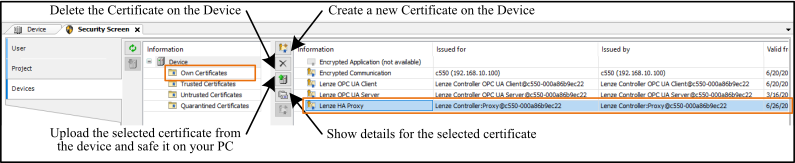
Replace Certificate
Details of this automatic generated certificate can be found in this documentation, (refer to chapter Controller.CertificateStore.HAProxy:Certificate
At this point, the certificate for the "Lenze HA Proxy" can be recreated or deleted. Details on this can also be called up.
-
A certificate is mandatory for a secure https connection. Existing connections are also terminated if the HA Proxy certificate has been deleted and a new one has not yet been generated.
Example:
A web browser is connected via https to the diagnosis visualization of the controller and the user has passed the authentication successfully. With an existing https connection, the certificate is deleted with the »PLC Designer«. As a reaction, the connection is immediately interrupted and an error message appears in the browser "…Client cannot communicate. Socket is not available…". If a new HA proxy certificate is generated using ‘PLC Designer’ and the user clicks the ‘Reload’ button on the browser page, the controller must first be restarted. After the restart, the HTTPS connection is established and the user must authenticate again.
Behavior when HA Proxy certificate is deleted after different reset levels:
|
Reset Level |
Behavior |
|---|---|
|
Manually stop and start the application |
The HA Proxy Certificate is still deleted. |
|
Reset Warm |
The HA Proxy Certificate is still deleted. |
|
Reset Cold |
The HA Proxy Certificate is still deleted. |
|
Reset Origin and create the application again |
The HA Proxy Certificate is still deleted. |
|
Boot the Controller |
The HA Proxy Certificate is automatically generated new. |