Controller.OPCUAServer.GDS.Registration
The OPC UA Server also offers the option of automatically registering at a GDS Server. For this purpose, there is an internal client implementation in the OPC UA Server application that establishes a connection with the GDS Server.
For the automatic registration the GDS Client Mode parameter 0x2471:150 has to be set to 1:Enabled Registration or to 2:Enabled Registration and Pull.
|
Index |
Sub |
Name |
Default |
Note |
|---|---|---|---|---|
|
0x2471 |
150 |
GDS Client Mode |
0: Disabled |
0: Disabled 1: Enabled Registration 2: Enabled Registration and Pull |
|
0x2471 |
156 |
GDS Endpoint URL |
GDS Server address, e.g. opc.tcp://192.168.91.48:48060 |
|
|
0x2471 |
157 |
GDS User |
User name for authentication at GDS Server |
|
|
0x2471 |
158 |
GDS Password |
Password for authentication at GDS Server Use the password dialogue in PLC Designer and EASY Starter for encrypted storage on the device. |
|
|
0x2471 |
159 |
GDS Hostname Check |
0: Enabled |
0: Disabled 1: Enabled |
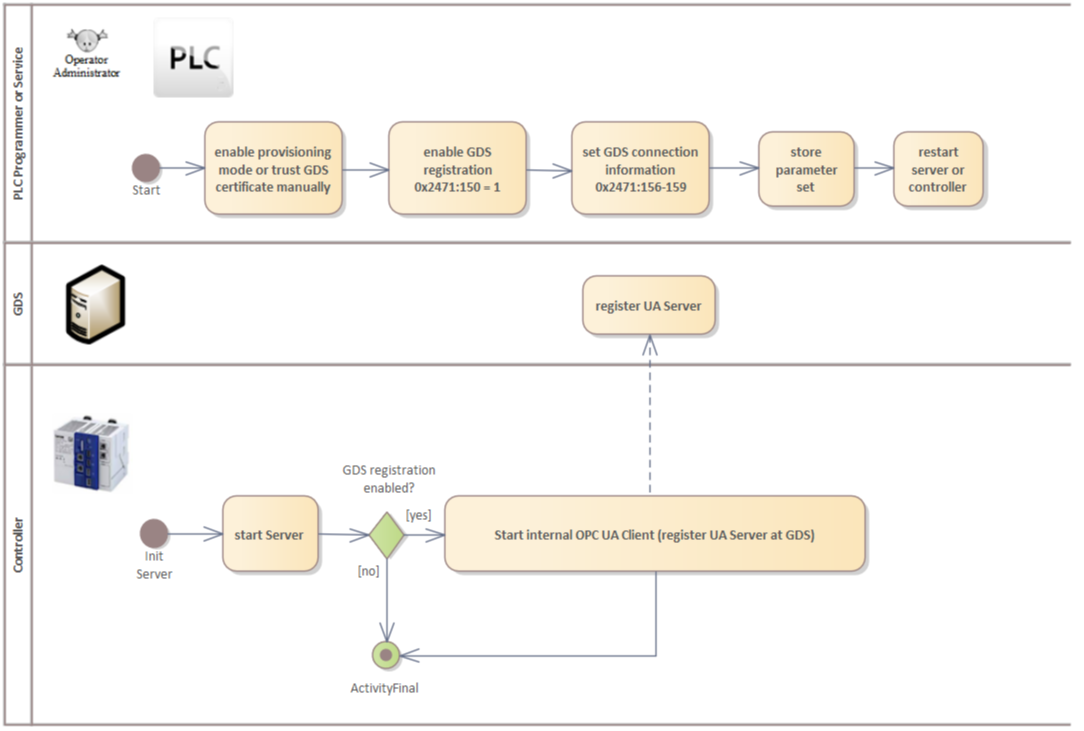
Activity Diagram
It is recommended to use encrypted transport and encrypted storage whenever the Password parameter in 0x2471:158 is changed. To establish an encrypted communication with the target device use either the PLC Designer or the EASY Starter, both require a forced encryption. To edit the parameters, after a secure connection is established, only use the password dialogue on the OPC UA Client Settings tab in the PLC Designer or EASY Starter. If this method is used, the password is only stored in encrypted form on the controller. The password will not be stored in the offline parameter set.
If the parameter is set using other methods, e.g. the "Parameter list” of the tool, the password is also stored unencrypted in the offline parameter set created by the tool.
The certificate check during connection establishment between the internal GDS Client and the GDS Server includes a check of the hostname in the GDS Server certificate and the GDS Endpoint Url in parameter 0x2471:156. Normally this should match, because otherwise an attacker could use any trusted certificate to fake a server's identity.
Nevertheless, the check can be disabled by the parameter 0x2471:159. It´s useful if the IT infrastructure is not able to resolve hostnames via DNS server and an IP address has to be used for the GDS Endpoint Url in parameter 0x2471:156.
From a security point of view, it is not recommended to disable the hostname check.
To grant the GDS access to the OPC UA Server in case of manual or automatic registration or in case of pushing certificates, the GDS must be trusted on OPC UA Server side. This can be done manually with the Security Screen in the PLC Designer or automatically with the provisioning mode.