Components of the system module
The following diagram shows the components of the user management system module. The task of each component and the interaction of the components are explained below.
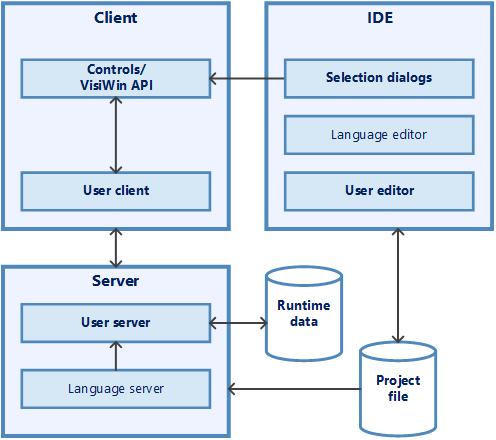
User administration components
Client
The client manages the releases of all control elements of a visualisation application.
User server
The user server is started via the VisiWin server. Its task is to centralise the administration and registration of users for a project. User logon processes are forwarded to the user server. Administrative processes, such as adding a user at runtime, are forwarded from the client applications to the user server, which makes the information persistent in the runtime data(*.RT7). This means that the new administration information is available to all connected clients.
Control elements
The controls design the interface of the visualisation application. Each control element can be assigned either an authorisation level (for level-oriented user administration) or the name of a right (for right-oriented user administration) in the "AuthorisationRight" property at development time. At runtime, the controls are notified by the client when a new user logs in. The controls are activated or deactivated depending on the rights or authorisation level of the user's group.
User editor
The user editor is used to configure the definitions at development time. It is integrated into the development environment. The definitions made here are saved in the project file.
Project file
The project file(*.vw7) contains, among other things, the definitions of the user administration. These are configured in the development environment via the user editor. At runtime, the data is managed by the user server.
Selection dialogues
To support project planning, (Undefined variable: docInfo_DE.Produktname) provides dialogues for the user-friendly selection of definitions from the project file at development time. The Select right dialogue is available for the User administration system module, in which a right can be selected to which the control element is to be bound. This dialogue opens when you select a control in the Designer or in the document outline and click on the  button next to the "AuthorisationRight" property input field in the properties window.
Verwandte Themen:
-
Definitions (User Management system module)
-
Configuration (User Management system module)