Define text parameters
General
-
Create a localizable text as described in chapter Create localizable texts.
-
Click the button
 within a language column to open the Edit Localizable Text dialog.
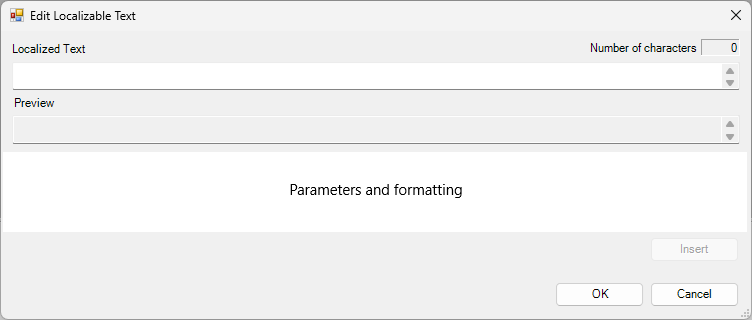
Edit Localizable Text dialog
-
Add or write a text in the Localized Text input field.
-
Place the cursor in the Localized Text input field at the position where the parameter is to be inserted.
-
In the Parameters and formatting area, add a parameter and set the desired formatting.
The exact creation process can be found in the next section. -
Click Insert.
A format block
@...@is inserted into the localized text at the cursor position. The format block is always enclosed by two @ characters; the content depends on the parameter and the formatting. -
Repeat these steps for additional parameters.
Parameters and formatting
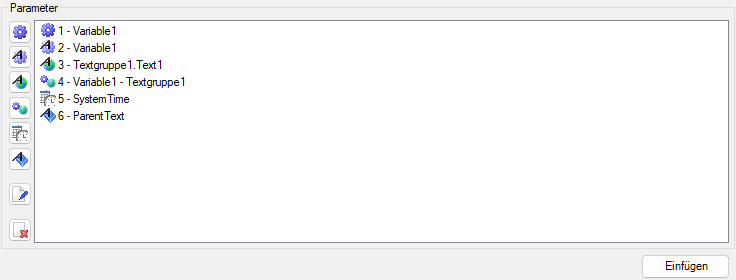
-
Hover the mouse over one of the six buttons at the top. The tooltip displays the type of the parameter. Click the desired button.
A selection dialog for variables and/or localizable texts opens.
-
Select the necessary objects.
The new parameter is added to the list.
-
Select a parameter in the list.
Depending on the type, various controls for formatting the parameter are displayed at the bottom.
-
Optionally, set the
Numerical formatting,Integral digits,Fractional digits, andLeading zeros, or aDate/Time Format. -
The Edit parameter dialog can be opened for the selected parameter using the button
 to make changes to the configuration. The dialog can also be opened by double-clicking a parameter.
-
Select a parameter in the list and click Insert.
The corresponding format block is inserted into the localized text.