Example
The following example shows three typical applications for unit classes:
-
Sensor customisation
-
Language-switchable unit changeover
-
Variable-dependent unit switching in the display using the example of mm/cm/mil/inch
Scenario
The scenario describes the following case:
A distance of 0 ... 1000 mm recorded by the PLC is to be displayed in the application. Two different sensor types with the following output ranges are available:
|
Type |
Measuring range |
Output value range |
|---|---|---|
|
A |
0 ... 2000 mm |
0 ... 32000 |
|
B |
0 ... 100 inch |
0 ... 32000 |
In the application, it should be possible to switch the sensor to be used via a variable-dependent unit class.
In addition, the country-specific representation of the unit (cm/inch) must be understood. A language-dependent unit class is used for this purpose.
As an extension, switching between cm/mm/inch/mil is also shown. Switching takes place via a second variable-dependent unit class.
Definitions
Definitions are required for the example:
-
Two internal variables that each switch the variable-dependent unit classes as control variables
-
The three unit classes mentioned above
-
An external variable from the demo driver that simulates the value to be switched
The block diagram shows the systematic structure of the example:
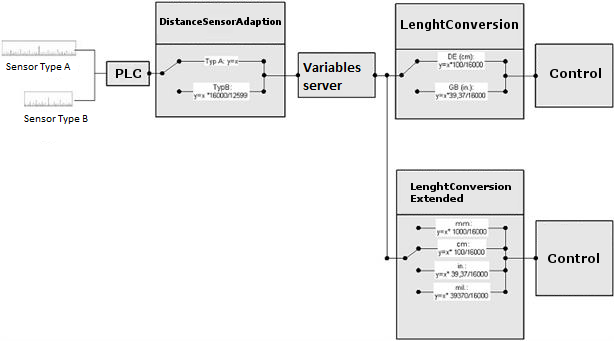
Design
The design of the example includes the individual views and the controls for switching the units.
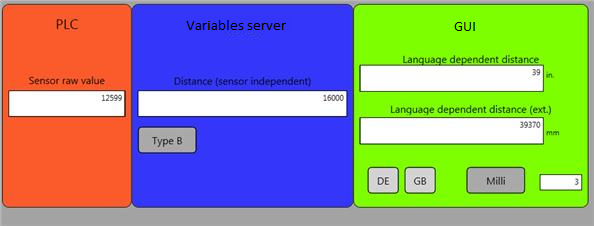
The following elements are required for the design:
-
Four input elements (NumericVarIn) that show the individual stages of the conversions (PLC value, standardised value of the sensor adjustment, language-switched value, value of the variable-dependent conversion cm/mm/inch/mil)
-
Two buttons for language switching
-
Two switches that manipulate the control variables of the variable-dependent unit classes.
Work steps
To simplify matters, the order of the steps to be carried out is arranged in such a way that the definitions and objects can be easily linked together: