Length-controlled operation
After a rising edge (FALSE ä TRUE) at the input xResumeTargetPos the target position (output lrTargetPos ) is approached again.
Example
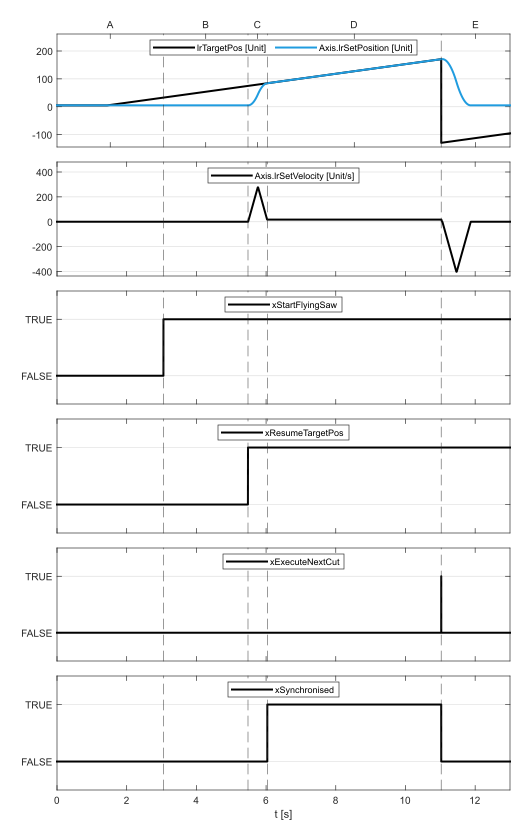
Example: Process "Restore target position" in length-controlled operation
|
No. |
xStartFlying Saw |
xResume TargetPos |
xExecuteNext Cut |
xSynchronised |
Description |
|---|---|---|---|---|---|
|
A |
FALSE |
FALSE |
FALSE |
FALSE |
After a stop, the master axis, and thus the material, is started again. The target position is also moved along. |
|
B |
TRUE |
FALSE |
FALSE |
FALSE |
The technology module is switched to the "SAW_IN_PROCESS" state via the xStartFlyingSaw input and the parameter eStartMode = 0. |
|
C |
TRUE |
TRUE |
FALSE |
FALSE |
The FALSE ä TRUE edge at the input xResumeTargetPos synchronizes the slave axis to the restored target position. |
|
D |
TRUE |
TRUE |
FALSE |
TRUE |
The slave axis moves synchronously to the target position lrTargetPos . |
|
E |
TRUE |
TRUE |
FALSE ä TRUE |
FALSE |
With the command "Next cut" ( xExecuteNextCut ) the target position jumps by the cutting length lrCuttingLength = S1 added with the two gap widths ( lrGap + lrGap ) in the negative direction. The slave axis smoothes out the jump of the target position lrTargetPos via the profile generator with the defined parameters lrSyncVel , lrSyncAcc and lrSyncDec . |