Hardware abstraction
Control configuration through abstraction of hardware components and their software mappings (AxisREF)
Note 1:
The hardware abstraction function is supported from PLC Designer 4.0.0.32331!
Note 2:
The FUNCTIONS display is the DEFAULT setting as of PLCD version 4.0.0.32331
Note 3:
Advantage of hardware abstraction: The programmer does not need to know any hardware at the time of programming
Change the default setting for inserting the AxisREF as a "Function":
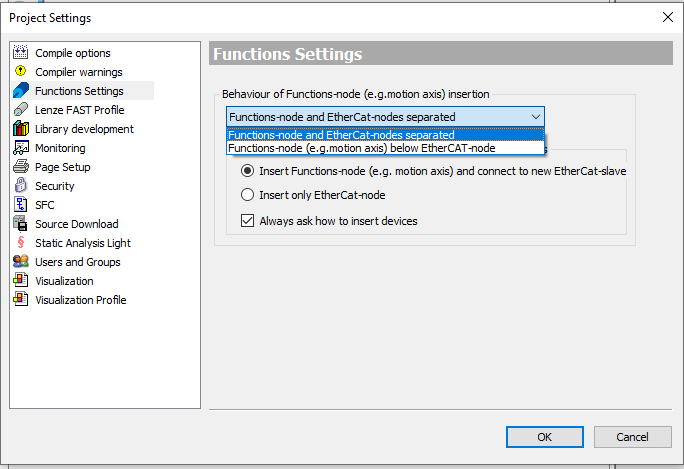
Changing the DEFAULT setting under "Projects" "Project Settings"
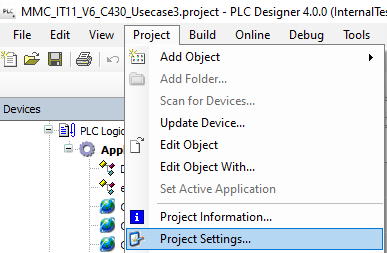
„Functions Settings“
Insert a new EtherCat node:
-
Step 1: Right-click on EtherCat master: AddDevice -select the EtherCat node
-
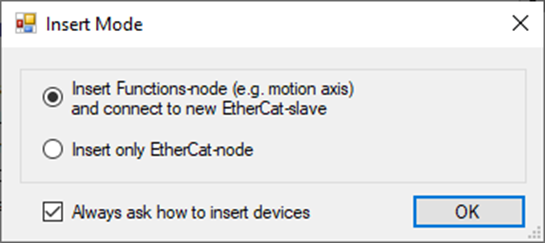
Step 2: A dialog for inserting the EtherCat and Functions (AxisREF) nodes appears.
-
Selection options:
-
Inserting EtherCat and Functions nodes
-
Insert only one EtherCat node, because the Functions node is already inserted before
-
Variant 1: „Insert only EtherCat-node”
-
In this case, only the EtherCat node is inserted:
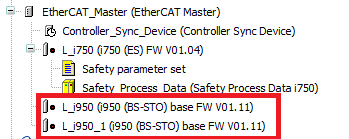
NOTE: There is no longer an AxisREF node under the EtherCat node!
-
No AxisREF is inserted under the "Functions" node! This function must be added manually or already exists (see below).
Variant 2: „Insert Functions-node (e.g. motion axis) and connect to new EtherCat-node”
-
In this case, a Functions node is added in addition to the EtherCat node.
-
The node is given the name of the EtherCat node preceded by "Axis" in the case of motion axes:
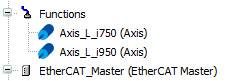
Hardware-independent functions (node in the PLCD tree: FUNCTIONS):
-
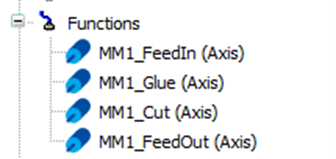
Creation of the four required functions (new node in the PLCD tree: FUNCTIONS):
-
The functions required for PLC programming can be created here independently of the EtherCat nodes.
-
In this case, these are "AxisREF" functions that are stimulated by FAST basic motion blocks or FAST technology modules.
Connections of the EtherCat components with the functions (AxisREF):
-
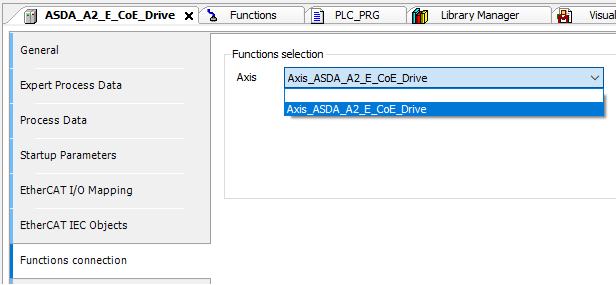
Variant 1: Assignment of the "Function" to the EtherCat component:
-
Tab card of the EtherCat component: "Functions connections"
-
-
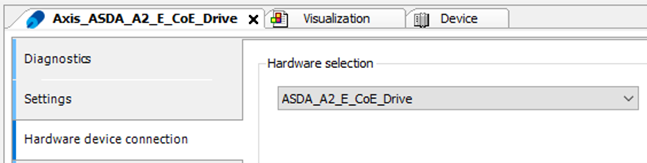
Variant 2: Assignment of the EtherCat component to the "Function":
-
Click on the "Functions" node and the desired "Function" and make a "Hardware selection":
-
-
Variant 3: Assignment of EtherCat components to the "Functions":
-
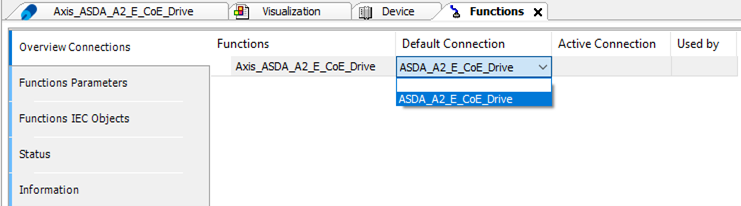
There is an "Overview Connections" overview under the "Functions" node.
-
The available EtherCat components can be assigned to the "Functions" here.
-
Only one 1:1 relationship can be entered at a time.
-
An EtherCat component cannot be assigned to two "Functions".
-
Variant 3 is particularly suitable for projects with many axes because all AxisREF assignments to the EtherCAT devices can be set centrally on a user interface.
Different "Functions" to choose from
-
To insert a new "Function", a selection must be made as to which type of "Function" is to be inserted.
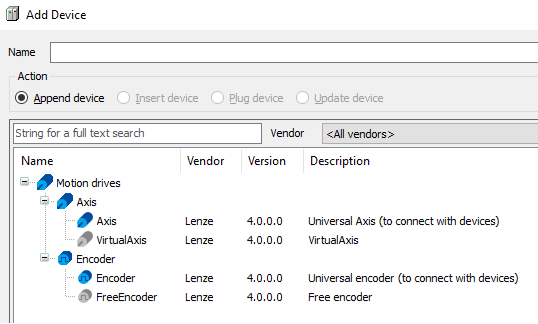
Explanations:
Axis:
-
Universal AxisREF with all parameters. This "Axis" can be connected to an EtherCat node.
-
If this Axis is not yet connected to an EtherCat node, it can be used in the PLC program in the same way as a "VirtualAxis"
-
NOTE: The hardware abstraction function means that the virtual axes are no longer required.
Virtual axis:
-
Known virtual axis that is retained due to compatibility.
Encoder:
-
Universal encoder with all parameters. This "encoder" can be connected to an encoder connection of the EtherCat node.
Free Encoder:
-
Known encoder mapping, which is retained due to compatibility.