Creating a tappet track offline with a "TappetTrack1" file

 How to create a tappet track offline with a "TappetTrack1" file:
- Create a tappet track offline without ticking the box in the dialog:
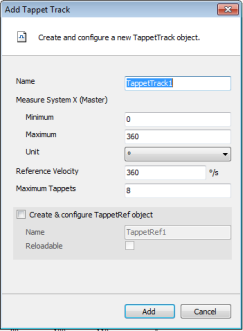
- Press Add .
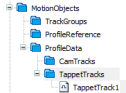
- The dialog box is closed. The directory tree includes the created file TappetTrack1 :
- Create the instance of FB L_MC2P_TappetRefFromFile
- That way, the tappet file is read out.
- Create an FB array of the type L_MC2P_TappetDataObject .
- The size results from the number of the created tappets, e.g.:
L_MC2P_TappetDataObject1:ARRAY[0..7] OF L_MC2P_TappetDataObject;
- Assign the name of the instance of FB L_MC2P_TappetDataObject1 to the input itfTappetData of L_MC2P_TappetRefFromFile1 .
- Assign the name of the instance of FB L_MC2P_TappetRefFromFile to the input itfTappetTable of FB L_MC2P_TappetRegister :
|
|