Step 1: Create a new project with Controller and several Servo Inverters i700
General procedure:
-
If no project is available yet, create a new project in the »PLC Designer« with the menu command
File
 New project
.
- Use the "standard project" template for this project.
- Select "Lenze Controller 3200".
- In case of an already existing project, the device can be changed subsequently via the Update device command.
Sample
device view
:
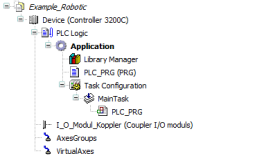
- Add the required drive axes (including fieldbus) to the Controller.
- For this purpose, go to the context menu of the Device (Controller 3200C) and execute the Add device... command.
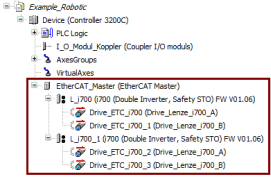
- In the following example, two Servo Inverters i700 (double axis) have been added to the EtherCAT master as EtherCAT slaves:
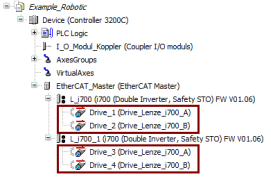
- Recommendation: Rename the axes in the device view logically.
For this example, the four axes in "Drive_1" ... "Drive_4" have been renamed:
- Compile the product to generate the parameters.
- Parameterise real axes: Set motor and encoder parameters.

|
Note!
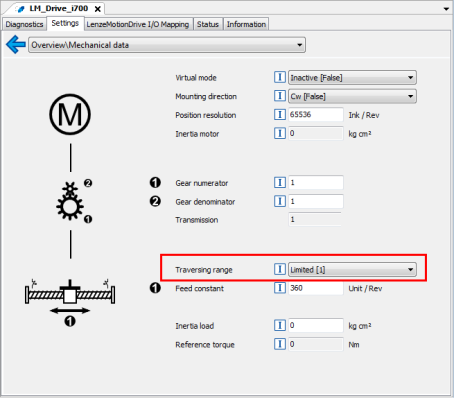
For the use in combination with an axes group, the scaling factors of the drives must be set in a way that resolve one revolution of the rotary axes (e.g. for Delta3_3dof ) at the (gearbox) output end with 360 ° (1 unit º 1 degree). For linear axes (e.g. Portal_3dof ) the drive must be parameterised to the unit [mm]. In general, all drives must be parameterised as axes with limited traverse path (parameter 30 , traversing range: "Limited value", see following illustration) |

|
Detailed information on how to parameterise the Servo Inverter i700 can be found in the following sections of the »PLC Designer« online help:
|