Step 4: Visualising movements with the L_MC4PAxesGroupBasicControl FB
- Operate the PLC Designer in the online mode..
 Overview\Connected drives
):
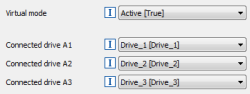
- Switch on the AGBC visualisation via the InternalControl button and the axes group visualisation via xEnable .
- Activate the control in the xRegulatorOnALL drives and then the xEnableGroup axes group.
|
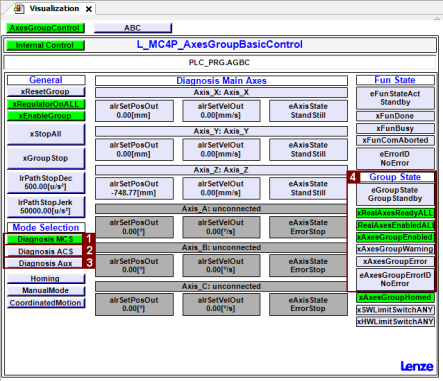
Diagnosis MCS , Diagnosis ACS and Diagnosis Aux |
|
|---|---|
|
|
|
1 ... 3 |
Modes Diagnosis MCS , Diagnosis ACS and Diagnosis Aux |
|
4 |
The Diagnosis MCS , Diagnosis ACS and Diagnosis Aux modes serve to analyse the positions, velocities and PLCopen states of all connected Cartesian axes, drive axes and auxiliary axes. |
|
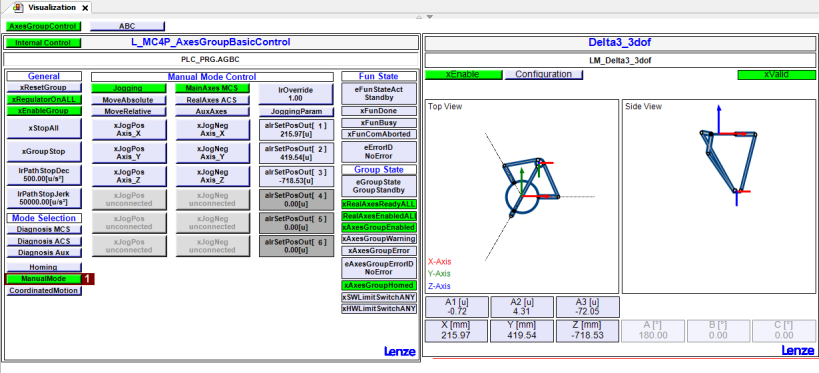
Manual Mode |
|
|---|---|
|
|
|
1 |
The
ManualMode
mode serves to traverse the connected axes during manual operation, cp.
Please note: Without a referenced axes group, only the real drives (eCoordSystem := L_MC4P_Coordsystem.ACS) and the auxiliary axes (AuxAxes) can be traversed in manual operation. |
 ManMode (manual traversing of single axes)
|
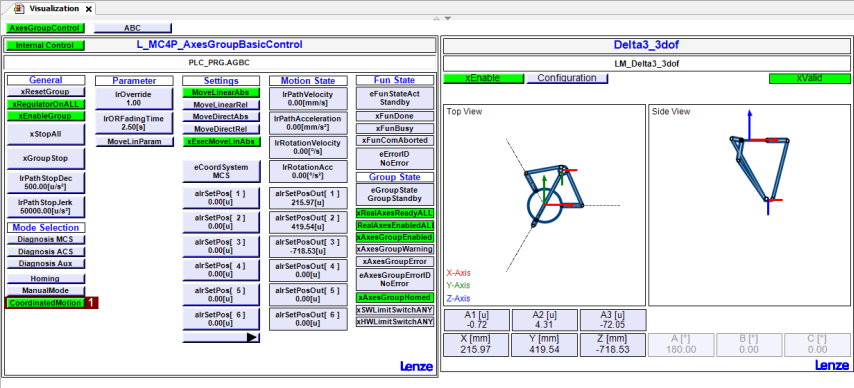
CoordinatedMotion Mode |
|
|---|---|
|
|
|
1 |
The CoordinatedMotion mode serves to start MC_MoveLinear and MC_MoveDirect movements. The movements are represented live in the axes group visualisation. |