The basic transfer actions can be triggered automatically.
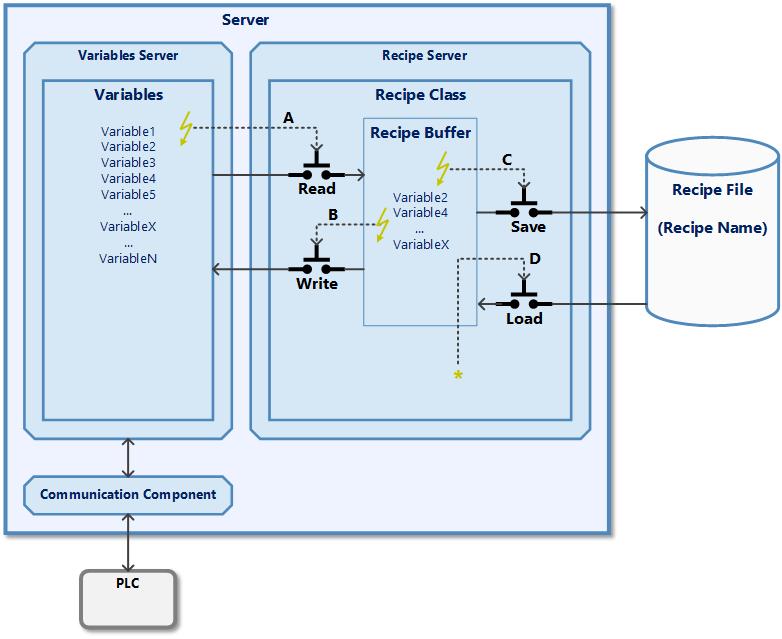
The actions available for transferring the recipe data to the recipe buffer, to a recipe file or to the variable server can be triggered automatically by variable changes. This can be controlled by the following configurations:
- A: Automatically read variable server values into the recipe buffer on change
- If one of the recipe variables in the variable server changes, this changed value is automatically transferred to the recipe buffer. This corresponds to the Read action. The change in the variable server can be made, for example, by reading a new value from the PLC or by user input in the user interface.
- Subject:
 Cross-Platform Server
 - B: Automatically write recipe buffer to the variable server on change
- If a variable value in the recipe buffer changes, this changed value is automatically transferred to the variable server. This corresponds to the Write action. The value may be written to the PLC via the communication component. The change in the recipe buffer can be made, for example, by loading a recipe file or by user input in the user interface if the input element is in recipe mode.
- C: Automatically save recipe buffer in current recipe file when changes are made
- If a variable value in the recipe buffer changes, the entire content of the buffer is saved in the current recipe file. This corresponds to the Save action. The change in the recipe buffer can be made, for example, by reading the recipe values from the variable server or by user input in the user interface if the input element is in recipe mode.
- A then C: Automatically save variable server values to current recipe file when changed
- If one of the recipe variables in the variable server changes, this changed value is automatically transferred to the recipe buffer. The entire content of the buffer is then saved in the current recipe file. This corresponds to the Read action followed by the Save action. The change in the variable server can be made, for example, by reading a new value from the PLC or by user input in the user interface.
- Subject:
 Standard server
 - D: Load last recipe file at start
- When the system is started, the data from the last recipe file is automatically loaded into the recipe buffer.
Note: A recipe name is required for actions C, A then C and D. When the system is started for the very first time, the name from the Initial recipe name parameter is used for this. If another recipe file is subsequently saved or loaded via the recipe class object, this recipe name is saved in the runtime configuration and this name is used for the actions the next time the system is started. When a recipe file is saved for the first time, the content of the Initial recipe description parameter is used as the description.