Variable adapter
Variable values from applications are accessed via the complete identifier of process variables. This identifier contains the channel name, the alias of the process variable and, if applicable, the resolution of field and/or structure elements.
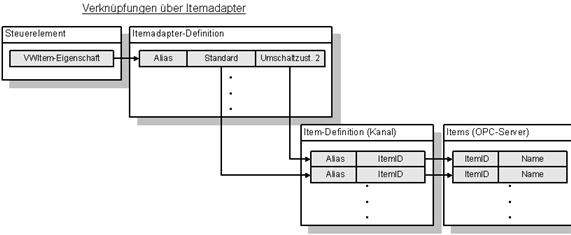
Variable adapters decouple this connection by introducing an additional alias. Variable adapters also contain a configurable switchover. Several process variable definitions defined in the communication channels can be assigned to each alias at development time. A configuration entry is used to define which variables are actually addressed via the alias during the initialisation phase of the project.
Problem definition
Variable adapters are used to solve the following problems:
- At the time of creating the project, it is not clear which connection constellation must be selected (connection of all controllers via one communication channel/via several communication channels): In practice, the connection via just one driver may prove to be less performant. However, all connections in the application contain the channel identifier. A later changeover from one to several communication channels proves to be extremely labour-intensive, as the variable connections in the control elements also have to be adapted, for example.
- It is foreseeable that the visualisation will have to use different controls. However, the variable naming cannot be kept compatible in any way: A typical case of this is the connection via an OPC server for one controller and the use of a VisiWin(.NET) driver for the alternative controller. Due to the optimised exchange via structures, the variable names in the application are no longer compatible with VisiWin drivers, as the structure element is enclosed in angle brackets and included in the identifier of the connected variable.
Until now, both problems could lead to the same visualisation having to be maintained for different control systems using several projects in parallel.
Project planning
To put a variable adapter into operation, the following steps must be carried out in the development environment:
- Definition of all variables that can occur in the different variants in several communication channels. Variables from different variants may not be defined in one channel.
- Creating a variable adapter in the project explorer
- Definition of the variables of the first switchover variant by adding variable sets in the table editor of the adapter. In this phase, each variable set is made up of a default value and an alias. If the application is already linked to variables, these should be selected as the default value. No further application customisation is required as the alias is created by the editor from the name of the standard variable.
- Definition of a new switching state: In the development environment, a column is added to the table by adding a switching state. The fields in this column are empty. The variables that replace the identifier in the standard column when switching to another control must now be inserted here.
- Activation of the appropriate switching state: To avoid any errors, one thing first. Although the switchover can be configured before the application starts, it can no longer be changed at runtime, so it is not a dynamic feature. If necessary, the steps for configuring the connected controllers must be described in detail to the technician who sets up the visualisation on site.
Parameters
| Name | Description of the |
|---|---|
| Definition active | Determines whether the object definition is valid. |
| Comment | Optional commentary on the object. |
| Name | Name of the object. |
| Switching states (variable adapter) | Defines which variables are switched to when the configuration of the variable adapter changes the value. |
| Channels to be deactivated | Defines for each entry in the list of switching states which communication channels are deactivated when the corresponding switching state is active. |