ViewBox
Container for scaling the content.
|
Symbol |
|
|
Menu ribbon |
Start > Controls > Container > Layout > ViewBox |

With the "ViewBox" control element, content can be scaled continuously at runtime. The "ViewBox" is particularly suitable for scaling graphics so that they are optimally displayed on screens of different sizes.
Example
From version 7.3, a sample project "DistillationPlant" is available for Web UI. There, the scaling of the graphic, which visualises the entire distillation plant, is implemented using the ViewBox.
-
This is how you proceed:
-
Start the »EASY UI Designer« development environment.
-
Click on Examples under File.
-
Under Version, select version "7.3".
-
Select "Web UI (HTML5)" as the technology, click on Distillation system and confirm with OK to open the sample project in the development environment.
-
If the project is open in the development environment, start it with F5.
The application is started in the browser.
-
Click on DISTILLING SYSTEM in the footer of the application.
-
Drag the browser window smaller and then larger again and observe how the size of the graphic changes.
-
Return to the development environment and open the "DistillationPlantPage.html" page in the Designer.
In the Document organisation window, you can see that the page contains a ViewBox. The ViewBox allows you to scale the AbsoluteLayout element, which contains several elements of type Image, Bar, Label and StateIndicator.
Functionalities
The ViewBox supports the following functionality:
-
Scaling of the displayed content
-
Absolute positioning of the contained elements
In principle, you can place control elements directly on a ViewBox and use the "Left"/"Top" properties of the respective control element to position them in a fixed (absolute) position. In the vast majority of cases, however, it makes sense to first place a layout container, e.g. an AbsoluteLayout, on the ViewBox. You can then position controls on the AbsoluteLayout.
-
Display of the background, the frame, the shadow, etc.
-
Color representation of the background and the frame
You can configure these functionalities via the properties in the Properties window when you select the control in the Designer or in the document outline.
Style
No system styles are available for the layout container. No user-defined styles can be created either.
Structure
If a ViewBox is placed on a page, it does not initially contain any other elements. First add a layout container, e.g. an AbsoluteLayout, to the ViewBox. You can then position control elements on the AbsoluteLayout as desired.
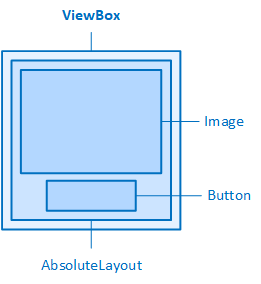
ViewBox with an AbsoluteLayout to encapsulate the controls
The following properties are available in the "ViewBox" category for scaling the content of the ViewBox to be displayed:
StretchDirection
Determines whether the content of the ViewBox is only reduced, only enlarged or both reduced and enlarged.
-
Both
The content is displayed smaller than the actual size when the window is reduced and larger than the actual size when the window is enlarged (default setting).
-
DownOnly
The content is displayed smaller when the window is reduced in size, but not larger than the actual size when the window is enlarged.
-
UpOnly
The content is displayed larger when the window is enlarged, but not smaller than the actual size when the window is reduced.
StretchMode
Determines whether and how the content of the ViewBox is scaled.
-
None
The content is not scaled, but displayed in its actual size.
-
Fill
The content is scaled in both width and height so that it fills the available space. The displayed aspect ratio may deviate from the actual aspect ratio so that a font or graphic may appear stretched or compressed.
-
Uniform
The content is scaled both in width and height so that the ratio between height and width is maintained (default setting).
Related topics: