EmbeddedWebsite
Control element for integrating an external resource into the application.
|
Symbol |
|
|
Menu ribbon |
Start > Controls > Input/output > Media > EmbeddedWebsite |

The "EmbeddedWebsite" control element displays content that can be accessed via a web server. The control element can be used, for example, to integrate web pages from the Internet, help documents or camera images supplied via an external source into the application.
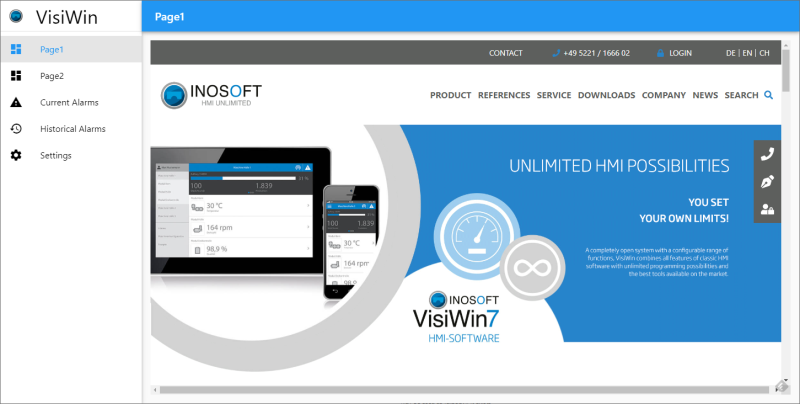
INOSOFT website integrated into the application
Functionalities
The control element supports the following functionality:
-
Connection to the user administration for blocking operability
-
Display of the background, the frame, the shadow, etc.
You can configure these functionalities via the properties in the Properties window when you select the control in the Designer or in the document outline.
Style
No system styles are available for the control. No user-defined styles can be created either.
Structure
The control element contains the HTML element "<iframe>", which contains the external resource as a sub-element.
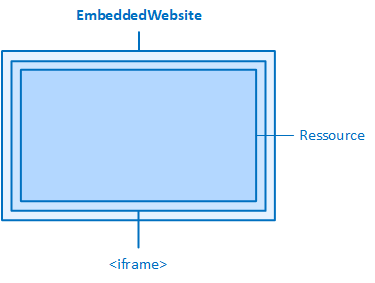
The embedded website and its elements
Embedding an external resource
The source for the resource is specified via the properties of the "Source" category:
RuntimeOnly
If the property is activated (default setting), the resource (website) is only displayed at runtime. If this property is deactivated, the resource is also displayed as a preview in the Designer.
Specifies the source (URL) of the resource (website) to be displayed.
Example: To display the INOSOFT website, enter "https://www.inosoft.com" in the property.
VariableName
Defines the variable from which the source (URL) of the resource (website) to be displayed is obtained at runtime.
Blocking and allowing functionalities of the resource
Internally, the HTML element <iframe> is used to embed a resource. This element embeds another page into the page on which it is located.
A number of attributes can be set in the iframe element that control the behaviour of the iframe element - and therefore the resource it contains. The most important attribute of the iframe element, the "src" attribute, specifies the URL of the page that is to be embedded. In the development environment, you set this attribute by setting the"Src" property.
VisiWin provides further attributes of the iframe element as properties of the EmbeddedWebsite control element. These properties are the same as the corresponding attributes of the HTML element <iframe>.
Example: The "Allow" property corresponds to the "allow" attribute of the HTML element <iframe>, the "AllowFullscreen" property corresponds to the "allowfullscreen" attribute, etc.
Allow
Defines which functionalities and APIs of the resource are authorised and to what extent(feature policy). To specify multiple functionalities, use a semicolon followed by a space to separate them.
Example: Specifying "camera 'none'; microphone 'none'" prevents the resource from using the camera and microphone functionality.
AllowFullscreen
Defines whether the resource may activate full screen mode.
AllowPaymentRequest
Defines whether the resource is authorised to use the Payment Request API.
Loading
Defines how the content of the resource is loaded.
-
eager
The content is loaded immediately, even if this content is outside the viewport (i.e. the visible area) and only becomes visible after scrolling (default setting).
-
lazy
The content is only loaded when this content comes close to the viewport (i.e. the visible area) when scrolling.
ReferrerPolicy
Determines whether and to what extent the URL (referrer) of the document (the source) is transmitted when the user navigates to another document (the destination) via a link on this document(referrer policy). This information can be used by the website owner to analyse from which websites the visitors to his website come.
-
no-referrer
The URL of the source is not transmitted.
Example:
Source
Goal
Transmitted URL (referrer)
https://inosoft.com/page1
any
-
-
no-referrer-when-downgrade
The URL of the source is not transmitted if the destination uses a less secure protocol (HTTPS→HTTP), in all other cases the full URL of the source is transmitted.
Example:
Source
Goal
Transmitted URL (referrer)
https://inosoft.com/page1
https://inosoft.com/page2
https://inosoft.com/page1
https://inosoft.com/page1
https://example.com
https://inosoft.com/page1
https://inosoft.com/page1
http://example.com
-
-
origin
The URL of the source is transmitted without the path (part of the URL after the first single slash).
Example:
Source
Goal
Transmitted URL (referrer)
https://inosoft.com/page1
any
https://inosoft.com/
-
origin-when-cross-origin
If the destination is in the same domain, the full URL of the source is transmitted. If the destination has a different domain, the URL is transmitted without the path (part of the URL after the first single slash).
Example:
Source
Goal
Transmitted URL (referrer)
https://inosoft.com/page1
https://inosoft.com/page2
https://inosoft.com/page1
https://inosoft.com/page1
https://example.com
https://inosoft.com/
https://inosoft.com/page1
http://example.com
https://inosoft.com/
-
same-origin
The URL is only transmitted if the destination is in the same domain.
Example:
Source
Goal
Transmitted URL (referrer)
https://inosoft.com/page1
https://inosoft.com/page2
https://inosoft.com/page1
https://inosoft.com/page1
https://example.com
-
-
strict-origin
Similar to "origin", but the URL is only transmitted if the destination is requested via HTTPS.
Example:
Source
Goal
Transmitted URL (referrer)
https://inosoft.com/page1
https://example.com
https://inosoft.com/
https://inosoft.com/page1
http://example.com
-
http://example.com/page1
any
http://example.com/
-
strict-origin-when-cross-origin
Similar to "origin-when-cross-origin", but no information is transmitted if the scheme is downgraded (navigation from HTTPS to HTTP).
Example:
Source
Goal
Transmitted URL (referrer)
https://inosoft.com/page1
https://inosoft.com/page2
https://inosoft.com/page1
https://inosoft.com/page1
https://example.com
https://inosoft.com/
https://inosoft.com/page1
http://example.com
-
-
unsafe-url
The full URL is always transmitted.
Example:
Source
Goal
Transmitted URL (referrer)
https://inosoft.com/page1?q=123
any
https://inosoft.com/page1?q=123
Restricting the activities of the resource
The activities of the resource that are programmed in JavaScript, such as the opening of additional windows (pop-ups), can be restricted via the"sandbox" attribute, which is set in the internal <iframe> element.
The "sandbox" attribute and some of the values of this attribute can be set in the »EASY UI Designer« IDE as properties of the EmbeddedWebsite control in the "Sandbox" category.
Example: The "AllowForms" value internally sets the "sandbox" property to the value "allow-forms", the "AllowModals" property sets the value "allow-modals", etc.
UseSandbox
Specifies that all activities of the resource, such as the opening of pop-ups, are blocked in the control. If this property is activated, the "sandbox" attribute is set in the internal <iframe> element of the control. Other properties in the "Sandbox" category, when activated, remove the respective sandbox restriction.
AllowForms
Defines whether the resource is allowed to send forms.
AllowModals
Specifies that the resource may display modal dialogues (i.e. dialogues that require user interaction and therefore block the main window).
AllowOrientationLock
Specifies that the resource may lock the screen orientation.
AllowPointerLock
Specifies that the resource may use the Pointer Lock API(hiding the mouse pointer, limiting the mouse pointer to certain elements, etc.).
AllowPopups
Specifies that the resource may open additional windows (pop-ups). To allow pop-ups, the "AllowSripts" property must also be activated.
AllowPopupsToEscapeSandbox
Specifies that the resource may open pop-ups that are not subject to sandboxing and may therefore open pop-ups themselves.
AllowPresentation
Specifies that the resource may use the Presentation API.
AllowSameOrigin
If this property is not activated, all contents of the resource are denied Same-Origin status, even if they have the same Origin.
AllowScripts
Specifies that the resource may execute scripts.
AllowTopNavigation
Specifies that the resource may be displayed in the top-level browser context (i.e. in the application window, outside the EmbeddedWebsite control).
AllowTopNavigationByUserActivation
Specifies that the resource may be displayed in the top-level browser context (i.e. in the application window, outside the EmbeddedWebsite control) if this is triggered by a user action.
Related topics: