VideoPlayer
Control element for playing a video.
| f
Symbol |
|
|
Menu ribbon |
Start > Controls > Input/Output > Media > VideoPlayer |

The "VideoPlayer" control plays a video file. The control element has a bar with buttons for operating the video, such as the play button for starting the video. The bar with the buttons is displayed dynamically when the mouse pointer is moved over it. The button bar can optionally be deactivated and the video can be started automatically, played in a continuous loop or muted.

VideoPlayer with displayed button bar
Functionalities
The control element supports the following functionality:
-
Connection to the user administration for blocking operability
-
Display of the background, the frame, the shadow, etc.
You can configure these functionalities via the properties in the Properties window when you select the control in the Designer or in the document outline.
Style
No system styles are available for the control. No user-defined styles can be created either.
Structure
The control element contains a video element that displays the video.
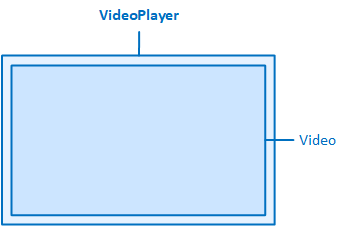
The VideoPlayer contains a video element.
The following properties are available in the "VideoPlayer" category to configure the video display:
Autoplay
Specifies that the video starts automatically.
Loop
Specifies that the video is automatically played again as soon as it has been played.
Mute
Specifies that the video is initially played back without sound. At runtime, the sound can be switched on using the button with the loudspeaker symbol. To do this, the display of the buttons must be activated via the "ShowControls" property.
ShowControls
Displays controls for operating the video such as start/pause, volume/mute, etc.
Source
Specifies the path of the video within the client project folder. Valid formats: *.mp4, *.webm, *.ogg.
Related topics: