Axis states (state diagram)
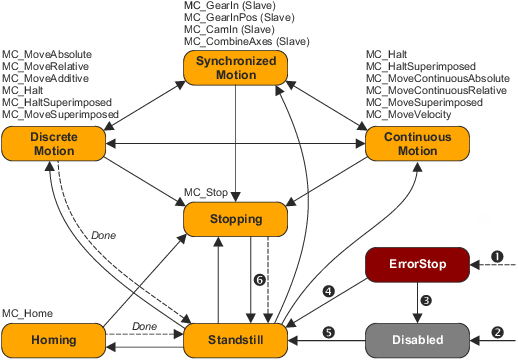
The state diagram displayed in the following defines the state of an axis and the state change from one state to another. It also shows which Motion Control function blocks are required for the state change and in which order they have to be carried out. Several Motion Control function blocks can be instructed at the same time.

|

|
|---|---|
|
State diagram (PLCopen state machine) |
|
|
|
|
|
Accessible from all states: An error has occurred in the axis. |
|
|
Accessible from all states: MC_Power . Status = FALSE and no error active |
|
|
|
|
|
MC_Reset AND MC_Power . Status = TRUE AND MC_Power . Enable = TRUE |
|
|
|
|
|
|


Comments on the state diagram
- The state diagram refers to a single axis.
- The axis is always in one of the states defined above.
- For multi-axes movements, the following applies: Master and slave axes can be in different states. For each axis involved, the state diagram displayed above applies. Coupling a slave axis does not affect the state of the master axis.
- The arrows between the states mark possible state changes (transitions). The dashed arrows mark state changes due to a motion command as well as system or error-dependent state change.
- Motion commands are always processed sequentially.
- The motion commands that cause a state change are listed above the corresponding state. The state change also changes the motion profile.
"Disabled" axis state
The " Disabled " device state describes the basic state of an axis:
- The axis is inhibited.
- No motion commands can be carried out.
- There is no error in the axis.
Enable axis (switch on motion readiness)
The "
Disabled
" state changes to the "
Axis state "Standstill"
- The axis is enabled.
- There is no error in the axis.
- NO motion commands are active.

|
Note!
Please observe the following when using setpoint-manipulating FBs (particularly L_MC1P_AverageFilterSetValue and L_CT1P_OscillationComp ):
|
|
|
Note!
When the FB MC_Stop is called in the " Standstill " state, it is changed to " Stopping " and then back to " Standstill " if the Execute input is reset to FALSE.
|
Inhibit axis again (switch off motion readiness)
Except for "
Axis state "ErrorStop"
The " ErrorStop " state has the highest priority and gets active in the event of an error. The error can be caused by a function block in the application or a monitoring function of the axis data. A change to the " ErrorStop " state also takes place if the connected drive has changed to an error state. For this purpose, the error bit in the status word is evaluated cyclically.
- The axis is braked to standstill (unless it is already at standstill).
- No further motion commands can be carried out.
- The error occurred is displayed in the axis data and can be provided via the AxisErrorID output of the FB MC_ReadAxisError .
- If in case of a drive error the device-specific error number is transmitted as PDO, it will be displayed in the axis data and can be provided via the DriveErrorID output of the FB MC_ReadAxisError .
- A warning of the drive is signalled via the DriveWarning output of the FB MC_ReadAxisError .
- The axis can be enabled or inhibited via the Enable input of the FB MC_Power (if permitted by the drive) without causing a state change to " Standstill " or " Disabled ".