L_MC4P_MoveSplineRelative
This FB serves to traverse an axes group in the coordinate system specified along a spline. In its individual sections, the complete spline consists of third-order polynomials.
The starting point is the target position of the FB instructed last or the current position if the axes group is in the "GroupStandby" state.
The spline is defined by selection of a maximum of nine interpolation points ( ascIntermediatePoint ) and a target point ( alrEndPoint ). The points always refer relatively to the fixed starting point.
The selection of a target point is mandatory. The minimum number of interpolation points must be 1, and the maximum number may be 9.
After the target position has been reached, the axes of the group are in the "GroupStandby" state if no further motion commands are pending.
- Changing even one interpolation point already has an impact on the geometry of the complete spline and not only on the geometry of the section changed.
- Double identical points following directly in succession are combined.
- Double points not following in succession are permissible.
- The orientation of the TCP is continuously interpolated during the movement between the starting point and end point.
- Due to the greatest curvature, if necessary, the maximum speed and acceleration are reduced along the full spline for the complete spline.

|
Danger!
All paths have to be first tested with override or in the simulation mode with virtual axes! |

|
Note!
Cartesian path movements can only be executed if all drive axes are referenced to the zero positions defined in the " Supported kinematics " section. |
|
|
|
|
L_MC4P_MoveSplineRelative |
|
|
|
|
|---|---|---|---|---|---|---|---|
|
AXES_GROUP_KIN |
- |
|
AxesGroup |
AxesRef |
|
- |
AXES_GROUP_KIN |
|
BOOL |
- |
|
xExecute |
xDone |
|
- |
BOOL |
|
ARRAY [1..9] OF STRUCT |
- |
|
ascIntermediatePoint |
xBusy |
|
- |
BOOL |
|
ARRAY [1..12] OF LREAL |
- |
|
alrEndPoint |
xActive |
|
- |
BOOL |
|
LREAL |
- |
|
lrVelocity |
xCommandAborted |
|
- |
BOOL |
|
LREAL |
- |
|
lrAcceleration |
xError |
|
- |
BOOL |
|
LREAL |
- |
|
lrDeceleration |
xErrorID |
|
- |
L_IE1P_Error |
|
LREAL |
- |
|
lrJerk |
iPointPassed |
|
- |
INT |
|
L_MC4P_CoordSystem |
- |
|
eCoordSystem |
|
|
|
|
|
MC_BUFFER_MODE |
- |
|
eBufferMode |
|
|
|
|
|
MC_TRANSITION_MODE |
- |
|
eTransitionMode |
|
|
|
|
|
ARRAY [ 1..12 ] OF LREAL |
- |
|
alrTransitionParameter |
|
|
|
|
|
ARRAY [1..6] OF
|
- |
|
aeAuxMode |
|
|
|
|
|
L_MC4P_Orientation_Mode |
- |
|
eOrientationMode |
|
|
|
|
|
ARRAY[4..6] OF MC_DIRECTION |
- |
|
aeDirection |
|
|
|
|
|
|
|
|
|
|
|
|
|
Inputs
|
Name Data type |
Information/possible settings |
|
|---|---|---|
|
AxesGroup AXES_GROUP_KIN |
axes group reference |
|
|
xExecute BOOL |
FALSE ä TRUE |
Start execution of the function block |
|
ascIntermediatePoint ARRAY [1..9] OF L_MC4P_IntermediatePointSpline structure |
|
|
|
alrEndPoint ARRAY [1..12] OF LREAL |
End point with orientation and auxiliary axes |
|
|
lrVelocity LREAL |
Maximum velocity in [unit/s] for approaching the target position
|
|
|
lrAcceleration LREAL |
Maximum acceleration in [unit/s 2 ] |
|
|
lrDeceleration LREAL |
Maximum deceleration in [unit/s 2 ] |
|
|
lrJerk LREAL |
Maximum jerk in [unit/s 3 ] |
|
|
eCoordSystem |
Selection of the coordinate system to be used:
|
|
|
eBufferMode |
Mode for processing successive motion commands |
|
|
eTransitionMode |
Mode for the path behaviour at the motion end |
|
|
alrTransitionParameter ARRAY [1..12] OF LREAL |
Description of the alrTransitionParameter parameter Parameters for "Overloops" Only relevant if eTransitionMode = TMCornerDistance has been selected. * alrTransitionParameter[1]
* alrTransitionParameter[2]
* alrTransitionParameter[3..12]
|
|
|
aeAuxMode ARRAY [1..6] OF L_MC4P_AuxMode |
Mode for the auxiliary axes:
|
|
|
eOrientationMode L_MC4P_Orientation_Mode |
Specification of the orientation interpolation for the WCS axes
See also: Direction selection for Modulo axes |
|
|
aeDirection ARRAY[4..6] OF MC_DIRECTION |
Direction select for orientation axes (WCS axes) parameterised as "Modulo". The input is only evaluated with
Index 4 ... 6: Main axes A, B, C Permitted selection:
Modes mcCurrentDirection , mcPositiveCycle and mcNegativeCycle are not supported. See also: Direction selection for Modulo axes |
|
 Coordinate systems and transformations
Outputs
|
Name Data type |
Value/meaning |
|
|---|---|---|
|
xDone BOOL |
TRUE |
Positioning completed successfully. |
|
xBusy BOOL |
TRUE |
Processing is running.
|
|
xActive BOOL |
TRUE |
The command of the FB is currently executed. |
|
xCommandAborted BOOL |
TRUE |
The command was aborted by another FB. |
|
xError BOOL |
TRUE |
An error has occurred. For details see ErrorID . |
|
eErrorID |
If Error = TRUE: Error number for the error that has occurred.
|
|
|
iPointPassed INT |
Output of the spline interpolation point passed last |
|
L_MC4P_IntermediatePointSpline structure
|
Name Data type |
Value/meaning |
|
|---|---|---|
|
lrXPos LREAL |
TRUE |
X position of the spline interpolation point in the coordinate system of the FB |
|
lrYPos LREAL |
TRUE |
Y position of the spline interpolation point in the coordinate system of the FB |
|
lrZPos LREAL |
TRUE |
Z position of the spline interpolation point in the coordinate system of the FB |
|
xUsePoint BOOL |
TRUE FALSE |
Point is taken into consideration when calculating the spline Point is ignored |
Programming example
This example shows the programming of a movement along a spline defined with relative interpolation points specified.
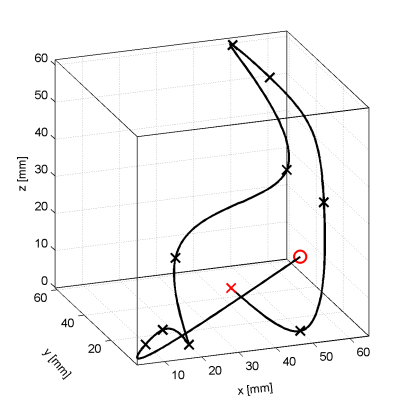
X Starting point X Intermediate points O End points |
The position of the axes group is x=50.0, y =10.0, z=20.0
Via the My_MoveSpline FB (instance of the L_MC4P_MoveSplineRelative), the following movement is programmed:
|
My_MoveSpline.alrIntermediatePoint[1].lrXPos := -45.0;
My_MoveSpline.alrIntermediatePoint[1].lrYPos := -9.0;
My_MoveSpline.alrIntermediatePoint[1].lrZpos := -15.0;
My_MoveSpline.alrIntermediatePoint[1].xUsePoint := TRUE;
My_MoveSpline.alrIntermediatePoint[2].lrXPos := -40.0;
My_MoveSpline.alrIntermediatePoint[2].lrYPos := -8.0;
My_MoveSpline.alrIntermediatePoint[2].lrZpos := -12.0;
My_MoveSpline.alrIntermediatePoint[2].xUsePoint := TRUE;
My_MoveSpline.alrIntermediatePoint[3].lrXPos := -30.0;
My_MoveSpline.alrIntermediatePoint[3].lrYPos := 0.0;
My_MoveSpline.alrIntermediatePoint[3].lrZpos := -20.0;
My_MoveSpline.alrIntermediatePoint[3].xUsePoint := TRUE;
My_MoveSpline.alrIntermediatePoint[4].lrXPos := -30.0;
My_MoveSpline.alrIntermediatePoint[4].lrYPos := 10.0;
My_MoveSpline.alrIntermediatePoint[4].lrZpos := 0.0;
My_MoveSpline.alrIntermediatePoint[4].xUsePoint := TRUE;
My_MoveSpline.alrIntermediatePoint[5].lrXPos := 0.0;
My_MoveSpline.alrIntermediatePoint[5].lrYPos := 10.0;
My_MoveSpline.alrIntermediatePoint[5].lrZpos := 20.0;
My_MoveSpline.alrIntermediatePoint[5].xUsePoint := TRUE;
My_MoveSpline.alrIntermediatePoint[6].lrXPos := 0.0;
My_MoveSpline.alrIntermediatePoint[6].lrYPos := 50.0;
My_MoveSpline.alrIntermediatePoint[6].lrZpos := 40.0;
My_MoveSpline.alrIntermediatePoint[6].xUsePoint := TRUE;
My_MoveSpline.alrIntermediatePoint[7].lrXPos := 10.0;
My_MoveSpline.alrIntermediatePoint[7].lrYPos := 50.0;
My_MoveSpline.alrIntermediatePoint[7].lrZpos := 30.0;
My_MoveSpline.alrIntermediatePoint[7].xUsePoint := TRUE;
My_MoveSpline.alrIntermediatePoint[8].lrXPos := 10.0;
My_MoveSpline.alrIntermediatePoint[8].lrYPos := 10.0;
My_MoveSpline.alrIntermediatePoint[8].lrZpos := 10.0;
My_MoveSpline.alrIntermediatePoint[8].xUsePoint := TRUE;
My_MoveSpline.alrIntermediatePoint[9].lrXPos := 0.0;
My_MoveSpline.alrIntermediatePoint[9].lrYPos := 0.0;
My_MoveSpline.alrIntermediatePoint[9].lrZpos := -20.0;
My_MoveSpline.alrIntermediatePoint[9].xUsePoint := TRUE;
My_MoveSpline.alrEndPoint[1] := -15.0;
My_MoveSpline.alrEndPoint[2] := 10.0;
My_MoveSpline.alrEndPoint[3] := -10.0;
|