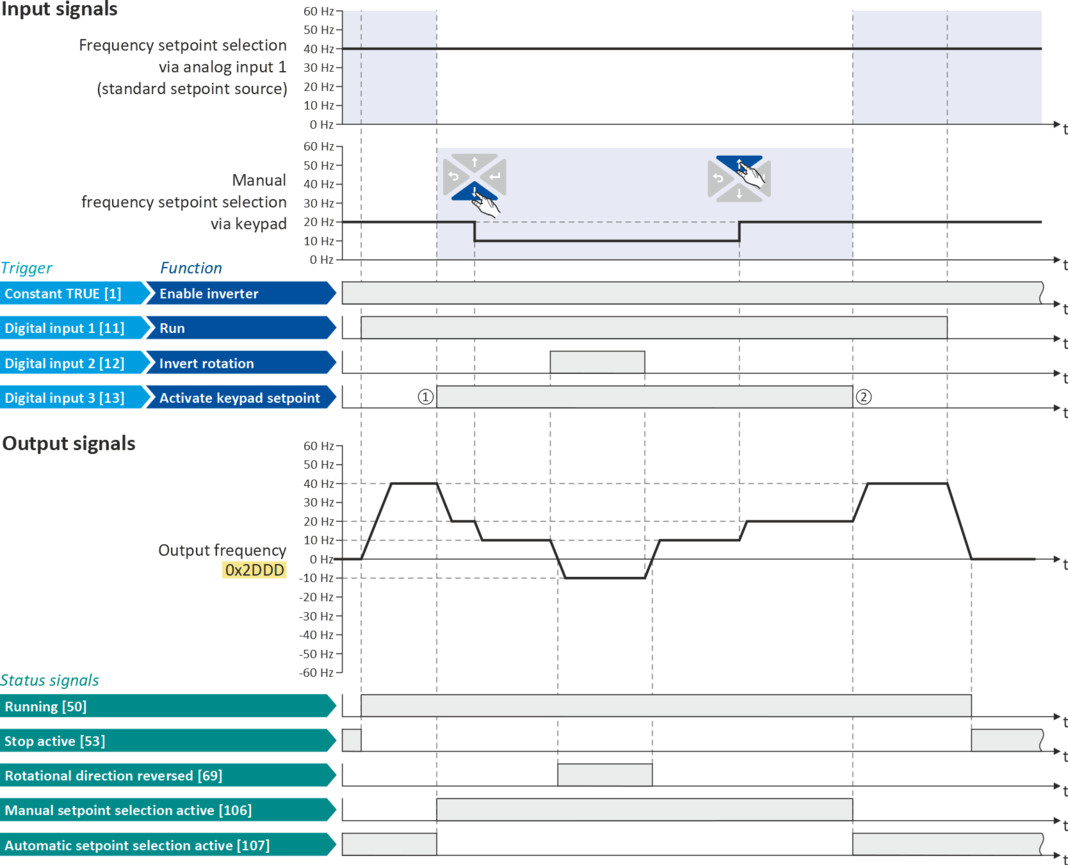
Example: Change-over from AI1 setpoint to keypad setpoint
–
The analog input 1 is set as standard setpoint source.
–
Switch S1 starts the motor in forward direction of rotation. Switch S1 in initial position stops the motor again.
–
Switch S2 switches the direction of rotation.
–
Switch S3 activates the keypad as setpoint source. The keypad setpoint can be changed in the operating mode via the navigation keys and .
 and
and  .
.|
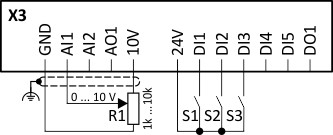
Connection diagram
|
Function
|
|
|
|
Potentiometer R1
|
Frequency setpoint selection
|
|
Switch S1
|
Run
|
|
|
Switch S2
|
Reverse rotational direction
|
|
|
Switch S3
|
Activate keypad setpoint
|
|
|
Parameter
|
Name
|
Setting for this example
|
|
Keypad setpoints: Frequency setpoint
|
20.0 Hz
|
|
|
Enable inverter
|
Constant TRUE [1]
|
|
|
Run
|
Digital input 1 [11]
|
|
|
Reset fault
|
Not connected [0]
|
|
|
Reverse rotational direction
|
Digital input 2 [12]
|
|
|
Activate keypad setpoint
|
Digital input 3 [13]
|
|
|
Control selection
|
Flexible I/O configuration [0]
|
|
|
Stop method
|
Standard ramp [1]
|
|
|
Frequency control: Default setpoint source
|
Analog input 1 [2]
|
|
The status signals can be assigned to digital outputs.
 Configure digital outputs Configure digital outputs |
|
|
|
|
|
①
|
Changeover from analog input 1 (standard setpoint source) to keypad setpoint.
|
|
②
|
Changeover from keypad setpoint back to analog input 1 (standard setpoint source).
|