 Basic setting
 Process controller function selection
By means of the following functions, the response of the inverter can be controlled when PID control is activated.
Parameter
|
Address
|
Name / setting range / [default setting]
|
Information
|
|
|
0x2631:045
(P400.45)
|
Function list: Disable PID controller
(Function list: PID off)
|
Assignment of a trigger for the "Disable PID controller" function.
Trigger = TRUE: If PID control is activated, ignore PID control and drive the motor in speed-controlled manner.
Trigger = FALSE: If PID control is activated, drive the motor with PID control.
|
|
|
0
|
Not connected
|
No trigger assigned (trigger is constantly FALSE).
|
|
|
0x2631:046
(P400.46)
|
Function list: Set process controller output to 0
(Function list: PID output=0)
|
Assignment of a trigger for the "Set process controller output to 0" function.
Trigger = TRUE: If PID control is activated, I component and the output of the PID controller are set to 0 and the internal control algorithm is stopped. The PID control remains active.
Trigger = FALSE: no action / deactivate function again.
|
|
|
0
|
Not connected
|
No trigger assigned (trigger is constantly FALSE).
|
|
|
0x2631:047
(P400.47)
|
Function list: Inhibit process controller I-component
(Function list: PID-I inhibited)
|
Assignment of a trigger for the "Inhibit process controller I-component" function.
Trigger = TRUE: If PID control is activated, the I component of the PID controller is set to 0 and the integration process is stopped.
Trigger = FALSE: no action / deactivate function again.
|
|
|
0
|
Not connected
|
No trigger assigned (trigger is constantly FALSE).
|
|
|
0x2631:048
(P400.48)
|
Function list: Activate PID influence ramp
(Function list: PID-Inf ramp on)
|
Assignment of a trigger for the "Activate PID influence ramp" function.
Trigger = TRUE: the influence of the process controller is shown via a ramp.
Trigger = FALSE or not connected: the influence of the process controller is hidden via ramp.
Notes:
–
The influence of the process controller is always active (not only when PID control is activated).
–
Acceleration time for showing the influence of the process controller can be set in 0x404C:001 (P607.01).
–
Deceleration time for hiding the influence of the process controller can be set in 0x404C:002 (P607.02).
|
|
|
1
|
Constant TRUE
|
Trigger is constantly TRUE.
|
|
Example for operating mode
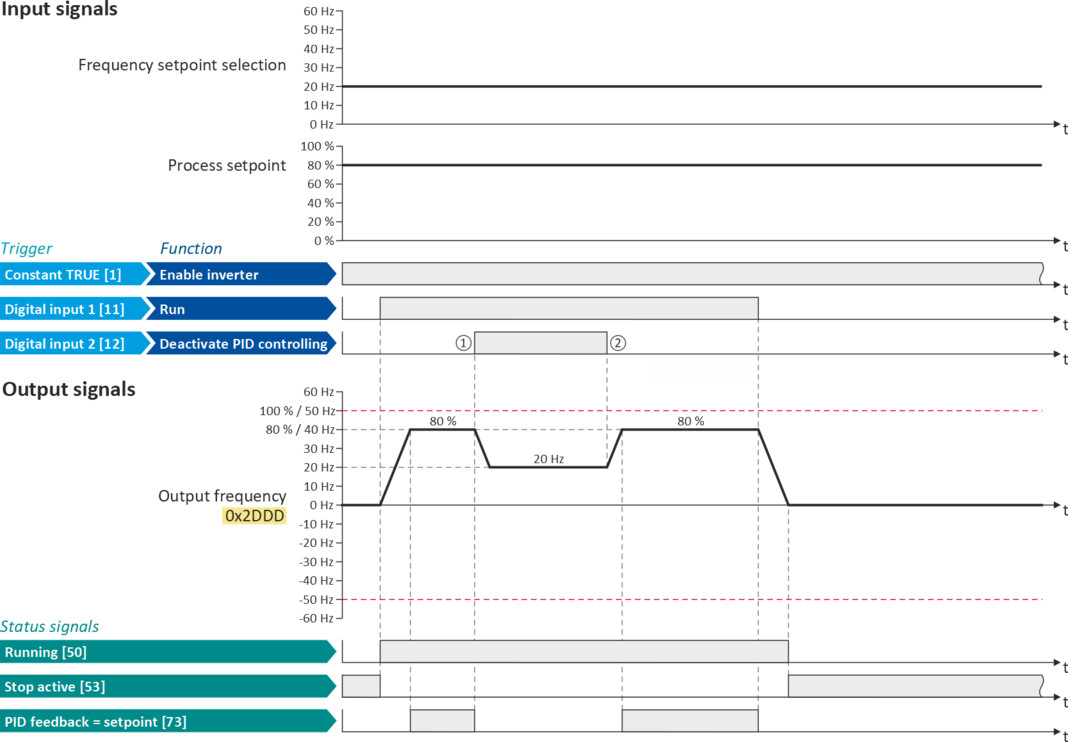
In the following example, the "Disable PID controller" function is used to deactivate the PID control temporarily:
–
As standard setpoint source, the frequency preset 1 is set to 20 Hz.
–
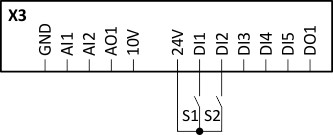
Switch S1 starts the motor in the forward direction of rotation. Switch S1 in initial position stops the motor again.
–
The switch S2 deactivates the PID control. The motor is then driven in a speed-controlled way.
|
Connection diagram
|
Function
|
|
|
|
Switch S1
|
Run
|
|
Switch S2
|
Disable PID controller
|
|
|
Parameter
|
Name
|
Setting for this example
|
|
Enable inverter
|
Constant TRUE [1]
|
|
|
Run
|
Digital input 1 [11]
|
|
|
Reset fault
|
Not connected [0]
|
|
|
Disable PID controller
|
Digital input 2 [12]
|
|
|
Control selection
|
Flexible I/O configuration [0]
|
|
|
Stop method
|
Standard ramp [1]
|
|
|
Frequency control: Default setpoint source
|
Frequency preset 1 [11]
|
|
|
Frequency setpoint presets: Preset 1
|
20 Hz
|
|
|
Maximum frequency
|
50 Hz
|

The example assumes that the process controller has been configured accordingly. Basic setting
Basic setting |
The status signals can be assigned to digital outputs.
 Configure digital outputs Configure digital outputs |
|
|
|
|
|
①
|
PID control is deactivated: a changeover is initiated from the configured PID control to speed-controlled operation.
|
|
②
|
PID control is activated again: a changeover is initiated from speed-controlled operation back to the configured PID control.
|