Basic setting
The process controller is set in two steps:
1.
Basic settings
2.
Fine adjustment of the PID controller for an optimum control mode
Basic settings
Based on the default setting, we recommend the following proceeding:
1.
Select the standard setpoint source for the frequency control in 0x2860:001 (P201.01).
2.
Configure the selected standard setpoint source.  Configure setpoint sources
Configure setpoint sources 3.
Activate the PID control. Set the desired operating mode (normal or reverse operation) in 0x4020:001 (P600.01).
4.
If the feedback of the variable is to take place via analog input 2 instead of analog input 1: Set 0x4020:002 (P600.02) = "analog input 2 [2]".
5.
Configure the analog input used:
–
Configure the input range.
–
Configure the setting range for the PID control.
–
Adapt the filter time to minimise the impact
of noise on the control variable.
–
Set the monitoring response to "No response [0]".
Configure analog inputs
Configure analog inputs 6.
If a (temporary) change-over to a speed-controlled operation is to be possible via a digital input:
–
Assign a free digital input to the control function "Disable PID controller" in 0x2631:045 (P400.45). As long as the digital input provides a TRUE signal, the PID control is ignored and the motor is driven in a speed-controlled way.
–
Set acceleration time 0x4021:001 (P606.01) and deceleration time 0x4021:002 (P606.02) for speed-controlled drive control.
7.
Select the standard setpoint source for the reference value in 0x2860:002 (P201.02).
–
Functions for setpoint change-over can be used as well. Changing the setpoint source during operation
Changing the setpoint source during operation –
The keypad setpoint can be preset in 0x2601:002 (P202.02).
–
If process controller presets are used, they have to be set in 0x4022:001 (P451.01) ... 0x4022:008 (P451.08).
–
If the analog input is used as setpoint source, it must be configured accordingly. Configure analog inputs
Configure analog inputs –
If the motor potentiometer is used as setpoint source, this function must be configured accordingly. Motor potentiometer (MOP)
Motor potentiometer (MOP) 8.
Set the speed range to be controlled in 0x4020:003 (P600.03).
9.
If the output value of the process controller is to be limited, adapt the following parameters:
10.
Test the following parameters with the default setting first and only adapt them if required:
–
0x404B (P604.00): Setpoint ramp
–
0x404C:001 (P607.01): acceleration time for
showing the process controller influence
–
0x404C:002 (P607.02): deceleration time for
hiding the process controller influence
11.
Diagnostics: check the current reference value and feedback of the control variable:
–
The current reference value (setpoint) is displayed in 0x401F:001 (P121.01).
–
The current variable (actual value)
is displayed in 0x401F:002 (P121.02).
After the basic setting of the process controller has been carried out, a fine adjustment of the PID controller must be executed for optimum control behaviour (see the following section).
Fine adjustment of the PID controller
The dynamics of the PID controller are parameterised based on the gain of the P component 0x4048 (P601.00), the reset time for the I component 0x4049 (P602.00) and the gain of the D component 0x404A (P603.00).
In the default setting, the process controller operates as a PI controller. The D component is deactivated.
Basics
–
If only the P component is used and the system operates in a steady-state status (the reference value is constant and the process variable is controlled to a fixed value), a certain system deviation always continues to exist. This remaining system deviation is also called "stationary deviation".
–
The I component prevents a permanent fluctuation around the setpoint. Here, the reset time 0x4049 (P602.00) determines how much the duration of the control deviation influences the control. A high reset time means a lower influence of the I component and vice versa.
–
The D component does not respond to the height of the system deviation but to their rate of change only. The D component acts as a "damper" for overshoots. Overshoots may occur if the control tries to respond quickly to changes in the system deviation or the reference value. Thus, the D component reduces the risk of instabilities due to overshoots.

For most applications, the setting of the gain of the P component and the reset time for the I component is sufficient for the fine adjustment. The setting of the gain of the D component may by required for a further stabilisation of the system especially if a quick response to system deviations is to take place.
Execute fine adjustment:
1.
Set the reset time for the I component to 6000 ms in 0x4049 (P602.00) to deactivate the I component.
–
With this setting and the default setting of 0x404A (P603.00), the process controller operates as P controller.
2.
Increase gain of the P component step by step in 0x4048 (P601.00) until the system becomes instable.
3.
Reduce the gain again until the system is stable again.
4.
Reduce the gain by another 15 %.
5.
Set reset time for the I component in 0x4049 (P602.00).
–
With this setting it should be noted that a too low reset time may cause overshoots, especially in case of high steps of the system deviation.
6.
Optional: set the gain of the D component in 0x404A (P603.00).
–
With this setting it should be noted that the D component responds very sensitively to electrical disturbance on the feedback as well as digitisation errors.
Internal signal flow
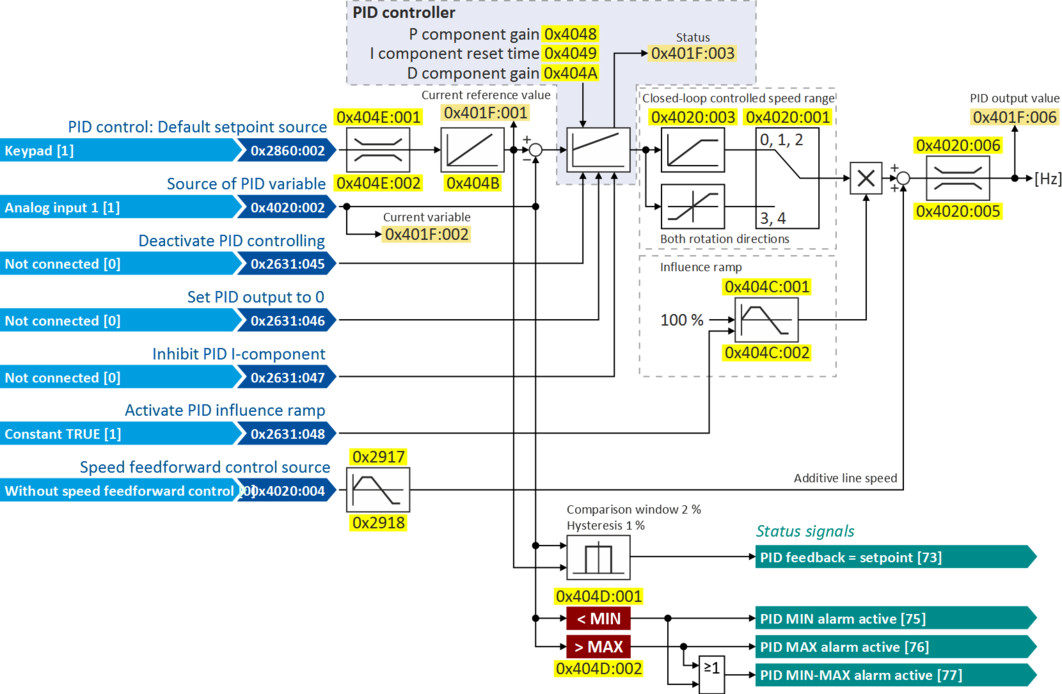
The following illustration shows the internal signal flow of the process controller (without the additional functions "idle state" and "rinsing function"):
|
|
Control functions
The flexible I/O configuration serves to configure different control functions for the process controller:
–
0x2631:045 (P400.45): Disable PID controller
–
0x2631:046 (P400.46): Set process controller output to 0
–
0x2631:047 (P400.47): Inhibit process controller I-component
–
0x2631:048 (P400.48): Activate PID influence ramp
For details see chapter "Process controller function selection".
Status signals for configurable outputs
The process controller provides different internal status signals. These status signals can be assigned to the relay, the digital outputs or the NetWordOUT1 status word.
For details see chapter "Configure digital outputs".
Parameter
|
Address
|
Name / setting range / [default setting]
|
Information
|
|
|
0x2860:002
(P201.02)
|
PID control: Default setpoint source
(PID setp. src.)
|
Selection of the standard setpoint source for the reference value of the PID control.
–
The selected standard setpoint source is always active with an activated PID control when no setpoint change-over to another setpoint source via corresponding triggers/functions is active.
|
|
|
1
|
Keypad
|
The setpoint is specified locally by the keypad.
–
Default setting: 0x2601:002 (P202.02)
–
Use the and navigation keys to change the keypad setpoint (also during running operation).
|
|
|
2
|
Analog input 1
|
The setpoint is defined as analog signal via the analog input 1.
|
|
|
3
|
Analog input 2
|
The setpoint is defined as analog signal via the analog input 2.
|
|
|
5
|
Network
|
The setpoint is defined as process data object via the network.
|
|
|
11
|
PID preset 1
|
For the setpoint selection, preset values can be parameterised and selected.
|
|
|
12
|
PID preset 2
|
||
|
13
|
PID preset 3
|
||
|
14
|
PID preset 4
|
||
|
15
|
PID preset 5
|
||
|
16
|
PID preset 6
|
||
|
17
|
PID preset 7
|
||
|
18
|
PID preset 8
|
||
|
31
|
Segment preset 1
|
For the setpoint selection, the segment presets parameterised for the "sequencer" function can be selected as well.
|
|
|
32
|
Segment preset 2
|
||
|
33
|
Segment preset 3
|
||
|
34
|
Segment preset 4
|
||
|
35
|
Segment preset 5
|
||
|
36
|
Segment preset 6
|
||
|
37
|
Segment preset 7
|
||
|
38
|
Segment preset 8
|
||
|
50
|
Motor potentiometer
|
The setpoint is generated by the "motor potentiometer" function. This function can be used as an alternative setpoint control which is controlled via two signals: "MOP setpoint up" and "MOP setpoint down".
|
|
|
201
|
Internal value
|
Internal values of the manufacturer.
|
|
|
202
|
Internal value
|
||
|
203
|
Internal value
|
||
|
204
|
Internal value
|
||
|
205
|
Internal value
|
||
|
206
|
Internal value
|
||
|
0x4020:001
(P600.01)
|
Process controller setup (PID): Operating mode
(PID setup: Operating mode)
|
Selection of the process controller operating mode.
|
|
|
0
|
Inhibited
|
Process controller deactivated.
|
|
|
1
|
Normal operation
|
The setpoint is higher than the feedback variable (actual value). If the system deviation increases, the motor speed is increased.
Example: pressure-controlled booster pumps (increase in the motor speed produces an increase in pressure.)
|
|
|
2
|
Reverse operation
|
The setpoint is lower than the feedback variable (actual value). If the system deviation increases, the motor speed is increased.
Example: temperature-controlled cooling water pump (increase in motor speed produces decrease in temperature.)
|
|
|
3
|
Normal bi-directional
|
The direction of rotation corresponds to the sign of the system deviation. If the system deviation increases, the motor speed is increased.
|
|
|
4
|
Reverse bi-directional
|
A negative system deviation causes a positive direction of rotation. If the system deviation increases, the motor speed is increased.
|
|
|
0x4020:002
(P600.02)
|
Process controller setup (PID): PID process variable
(PID setup: PID process var.)
|
Selection of the source via which the feedback of the controlled variable (actual value) for the process controller is effected.
|
|
|
1
|
Analog input 1
|
||
|
2
|
Analog input 2
|
||
|
3
|
DC-bus voltage
|
||
|
4
|
Motor Current
|
||
|
5
|
Network
|
||
|
201
|
Internal value
|
Internal values of the manufacturer.
|
|
|
202
|
Internal value
|
||
|
203
|
Internal value
|
||
|
204
|
Internal value
|
||
|
205
|
Internal value
|
||
|
206
|
Internal value
|
||
|
0x4020:003
(P600.03)
|
Process controller setup (PID): Closed-loop controlled speed range
(PID setup: PID speed range)
0 ... [100] ... 100 %
|
Setting of the maximum output frequency up to which the process controller carries out regulation.
|
|
|
0x4020:004
(P600.04)
|
Process controller setup (PID): Speed feedforward control source
(PID setup: PID line speed)
|
Optional selection of a speed feedforward control source for the process controller.
–
Is advisable, for instance, for dancer position controls if the motor speed must not fall below line speed (process controller output value = line speed + controlled motor speed).
–
Standard applications usually do not require a speed feedforward control; therefore it is deactivated in the default setting.
|
|
|
0
|
Without speed addition
|
||
|
1
|
Keypad frequency setpoint
|
||
|
2
|
Analog input 1
|
||
|
3
|
Analog input 2
|
||
|
4
|
Frequency preset 1
|
||
|
5
|
Frequency preset 2
|
||
|
6
|
Frequency preset 3
|
||
|
7
|
Frequency preset 4
|
||
|
8
|
Network
|
||
|
201
|
Internal value
|
Internal values of the manufacturer.
|
|
|
202
|
Internal value
|
||
|
203
|
Internal value
|
||
|
204
|
Internal value
|
||
|
205
|
Internal value
|
||
|
206
|
Internal value
|
||
|
0x4020:005
(P600.05)
|
Process controller setup (PID): Min speed limit
(PID setup: Min speed lim)
-100.0 ... [-100.0] ... 100.0 %
–
From version 03.00
|
Configuration of the process controller
–
100 % = Maximum frequency 0x2916 (P211.00).
–
The limitation becomes effective after the line speed has been added.
–
The value set here also limits the I component of the PID controller (Integrator-Anti-Windup).
|
|
|
0x4020:006
(P600.06)
|
Process controller setup (PID): Max speed limit
(PID setup: Max speed lim)
-100.0 ... [100.0] ... 100.0 %
–
From version 03.00
|
Maximum output value of the process controller.
–
100 % = Maximum frequency 0x2916 (P211.00).
–
The limitation becomes effective after the line speed has been added.
–
The value set here also limits the I component of the PID controller (Integrator-Anti-Windup).
|
|
|
0x4021:001
(P606.01)
|
PID speed operation: Acceleration time
(PID speed op.: Accel. time)
0.0 ... [1.0] ... 3600.0 s
|
Acceleration time for (temporary) speed-controlled drive control in process controller mode.
–
The acceleration time takes effect at the output of the process controller.
|
|
|
0x4021:002
(P606.02)
|
PID speed operation: Deceleration time
(PID speed op.: Decel. time)
0.0 ... [1.0] ... 3600.0 s
|
Deceleration time for (temporary) speed-controlled drive control in process controller mode.
–
The deceleration time takes effect at the output of the process controller.
–
Exception: In case of quick stop, the quick stop delay time is effective.
|
|
|
0x4048
(P601.00)
|
PID P-component
(PID P-component)
0.0 ... [5.0] ... 1000.0 %
|
Output frequency of the process controller per 1 % system deviation.
|
|
|
0x4049
(P602.00)
|
PID I- component
(PID I- component)
1 ... [400] ... 6000 ms
|
Reset time for system deviation.
–
With the setting "6000 ms", the I component is deactivated.
–
The I component can also be deactivated via the "Inhibit process controller I-component" 0x2631:047 (P400.47) function.
|
|
|
0x404A
(P603.00)
|
PID D-component
(PID D-component)
0.0 ... [0.0] ... 20.0 s
|
D component, does not respond to the rate of the system deviation, but only to its rate of change.
|
|
|
0x404B
(P604.00)
|
PID setpoint ramp
(PID setp.ramp)
0.0 ... [20.0] ... 100.0 s
|
Acceleration time and deceleration time for the process controller setpoint, relating to 100 PID units
Example: A setpoint increase from 0 PID units to 100 PID units with the default ramp takes 20s.
|
|
|
0x404C:001
(P607.01)
|
PID influence: Acceleration time for activation
(PID influence: Activation time)
0.0 ... [5.0] ... 999.9 s
|
If the trigger assigned in 0x2631:048 (P400.48) of the "Activate PID influence ramp" function is TRUE, the influence of the process controller is shown by means of a ramp with the acceleration time set here.
|
|
|
0x404C:002
(P607.02)
|
PID influence: Deceleration time for masking out
(PID influence: Mask out time)
0.0 ... [5.0] ... 999.9 s
|
If the trigger assigned in 0x2631:048 (P400.48) of the "Activate PID influence ramp" function is FALSE, the influence of the process controller is hidden via a ramp with the deceleration time set here.
|
|
|
0x404C:003
(P607.03)
|
PID influence: PID influence factor
(PID influence: PID infl. factor)
0.0 ... [100.0] ... 200.0 %
–
From version 06.04
|
||
|
0x404D:001
(P608.01)
|
PID alarms: MIN alarm threshold
(PID alarms: MIN alarm thrsh.)
-300.00 ... [0.00] ... 300.00 PID unit
|
Trigger threshold for the status signal "PID MIN alarm active [75]".
–
The "PID MIN alarm active [75]" status signal is TRUE if the feedback variable (with activated PID control) is lower than the threshold set here.
–
The status signal can be assigned to the relay or to a digital output.
 Configure digital outputs Configure digital outputs –
The status signal can be assigned to the NetWordOUT1 status word.
Define your own status word format |
|
|
0x404D:002
(P608.02)
|
PID alarms: MAX alarm threshold
(PID alarms: MAX alarm thrsh.)
-300.00 ... [100.00] ... 300.00 PID unit
|
Trigger threshold for the status signal "PID MAX alarm active [76]".
–
The "PID MAX alarm active [76]" status signal is TRUE if the feedback variable (with activated PID control) is higher than the threshold set here.
–
The status signal can be assigned to the relay or to a digital output.
Configure digital outputs –
The status signal can be assigned to the NetWordOUT1 status word.
Define your own status word format |
|
|
0x404D:003
(P608.03)
|
PID alarms: Monitoring bandwidth PID feedback signal
(PID alarms: Bandw. feedback)
0.00 ... [2.00] ... 100.00 %
–
From version 04.00
|
Hysteresis for status signal "PID feedback = setpoint [73]".
–
100 % = configured variable input range
–
Example: Variable input range 0 ... 10 V: 2 % = 0.2 V
–
The status signal "PID feedback = setpoint [73]" is TRUE if the controlled variable feedback = process controller setpoint (± hysteresis set here).
–
The status signal can be assigned to the relay or to a digital output.
Configure digital outputs –
The status signal can be assigned to the NetWordOUT1 status word.
Define your own status word format |
|
|
0x404E:001
(P605.01)
|
PID setpoint limits: Minimum setpoint
(PID setp. limit: Minimum setpoint)
-300.00 ... [-300.00] ... 300.00 PID unit
|
Minimum value of the process controller setpoint.
|
|
|
0x404E:002
(P605.02)
|
PID setpoint limits: Maximum setpoint
(PID setp. limit: Maximum setpoint)
-300.00 ... [300.00] ... 300.00 PID unit
|
Maximum value of the process controller setpoint.
|
|
 and
and  navigation keys to change the keypad setpoint (also during running operation).