Analog input 1
Settings for analog input 1.
Intended use
The analog input 1 can be used for the following tasks:
–
As a standard setpoint source
|
Intended use
|
Parameter
|
Setting
|
Further information
|
|
As a setpoint source for specifying a frequency setpoint.
|
Analog input 1 [2]
|
Frequency control
 Standard setpoint source Standard setpoint source |
|
|
As setpoint source for defining the reference value for the process controller.
|
Analog input 1 [2]
|
Frequency control
Configuring the process controller |
|
|
As a setpoint source for defining a torque setpoint.
|
Analog input 1 [2]
|
Torque control
Standard setpoint source |
|
|
As an alternative to the setting as a standard setpoint source, the "Activate AI1 setpoint" 0x2631:014 (P400.14) function can be used to enable a setpoint change-over to the analog input 1.
|
|||
–
As an actual value source or speed feedforward source for the process controller:
|
Intended use
|
Parameter
|
Setting
|
Further information
|
|
As an actual value source for the process controller.
|
Analog input 1 [1]
|
Frequency control
Configuring the process controller |
|
|
As a speed feedforward source for the process controller.
|
Analog input 1 [2]
|
Configuration examples
Detailed configuration examples can be found in the following subchapters:
 Example: Input range 0 ... 10 V = setting range 0 ... 50 Hz
Details
The following settings are possible for the analog input:
–
Definition of the input range ①
–
Filter time for low-pass filters ②
–
Monitoring of the input signal ③
–
Dead band for eliminating the smallest signal levels ④
–
Definition of the setting range ⑤
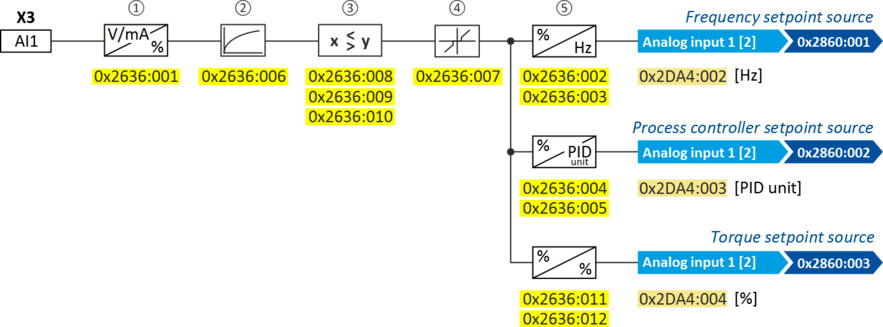
Diagnostic parameters:
–
The frequency value is displayed in 0x2DA4:002 (P110.02).
–
The process controller value is displayed in 0x2DA4:003 (P110.03).
–
The torque value is displayed in 0x2DA4:004 (P110.04).
Definition of the input range
The analog input can be configured as voltage or current input. Internally, the signal is always converted to a value in percent.
Definition of the setting range
The setting range results from the set min and max value for the respective mode.
Parameter
|
Address
|
Name / setting range / [default setting]
|
Information
|
|
|
0x2636:001
(P430.01)
|
Analog input 1: Input range
(Analog input 1: AI1 input range)
|
Definition of the input range.
|
|
|
0
|
0 ... 10 VDC
|
||
|
1
|
0 ... 5 VDC
|
||
|
2
|
2 ... 10 VDC
|
||
|
4
|
4 ... 20 mA
|
||
|
5
|
0 ... 20 mA
|
||
|
0x2636:002
(P430.02)
|
Analog input 1: Min frequency value
(Analog input 1: AI1 freq @ min)
-1000.0 ... [0.0] ... 1000.0 Hz
|
Scaling of the input signal to the frequency value.
–
Direction of rotation according to sign.
–
The standard setpoint source for operating
mode 0x6060 (P301.00) = "MS: Velocity mode [-2]" is selected in 0x2860:001 (P201.01).
|
|
|
0x2636:003
(P430.03)
|
Analog input 1: Max frequency value
(Analog input 1: AI1 freq @ max)
Device for 50-Hz mains: -1000.0 ... [50.0] ... 1000.0 Hz
Device for 60-Hz mains: -1000.0 ... [60.0] ... 1000.0 Hz
|
||
|
0x2636:004
(P430.04)
|
Analog input 1: Min PID value
(Analog input 1: AI1 PID @ min)
-300.00 ... [0.00] ... 300.00 PID unit
|
Scaling of the input signal to the PID value.
–
The standard setpoint source for the reference
value of PID control is selected in 0x2860:002 (P201.02).
|
|
|
0x2636:005
(P430.05)
|
Analog input 1: Max PID value
(Analog input 1: AI1 PID @ max)
-300.00 ... [100.00] ... 300.00 PID unit
|
||
|
0x2636:006
(P430.06)
|
Analog input 1: Filter time
(Analog input 1: AI1 filter time)
0 ... [10] ... 10000 ms
|
PT1 time constant for low-pass filter.
–
By the use of a low-pass filter, the impacts of noise to an analog signal can be minimised.
–
For an optimum filter effect, first the noise frequency has to be determined. The time constant then has to be set so that it equals the reciprocal value of the double frequency.
|
|
|
0x2636:007
(P430.07)
|
Analog input 1: Dead band
(Analog input 1: AI1 dead band)
0.0 ... [0.0] ... 100.0 %
|
Optional setting of a dead band that is placed symmetrically around the frequency zero point.
–
If the analog input value is within the dead band, the output value for the motor control is set to "0".
–
100 % = maximum value of analog input (0x2636:003 (P430.03), 0x2636:005 (P430.05), 0x2636:012 (P430.12))
–
Example: Dead band 10 % of 50 Hz: -10 V … 10 V, Dead band -5 Hz … 5 Hz, 0 V… 10 V, Dead band 0 Hz … 5 Hz
|
|
|
0x2636:008
(P430.08)
|
Analog input 1: Monitoring threshold
(Analog input 1: AI1 monit.level)
-100.0 ... [0.0] ... 100.0 %
|
Monitoring threshold for analog input 1.
–
100 % = 10 V (with configuration as voltage input)
–
100 % = 20 mA (with configuration as current loop)
Exception: In the case of a configured input range 4...20 mA (0x2636:001 [4]), the monitoring is triggered at 2 mA with a monitoring threshold of 0.0 %.
|
|
|
0x2636:009
(P430.09)
|
Analog input 1: Monitoring condition
(Analog input 1: Monitoring cond.)
|
Monitoring condition for analog input 1.
–
If the selected condition is met, the "Error of analog input 1 active [81]" trigger is set to TRUE. The trigger can be assigned to a function or a digital output.
–
If the selected condition is met, the error response set in 0x2636:010 (P430.10) takes place.
|
|
|
0
|
Input value < trigger threshold
|
||
|
1
|
Input value > trigger threshold
|
||
|
0x2636:010
(P430.10)
|
Analog input 1: Error response
(Analog input 1: AI1 error resp.)
|
Error response for analog input 1.
–
The selected response takes place if the monitoring condition selected in 0x2636:009 (P430.09) is met.
|
|
|
0
|
No response
|
||
|
1
|
Warning
|
||
|
2
|
Trouble
|
||
|
3
|
Fault
|
||
|
0x2636:011
(P430.11)
|
Analog input 1: Min torque value
(Analog input 1: Min. torque)
-400.0 ... [0.0] ... 400.0 %
–
From version 03.00
|
Scaling of the input signal to the torque value.
–
100 % = permissible maximum torque 0x6072 (P326.00)
–
Direction of rotation according to sign.
–
The standard setpoint source for operating mode 0x6060 (P301.00) = "MS: Torque mode [-1]" is selected in 0x2860:003 (P201.03).
|
|
|
0x2636:012
(P430.12)
|
Analog input 1: Max torque value
(Analog input 1: Max. torque)
-400.0 ... [100.0] ... 400.0 %
–
From version 03.00
|
||